Quickstart
Overview
- The TapTap Friends feature lets you bring TapTap social graphs into your game to bootstrap social interactions. It supports fetching relationship lists, viewing user info (user card), friend chat, and sending invitation messages (so friends can launch the game or jump into a specified team/room with one click).
- The user card, friend chat, and invitation UI are provided natively by the TapTap launcher client. The game only needs to activate the corresponding window via the SDK — no need to implement these views yourself.
Benefits
- Rapidly bootstrap in-game social graphs.
- Import a player's existing TapTap social graph into your game, combined with friend chat and invitation messages to support multiplayer/co-op gameplay.
- Convenient sharing for user acquisition and engagement.
- Invitation messages can be sent to TapTap friends who haven't played the game yet. They can download/launch the game with one click via the invitation, driving growth and engagement through social propagation.
- No friend-server costs.
- The friend feature is backed by TapTap's servers — no extra server cost on your side.
- Easy integration with full feature coverage.
- Friend management, chat, invitation, and user card UIs are provided by the TapTap launcher — no need to implement complex UI/program logic on the game side.
Integration
- This document uses C++ as the example. Other languages can refer to their respective DLL invocation methods.
- Before integrating the friend module, please read the Quickstart to understand the basic integration flow, and complete SDK initialization and launch verification.
This document only covers the integration flow. For detailed API descriptions, enums, struct definitions, etc., please read the Friend module API reference.
Before calling any friend module API function, you must successfully call TapSDK_Init first. If not initialized or initialization fails, friend module function calls will return errors or unexpected results.
1. Preparation
- Enable the TapTap Friends service.
- In the game console of the Developer Center, enable it via Game Services - TapTap Friends.
- Request authorization.
- The friend module requires the user to grant the
user_friendsscope. Calls without authorization will return an authorization error. - You can first call TapUser_AsyncGetApprovedScopes() to check the user's currently granted scopes. Only when
user_friendsis not in the granted scopes do you need to call TapUser_AsyncAuthorize("user_friends") to request friend info authorization.
- The friend module requires the user to grant the
- Callback events.
- The friend module uses events from TapEventID with the
Relationprefix.
- The friend module uses events from TapEventID with the
2. Fetch relationship lists
The friend module provides three list-fetching APIs that share the same usage pattern. They differ only in event ID and response struct:
- Mutual follows (friends):
TapRelation_AsyncGetFriendList(), eventRelationGetFriendList - Following list:
TapRelation_AsyncGetFollowingList(), eventRelationGetFollowingList - Fan list (followers):
TapRelation_AsyncGetFanList(), eventRelationGetFanList
Pagination: For the first request, pass NULL as continuation_token. If the continuation_token returned in the callback is non-NULL, there is a next page — pass it into the next request.
#include <atomic>
#include <iostream>
#include <string>
#include <thread>

#include "taptap_relation.h"

using namespace std;

atomic<int64_t> gRequestID;

// For pagination: stores the continuation_token returned by the previous callback.
// Note: After the callback returns, the SDK frees resp and its referenced memory.
// You must copy the token before reusing it.
string gFriendListNextToken;

// Callback for fetching the mutual-follow friend list
void getFriendListCallback(TapEventID eventID, void* data)
{
    // Cast data to TapRelationGetFriendListResponse* to access the friend list.
    // Note: data and its referenced memory will be freed by the SDK after the callback returns.
    // If you need it long-term, please copy it yourself.
    auto resp = static_cast<TapRelationGetFriendListResponse*>(data);
    if (resp->error != nullptr) { // Request failed, handle the error
        cout << "get friend list failed, code=" << resp->error->code
             << ", message=" << resp->error->message << endl;
        return;
    }

    cout << "get friend list success: requestID=" << resp->request_id
         << ", friend_count=" << resp->friend_count << endl;
    for (uint32_t i = 0; i < resp->friend_count; ++i) {
        const auto& f = resp->friends[i];
        // Note: all string fields (char*) are UTF-8 encoded. Convert as needed.
        cout << "  - open_id=" << f.open_id
             << ", name=" << (f.name ? f.name : "")
             << ", alias=" << (f.alias ? f.alias : "")
             << ", following=" << f.follow_status.following
             << ", followed=" << f.follow_status.followed << endl;
    }

    // A non-NULL continuation_token means there's a next page; copy it for the next request.
    if (resp->continuation_token != nullptr) {
        gFriendListNextToken = resp->continuation_token;
    } else {
        gFriendListNextToken.clear(); // Already on the last page
    }
}

int main()
{
    // SDK initialization and launch verification code are omitted here — assume they completed successfully.
    // Also assume user_friends authorization is already granted (see "Preparation" section).

    // 1. Register the friend-list callback; only needs to be done once.
    TapSDK_RegisterCallback(TapEventID::RelationGetFriendList, getFriendListCallback);

    // 2. Build the request (first page: continuation_token = NULL).
    TapRelationGetFriendListRequest req{};
    req.continuation_token = nullptr;

    // 3. Issue the async request.
    auto ret = TapRelation_AsyncGetFriendList(
                  TapRelation(),    // Friend module singleton
                  ++gRequestID,     // Request ID generated by the developer, returned in the callback to correlate with the original request
                  &req);
    if (ret != TapSDK_Result_OK) { // The request failed to start; no callback will fire — handle accordingly.
        cout << "TapRelation_AsyncGetFriendList failed, ret=" << ret << endl;
        return -1;
    }

    // Request started successfully — wait for the callback.

    // 4. Game main loop
    bool running = true;
    while (running) {
        // Dispatch SDK callbacks
        TapSDK_RunCallbacks();

        // Example: if the previous callback returned a continuation_token, fetch the next page.
        if (!gFriendListNextToken.empty()) {
            TapRelationGetFriendListRequest nextReq{};
            nextReq.continuation_token = gFriendListNextToken.c_str();
            TapRelation_AsyncGetFriendList(TapRelation(), ++gRequestID, &nextReq);
            gFriendListNextToken.clear(); // Avoid duplicate requests
        }

        // Your game logic
        // ...

        // Throttle the frame rate as appropriate for your game.
        this_thread::sleep_for(chrono::milliseconds(100));
    }

    // 5. Clean up
    TapSDK_Shutdown();
    return 0;
}
Fetching the following list and fan list works the same way — only the event ID and response struct differ:
// Following list
TapSDK_RegisterCallback(TapEventID::RelationGetFollowingList, getFollowingListCallback);
TapRelationGetFollowingListRequest reqFollowing{};
TapRelation_AsyncGetFollowingList(TapRelation(), ++gRequestID, &reqFollowing);
// In the callback, cast data to TapRelationGetFollowingListResponse*

// Fan list
TapSDK_RegisterCallback(TapEventID::RelationGetFanList, getFanListCallback);
TapRelationGetFanListRequest reqFan{};
TapRelation_AsyncGetFanList(TapRelation(), ++gRequestID, &reqFan);
// In the callback, cast data to TapRelationGetFanListResponse*
3. Sync friend relationships
If your game already has its own friend system (e.g., in-game friends, guild members), you can use TapRelation_AsyncSyncRelationshipWithOpenID() or TapRelation_AsyncSyncRelationshipWithUnionID() to sync the in-game friend relationships to TapTap.
// Sync callback
void syncRelationshipCallback(TapEventID eventID, void* data)
{
    auto resp = static_cast<TapRelationSyncRelationshipResponse*>(data);
    if (resp->error != nullptr) {
        cout << "Sync relationship failed, code=" << resp->error->code
             << ", message=" << resp->error->message << endl;
        return;
    }
    cout << "Sync relationship success, request_id=" << resp->request_id << endl;
}

// Register the callback (typically done once after SDK initialization).
TapSDK_RegisterCallback(TapEventID::RelationSyncRelationshipWithOpenID, syncRelationshipCallback);

// Sync via OpenID: add a friend relationship.
TapRelationSyncRelationshipWithOpenIDRequest req{};
// action: Add to add a friend relationship, Remove to remove one.
req.action = TapRelation_SyncRelationshipActionType_Add;
// nickname / friend_nickname: your own and the friend's in-game nicknames. NULL and empty strings are not allowed.
req.nickname = "My in-game nickname";
req.friend_nickname = "Friend's in-game nickname";
req.friend_open_id = "friend_open_id";

auto ret = TapRelation_AsyncSyncRelationshipWithOpenID(
    TapRelation(), ++gRequestID, &req);
if (ret != TapSDK_Result_OK) {
    // Request failed to start
}
Syncing via UnionID is the same — replace TapRelation_AsyncSyncRelationshipWithOpenID with TapRelation_AsyncSyncRelationshipWithUnionID, replace the friend_open_id field with friend_union_id, and register the TapEventID::RelationSyncRelationshipWithUnionID event.
4. Unread message count and new fan count
To make it easy to display TapTap message/fan red dots inside your game, the friend module provides:
- Change notifications (recommended): once you register the listener, the SDK immediately delivers the current unread message count / new fan count via a notification, and continues to deliver real-time updates whenever they change.
- Sync query API (not recommended): for one-off or polling reads when the corresponding in-game UI is opened.
// Listen for unread message count changes
void onUnreadMessageCountChanged(TapEventID eventID, void* data)
{
    auto n = static_cast<TapRelationUnreadMessageCountNotification*>(data);
    cout << "unread message count changed: " << n->count << endl;
    // Update the in-game red-dot UI
}
// After registration, the SDK immediately fires the callback once with the current unread count;
// subsequent changes fire the callback in real time.
TapSDK_RegisterCallback(TapEventID::RelationUnreadMessageCountChanged, onUnreadMessageCountChanged);

// Listen for new fan count changes
void onNewFanCountChanged(TapEventID eventID, void* data)
{
    auto n = static_cast<TapRelationNewFanCountNotification*>(data);
    cout << "new fan count changed: " << n->count << endl;
    // Update the in-game red-dot UI
}
// After registration, the SDK immediately fires the callback once with the current new fan count;
// subsequent changes fire the callback in real time.
TapSDK_RegisterCallback(TapEventID::RelationNewFanCountChanged, onNewFanCountChanged);

// One-off query for the current unread message count
uint32_t unreadCount = 0;
auto ret = TapRelation_GetUnreadMessageCount(TapRelation(), &unreadCount);
if (ret == TapSDK_Result_OK) {
    cout << "current unread message count: " << unreadCount << endl;
}

// One-off query for the current new fan count
uint32_t newFanCount = 0;
ret = TapRelation_GetNewFanCount(TapRelation(), &newFanCount);
if (ret == TapSDK_Result_OK) {
    cout << "current new fan count: " << newFanCount << endl;
}
5. Open user card
Activate the TapTap launcher's user-card window to perform follow / unfollow / invite-to-game actions. Clicking X closes the window and returns to the game.
// Open the user card window. open_id and union_id are mutually exclusive.
TapRelationShowUserProfileRequest req{};
req.open_id = "target_open_id";
// req.union_id = "target_union_id"; // Passing both alongside open_id will return an error

auto ret = TapRelation_ShowUserProfile(TapRelation(), &req);
if (ret != TapSDK_Result_OK) {
    cout << "TapRelation_ShowUserProfile failed, ret=" << ret << endl;
}
The user card window shows different action buttons depending on the follow relationship between the current user and the target user:
| Follow Status | UI Example | Action |
|---|---|---|
| Not following | 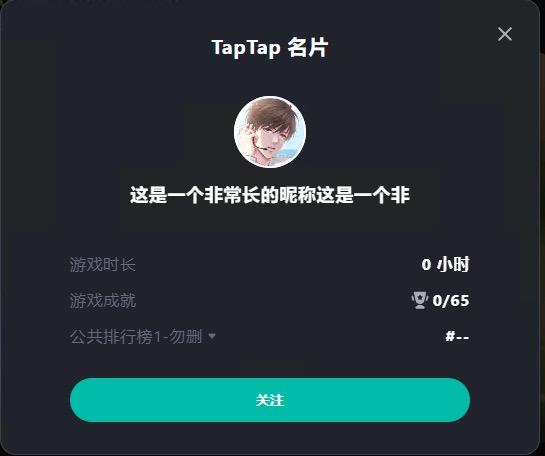 | Click "Follow" to follow the user. |
| Following | 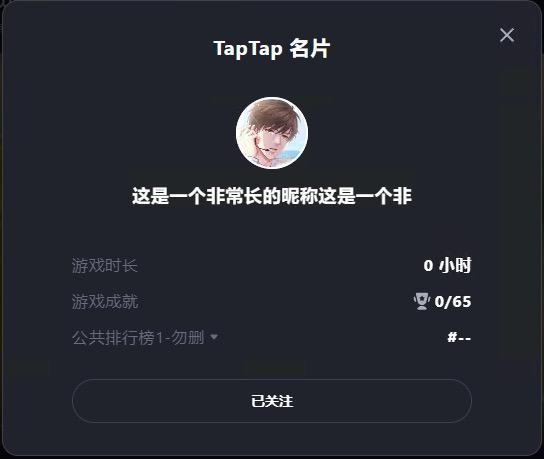 | Click "Following" to unfollow. |
| Followed by | 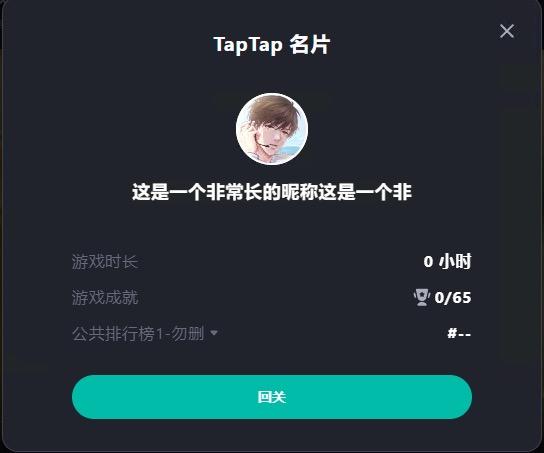 | Click "Follow back" to become mutual friends. |
| Mutual friends | 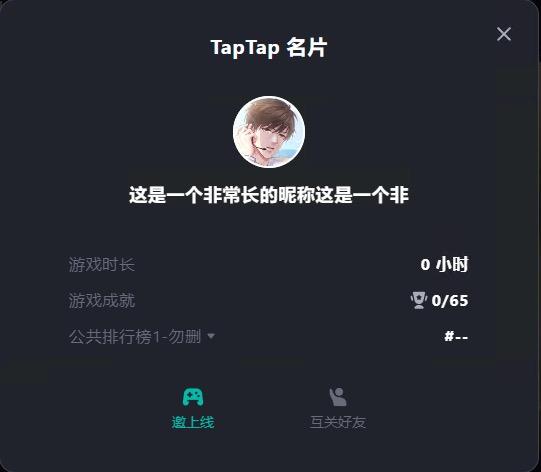 | Click "Invite to game" to send an invitation, which also closes the window and returns to the game. Click "Mutual friends" to unfollow. |
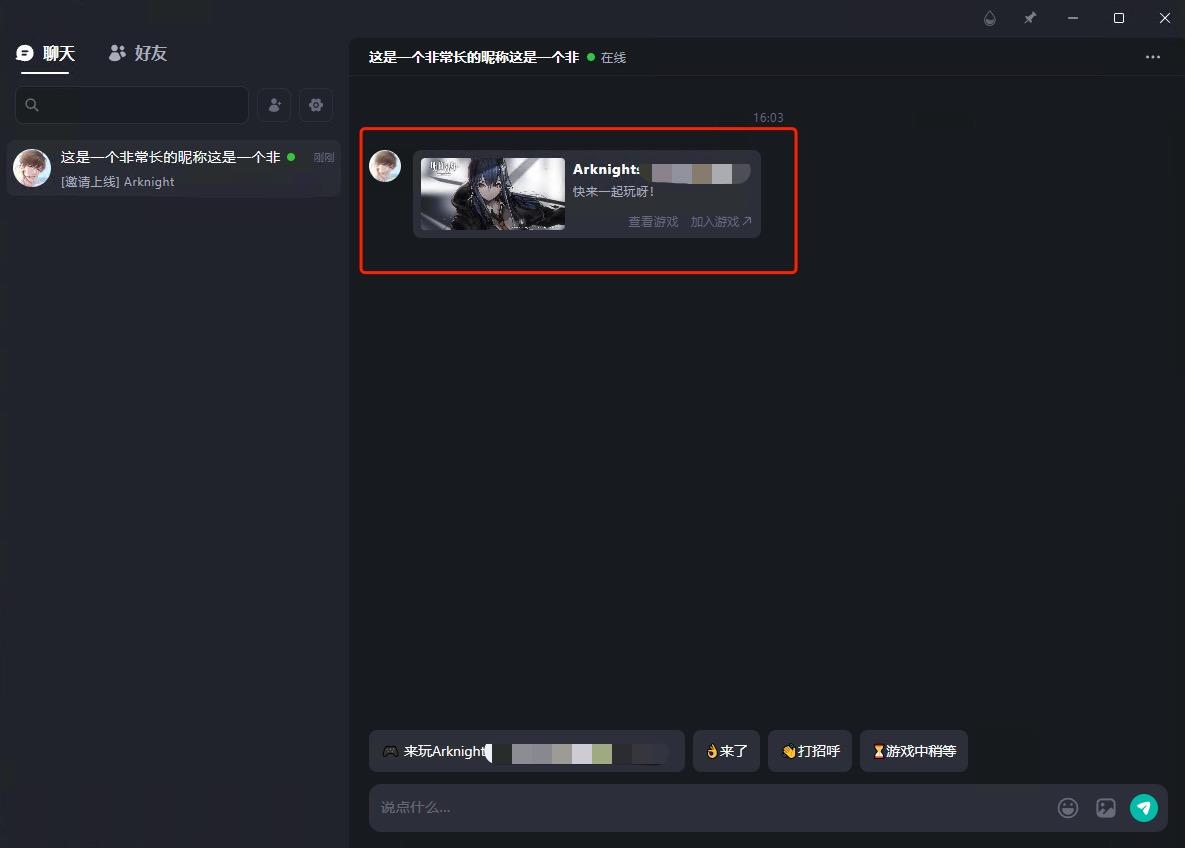
After sending an "invite to game" message to a friend, the message that the friend receives in their chat window:
6. Open friend chat window
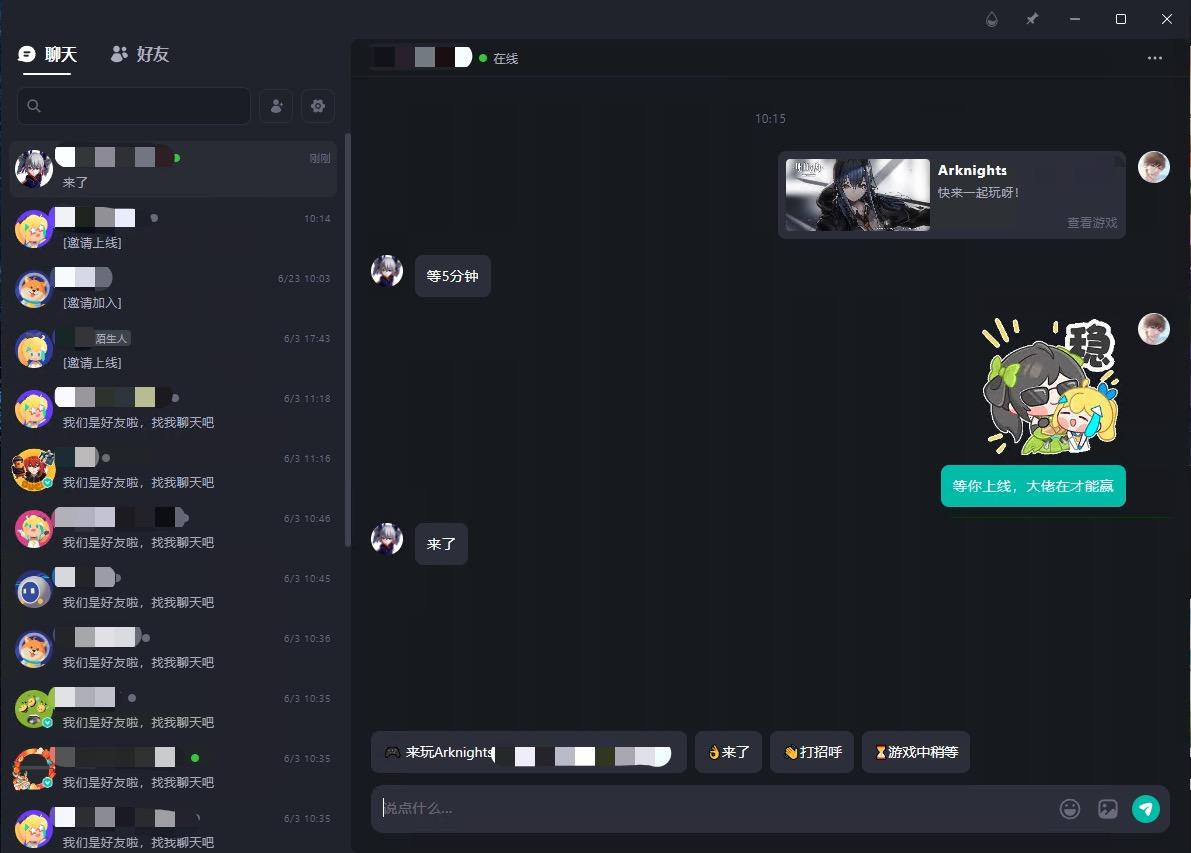
Activate the TapTap launcher's friend chat window for one-on-one private chat with friends. Clicking X closes the window and returns to the game.
// Open the TapPC IM main window where the player can chat with friends, manage friends, etc.
TapRelation_ShowIM(TapRelation());
The chat window looks like this:
7. Invite friends
- Send an "invite to game" or "invite to team" message to a friend. The friend can launch the game or jump into the specified team/room with one click on the message.
- For details, see Invite Friends.
Error codes
- All API calls return a
TapSDK_Result, which you can use for prompts or retries. See TapSDK_Result.- A non-
TapSDK_Result_OKreturn value means the request failed to start and no callback will fire.
- A non-
- In async callbacks, a non-NULL
resp->errorindicates the request failed. UseTapSDK_ErrorCodefor prompts or retries. See TapSDK_ErrorCode.