Quick Start
Overview
- Online Multiplayer provides stable, easy-to-integrate real-time multiplayer capabilities, including room management, player management and real-time messaging, suitable for casual games, competitive games, and real-time games with strong consistency.
- For a more detailed feature overview, see Online Multiplayer Features.
Integration
- This guide uses C++ to demonstrate integration; other languages can refer to the corresponding DLL calling methods.
- Before integrating online multiplayer, read Quick Start to understand the basic integration process, and complete SDK initialization and launch verification.
This page focuses on the integration flow. For full API details, enums, and struct definitions, see the Online Multiplayer API Reference.
Flow Overview
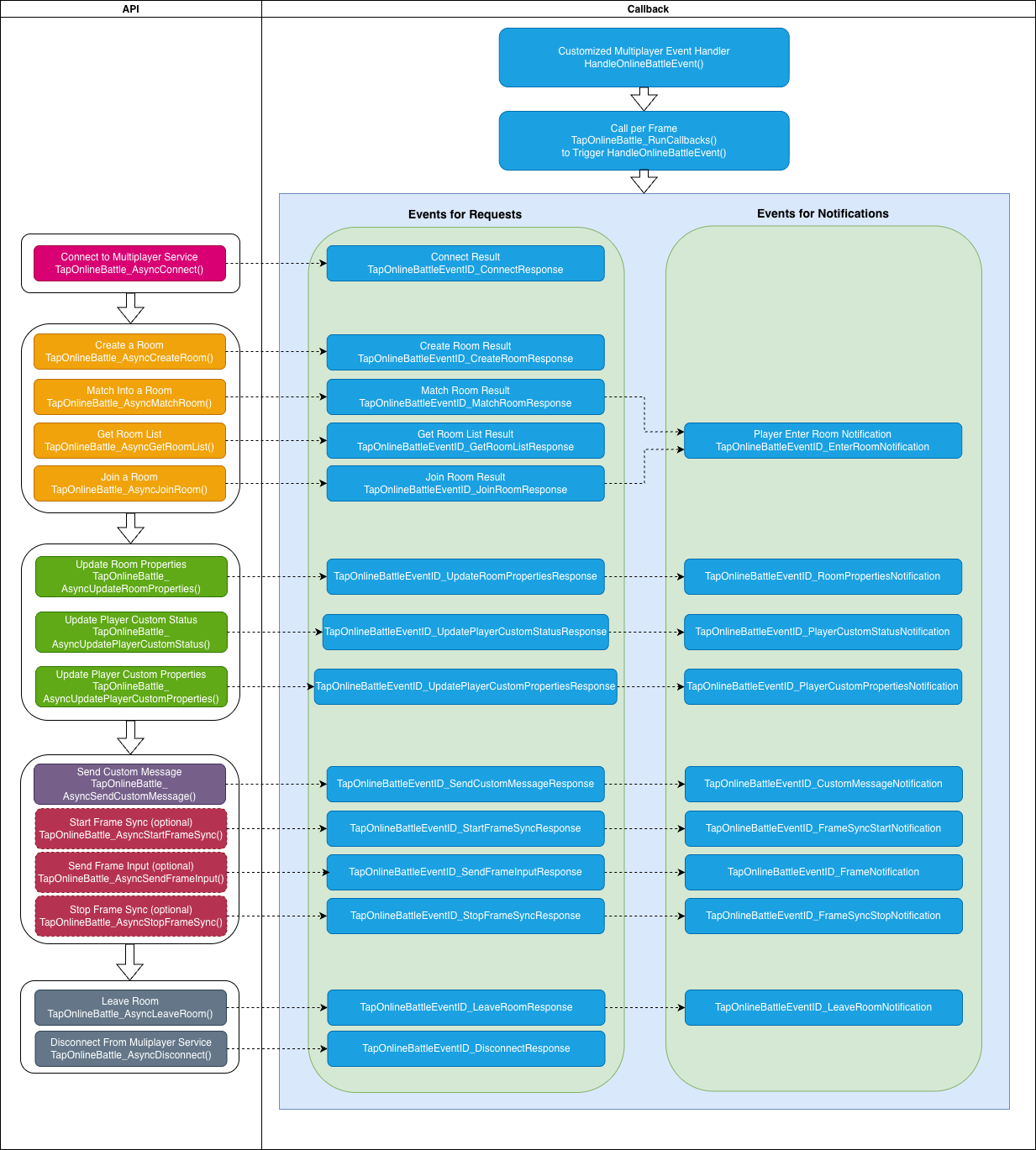
The main flow is shown below. Use it to decide when to call each API:
- Game start: Complete C++ SDK initialization and launch verification.
- Lobby: Connect to the online multiplayer service; after a successful connection, proceed with room operations.
- Join a room: Either create a room, match into a room, or get the room list and then join by room ID.
- In room: Update player custom status/properties, room properties, kick players; use custom messages for turn-based or card games, or frame sync for real-time games (e.g. fighting, MOBA).
- End: Leave the room and disconnect.
Establish Connection
After entering the lobby, establish a long-lived connection to the online multiplayer service before creating, matching, or joining rooms.
Register callback and poll it every frame
All async results and server notifications are delivered through a single callback. Call TapOnlineBattle_RunCallbacks() every frame in your main loop and dispatch by event_id inside the callback.
#include "taptap_onlinebattle.h" // Include online multiplayer header

static int64_t gRequestID = 0;

void HandleOnlineBattleEvent(const TapOnlineBattleEvent* event) {
    // Note: event and its referenced memory are released by the SDK after the callback returns;
    // copy if you need to keep it
    switch (event->event_id) {
    case TapOnlineBattleEventID_ConnectResponse: {
        if (event->error) {
            // Request failed; handle event->error->code
            return;
        }

        auto* resp = static_cast<const TapOnlineBattleConnectResponse*>(event->event_data);
        if (resp) {
            // Connection success; resp->player_id is the current player ID;
            // you can now create/match/join rooms
        }
        break;
    }
    case TapOnlineBattleEventID_CreateRoomResponse:
        // Create room result; event_data is TapOnlineBattleCreateRoomResponse*
        break;
    case TapOnlineBattleEventID_MatchRoomResponse:
        // Match room result; event_data is TapOnlineBattleMatchRoomResponse*
        break;
    case TapOnlineBattleEventID_JoinRoomResponse:
        // Join room result; event_data is TapOnlineBattleJoinRoomResponse*
        break;
    case TapOnlineBattleEventID_EnterRoomNotification:
        // A player entered the room; event_data is TapOnlineBattlePlayerEnterRoomNotification*
        break;
    case TapOnlineBattleEventID_LeaveRoomNotification:
        // A player left the room; event_data is TapOnlineBattlePlayerLeaveRoomNotification*
        break;
    case TapOnlineBattleEventID_CustomMessageNotification:
        // Custom message received; event_data is TapOnlineBattleCustomMessageNotification*
        break;
    case TapOnlineBattleEventID_FrameSyncStartNotification:
        // Frame sync started; event_data is TapOnlineBattleFrameSyncStartNotification* (includes seed)
        break;
    case TapOnlineBattleEventID_FrameNotification:
        // Frame sync data received; event_data is TapOnlineBattleFrame*
        break;
    case TapOnlineBattleEventID_FrameSyncStopNotification:
        // Frame sync stopped
        break;
    case TapOnlineBattleEventID_DisconnectNotification:
        // Kicked or disconnected;
        // use event->error to decide whether to reconnect (do not reconnect if kicked)
        break;
    // Other events: see API reference
    default:
        break;
    }
}

int main() {
    // Assume TapSDK_Init is done successfully

    // 1. Connect
    TapSDK_Result ret = TapOnlineBattle_AsyncConnect(TapOnlineBattle(), ++gRequestID);
    if (ret != TapSDK_Result_OK) {
        // Failed to start request; no callback will be invoked
        return -1;
    }

    // 2. Process online multiplayer events every frame
    bool running = true;
    while (running) {
        uint32_t left = 0;
        auto handledEvents = TapOnlineBattle_RunCallbacks( // Returns number of events processed this call
            TapOnlineBattle(),
            HandleOnlineBattleEvent, // Callback for events
            10, // Max events to process this call; 0 = process all. Typically use 10.
            &left // Out: number of events still in queue;
                  //      use to decide if you need to call TapOnlineBattle_RunCallbacks again
        );

        TapSDK_RunCallbacks();

        // Game logic...

        Sleep(33);
    }

    TapSDK_Shutdown();
    return 0;
}
Disconnect
When the user leaves the lobby or no longer needs online multiplayer, call TapOnlineBattle_AsyncDisconnect() to disconnect. After disconnecting, you cannot create, match, or join rooms until TapOnlineBattle_AsyncConnect() succeeds again.
TapOnlineBattle_AsyncDisconnect(TapOnlineBattle(), ++gRequestID);
Join a Room
Room concepts
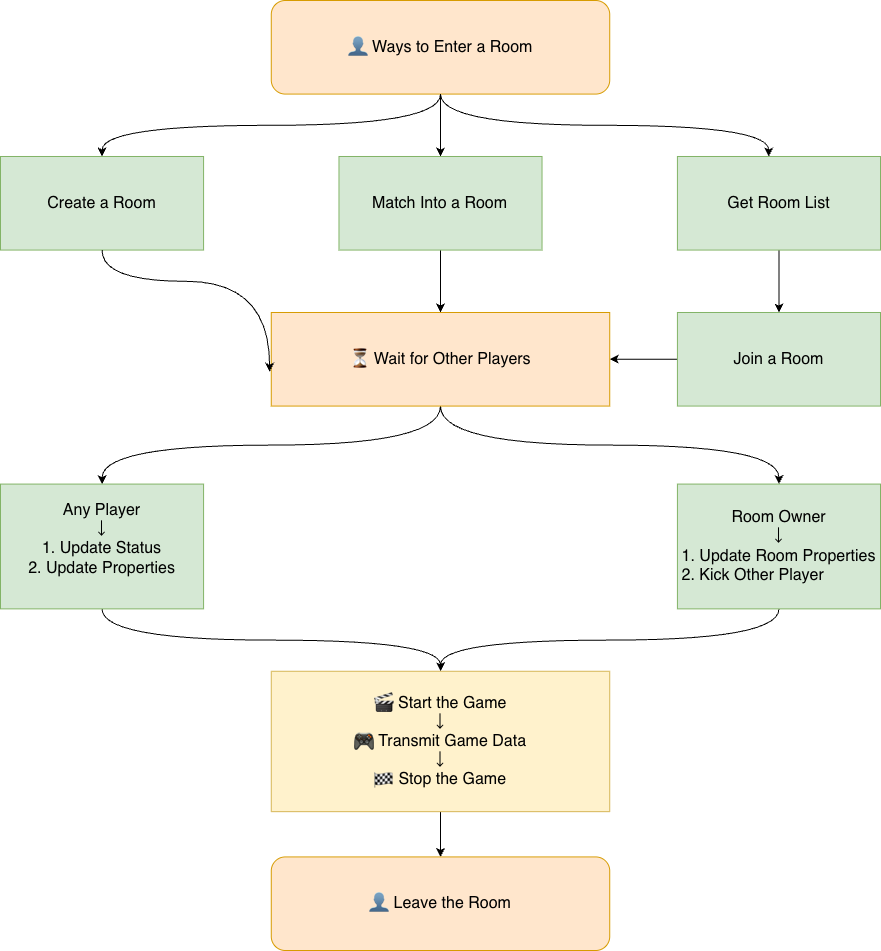
- Room: A virtual space for players; each room has a unique room ID.
- Room owner: The player who created the room; can kick players and update room properties. When the owner leaves, the server assigns a new owner from the room.
- Callbacks: When a player enters or leaves, the SDK notifies others via
TapOnlineBattleEventID_EnterRoomNotificationandTapOnlineBattleEventID_LeaveRoomNotification.
Ways to join
You can create a room, match into a room, or get the room list and then join by room ID.
Create room
On success, you become the room owner.
TapOnlineBattleCreateRoomRequest req = {};
req.room_cfg.max_player_count = 4;
req.room_cfg.room_type = "ranked";
req.room_cfg.name = "MyRoom";
req.room_cfg.custom_properties = "{}";
req.player_cfg.custom_status = 0;
req.player_cfg.custom_properties = "{}";

TapSDK_Result ret = TapOnlineBattle_AsyncCreateRoom(TapOnlineBattle(), ++gRequestID, &req);
// Result in TapOnlineBattleEventID_CreateRoomResponse; event_data is TapOnlineBattleCreateRoomResponse*
Match room
- Use the same room and player config as for create room. If no matching room exists, a new room is created and you become the owner.
- A room matches only when
room_cfg.max_player_count+room_cfg.room_type+room_cfg.match_paramsmatch the values used when that room was created.
TapOnlineBattleMatchRoomRequest req = {};
req.room_cfg.max_player_count = 4;
req.room_cfg.room_type = "ranked";
req.room_cfg.name = "MyRoom"; // Used when creating a new room when no match is found
req.room_cfg.custom_properties = "{}"; // Used when creating a new room when no match is found
req.player_cfg.custom_status = 0;
req.player_cfg.custom_properties = "{}";

TapOnlineBattle_AsyncMatchRoom(TapOnlineBattle(), ++gRequestID, &req);
// Result in TapOnlineBattleEventID_MatchRoomResponse; if an existing room is matched,
// other players get TapOnlineBattleEventID_EnterRoomNotification
Get room list and join
Fetch the list by room type (with pagination), then join by room ID.
// Get list
TapOnlineBattleGetRoomListRequest listReq = {};
listReq.room_type = "ranked";  // Omit to get all types
listReq.offset = 0; // Use 0 for first page; use returned offset for next page
listReq.limit = 20;
TapOnlineBattle_AsyncGetRoomList(TapOnlineBattle(), ++gRequestID, &listReq);
// Result in TapOnlineBattleEventID_GetRoomListResponse; contains rooms, offset, has_more

// Join by room_id (from the list result)
TapOnlineBattleJoinRoomRequest joinReq = {};
joinReq.room_id = "room_id_from_list";
joinReq.player_cfg.custom_status = 0;
joinReq.player_cfg.custom_properties = "{}";
TapOnlineBattle_AsyncJoinRoom(TapOnlineBattle(), ++gRequestID, &joinReq);
// Result in TapOnlineBattleEventID_JoinRoomResponse;
// other players in the room get TapOnlineBattleEventID_EnterRoomNotification
- After joining, use the returned
TapOnlineBattleRoomInfoto get the player list, owner, and room properties. - Other players entering or leaving are reported via
TapOnlineBattleEventID_EnterRoomNotificationandTapOnlineBattleEventID_LeaveRoomNotification.
Room Management
Update player custom status
Use for states like "not ready" / "ready". All players in the room receive TapOnlineBattleEventID_PlayerCustomStatusNotification.
// e.g. 0 = not ready, 1 = ready
TapOnlineBattle_AsyncUpdatePlayerCustomStatus(TapOnlineBattle(), ++gRequestID, 1);
// Result in TapOnlineBattleEventID_UpdatePlayerCustomStatusResponse
Update player custom properties
Any player can update their own custom properties (e.g. nickname, level). All players in the room receive TapOnlineBattleEventID_PlayerCustomPropertiesNotification.
const char* properties = "{\"nick\":\"Alice\",\"level\":10}";  // UTF-8, max 2048 bytes, may be empty
TapOnlineBattle_AsyncUpdatePlayerCustomProperties(TapOnlineBattle(), ++gRequestID, properties);
// Result in TapOnlineBattleEventID_UpdatePlayerCustomPropertiesResponse
Update room properties
- Room owner only, and frame sync must not have started.
- Update room name and custom properties. All players in the room receive
TapOnlineBattleEventID_RoomPropertiesNotification.
TapOnlineBattleUpdateRoomPropertiesRequest req = {};
req.name = "NewRoomName";
req.custom_properties = "{}";
TapOnlineBattle_AsyncUpdateRoomProperties(TapOnlineBattle(), ++gRequestID, &req);
// Result in TapOnlineBattleEventID_UpdateRoomPropertiesResponse
Kick player
- Room owner only, and frame sync must not have started.
- After a kick, all players in the room receive
TapOnlineBattleEventID_RoomPlayerKickedNotification.
TapOnlineBattle_AsyncKickRoomPlayer(TapOnlineBattle(), ++gRequestID, "player_id_to_kick");
// Result in TapOnlineBattleEventID_KickRoomPlayerResponse
Leave room
When frame sync has not started, a player can leave at any time. Other players receive TapOnlineBattleEventID_LeaveRoomNotification. If the room owner leaves, the server assigns a new owner.
TapOnlineBattle_AsyncLeaveRoom(TapOnlineBattle(), ++gRequestID);
// Result in TapOnlineBattleEventID_LeaveRoomResponse
In-Room Data Transfer
After joining a room, you can send game data via custom messages or frame input (after the owner starts frame sync). The two options suit different game types:
- Custom messages: State sync; good for turn-based, card games, and other low real-time needs.
- Frame sync: Good for real-time games such as fighting and MOBA.
For details, see Data Transfer.
Error Handling
- All API calls return
TapSDK_Result; use it for user feedback or retry. See TapSDK_Result.- If the return value is not
TapSDK_Result_OK, the call failed and no callback will be invoked.
- If the return value is not
- When
event->erroris non-null in the callback, the request failed; useTapSDK_ErrorCodefor feedback or retry. See TapSDK_ErrorCode.- Relevant enums are those with prefix
TapSDK_ErrorCode_(general) andTapSDK_ErrorCode_OnlineBattle_(online multiplayer).
- Relevant enums are those with prefix