Invite Friends
Overview
The invite-friends feature lets you send game invitations to friends quickly. Invitees can join the game with one click via the invitation message.
Two types of invitation messages are supported:
- Invite a friend to launch the game (invite to game): after the invitee accepts,
- If the game is running, the game receives a
TapEventID::RelationGameInviteReceivednotification. - If the game is not running, the TapTap launcher launches the game with the
--tap_invite_schemecommand-line argument.
- If the game is running, the game receives a
- Invite a friend to join a team (invite to team): invite a friend to join a specific team/room. Requires a developer-defined
team_id. After the invitee accepts,- If the game is running, the game receives a
TapEventID::RelationTeamInviteReceivednotification that includesteam_id. - If the game is not running, the TapTap launcher launches the game with the
--tap_invite_schemecommand-line argument.
- If the game is running, the game receives a
Example command-line argument:
yourgame.exe --tap_invite_scheme="tds<client_id>://<action>?open_id=xxx&union_id=yyy[&team_id=team_123]"
- After reading the
--tap_invite_schemeargument, the game can callTapRelation_HandleInviteScheme()to process the invitation and trigger the corresponding event callback.
Send an invitation
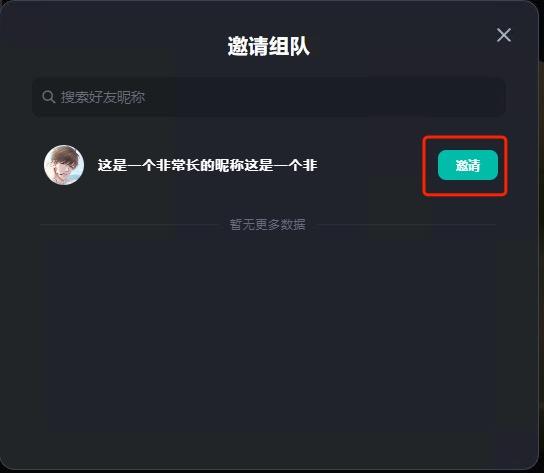
Calling TapRelation_InviteGame() or TapRelation_InviteTeam() activates the TapTap launcher's "Invite to game" or "Invite to team" window. Click the "Invite" button to send the invitation to the friend.
// Invite a friend to launch the game
TapRelation_InviteGame(TapRelation());

// Invite a friend to join a specific team/room
TapRelationInviteTeamRequest inviteReq{};
inviteReq.team_id = "team_abc123";  // Must be ASCII, and cannot contain spaces, double quotes, line breaks, or other special characters
TapRelation_InviteTeam(TapRelation(), &inviteReq);
Receive an invitation
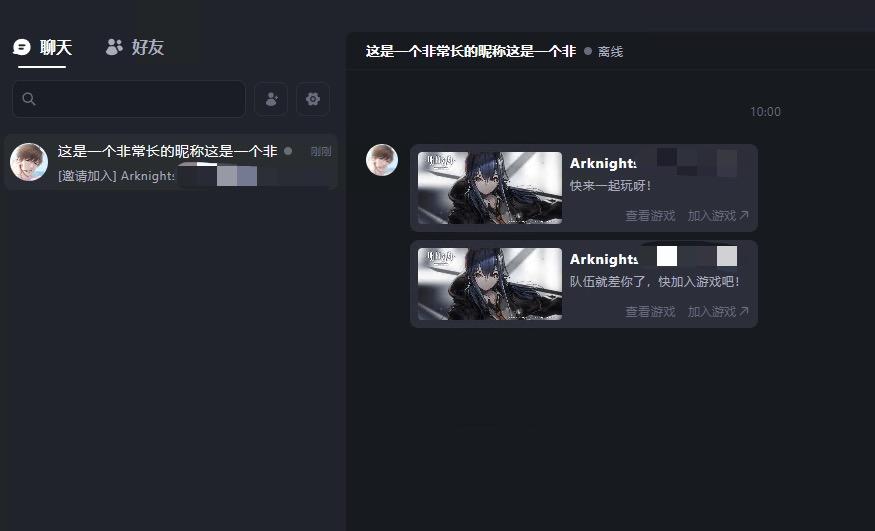
When the invitee receives the invitation: if the TapTap launcher's friend chat window is active, the invitation message is shown directly in the chat window:
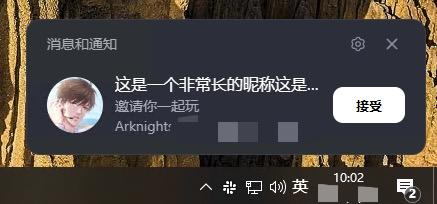
If the friend chat window is not active, the invitation appears as a notification at the bottom-right corner:
Accept an invitation
The invitee clicks "Join game" on the invitation message, or "Accept" on the invitation notification, to quickly launch the game — possibly even joining the specified team/room.
Game is running
- When the invitee accepts the invitation, if the game is already running, the invitee's game process is automatically brought to the foreground and the game receives the corresponding event notification.
Developers MUST register callbacks for TapEventID::RelationGameInviteReceived and TapEventID::RelationTeamInviteReceived immediately after TapSDK initialization succeeds, so the game can receive notifications when the invitee accepts the invitation.
// Callback for invitation-accepted notifications, distinguished by eventID
void onInviteReceived(TapEventID eventID, void* data)
{
    // Both invitation types share the TapRelationInviteReceivedNotification struct.
    // Note: data and its referenced memory will be freed by the SDK after the callback returns.
    // If you need it long-term, please copy it yourself.
    auto n = static_cast<TapRelationInviteReceivedNotification*>(data);
    switch (eventID) {
    case TapEventID::RelationGameInviteReceived:
        // Notification received by the game when the invitee accepts an "invite to game" invitation
        // n->team_id is NULL (only meaningful for team invitations)
        cout << "game invitation accepted: inviter_open_id=" << n->open_id
             << ", inviter_union_id=" << n->union_id << endl;
        break;
    case TapEventID::RelationTeamInviteReceived:
        // Notification received by the game when the invitee accepts an "invite to team" invitation
        cout << "team invitation accepted: inviter_open_id=" << n->open_id
             << ", inviter_union_id=" << n->union_id
             << ", team_id=" << n->team_id << endl;
        // Use n->team_id to enter the corresponding team/room
        break;
    default:
        break;
    }
}

// When accepting an "invite to game", the invitee's game receives the TapEventID::RelationGameInviteReceived event
TapSDK_RegisterCallback(TapEventID::RelationGameInviteReceived, onInviteReceived);
// When accepting an "invite to team", the invitee's game receives the TapEventID::RelationTeamInviteReceived event
TapSDK_RegisterCallback(TapEventID::RelationTeamInviteReceived, onInviteReceived);
Game is not running yet
- When the invitee accepts the invitation, if the game is not running, the TapTap launcher launches the game with the
--tap_invite_schemecommand-line argument. Example:yourgame.exe --tap_invite_scheme="tds<client_id>://<action>?open_id=xxx&union_id=yyy[&team_id=team_123]" - The values for
<action>in the command-line argument:invite_game: invite to game, corresponds to eventTapEventID::RelationGameInviteReceivedinvite_team: invite to team, corresponds to eventTapEventID::RelationTeamInviteReceived
- The game needs to call
CommandLineToArgvW(GetCommandLineW(), &argc)to retrieve the value of--tap_invite_scheme, then pass it as-is toTapRelation_HandleInviteScheme()to trigger the corresponding event notification.- Before calling
TapRelation_HandleInviteScheme(), you must have registered callbacks for bothTapEventID::RelationGameInviteReceivedandTapEventID::RelationTeamInviteReceived; otherwise, the notifications will not fire.
- Before calling
#include <windows.h>
#include <shellapi.h>  // CommandLineToArgvW
#include <cwchar>
#include <string>

// Use CommandLineToArgvW to tokenize the command line, then iterate argv to find the value of --tap_invite_scheme=
std::string ParseInviteSchemeFromCommandLine()
{
    int argc = 0;
    LPWSTR* argv = CommandLineToArgvW(GetCommandLineW(), &argc);
    if (argv == nullptr) {
        return {};
    }

    const std::wstring kPrefix = L"--tap_invite_scheme=";
    std::wstring schemeW;
    for (int i = 1; i < argc; ++i) {
        std::wstring arg = argv[i];
        if (arg.rfind(kPrefix, 0) == 0) { // starts with kPrefix
            schemeW = arg.substr(kPrefix.size());
            break;
        }
    }
    LocalFree(argv);

    if (schemeW.empty()) {
        return {};
    }

    // TapRelation_HandleInviteScheme accepts UTF-8 — convert once from UTF-16
    int len = WideCharToMultiByte(CP_UTF8, 0, schemeW.c_str(), -1, nullptr, 0, nullptr, nullptr);
    std::string scheme(len > 0 ? len - 1 : 0, '\0');
    if (len > 0) {
        WideCharToMultiByte(CP_UTF8, 0, schemeW.c_str(), -1, scheme.data(), len, nullptr, nullptr);
    }
    return scheme;
}

int main()
{
    // SDK initialization and launch verification are omitted here — assume they completed successfully.

    // 1. Register the callbacks first; otherwise events triggered by HandleInviteScheme below will be lost.
    TapSDK_RegisterCallback(TapEventID::RelationGameInviteReceived, onInviteReceived);
    TapSDK_RegisterCallback(TapEventID::RelationTeamInviteReceived, onInviteReceived);

    // 2. Parse the --tap_invite_scheme=... command-line argument.
    std::string inviteScheme = ParseInviteSchemeFromCommandLine();
    if (!inviteScheme.empty()) {
        // 3. Pass the scheme as-is to the SDK; the SDK triggers the corresponding event based on <action>.
        auto ret = TapRelation_HandleInviteScheme(TapRelation(), inviteScheme.c_str());
        if (ret != TapSDK_Result_OK) {
            cout << "TapRelation_HandleInviteScheme failed, ret=" << ret << endl;
        }
    }

    // 4. Enter the game main loop and dispatch SDK callbacks
    // ...
    return 0;
}
Cases where the game cannot be launched directly
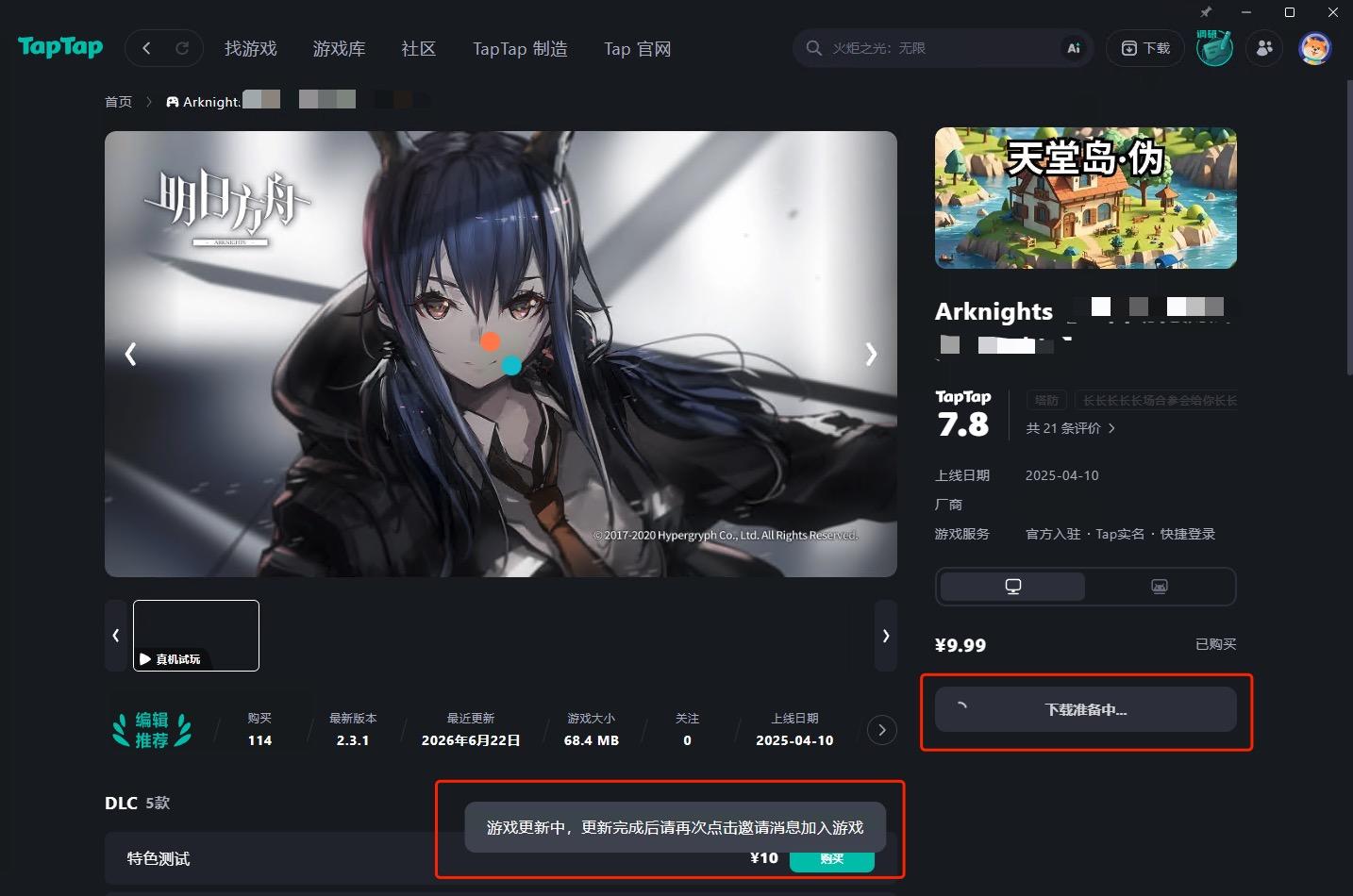
- If the invitee hasn't purchased/installed the game, or the game has an update available, the game cannot be launched directly. The detail page opens instead, prompting the invitee to take the appropriate action and then click "Join game" again.
- If an update is available, the update begins automatically when the detail page opens.
Other anomalies
- If the game is already running but TapSDK initialization has not completed, accepting the invitation shows a try again later prompt.
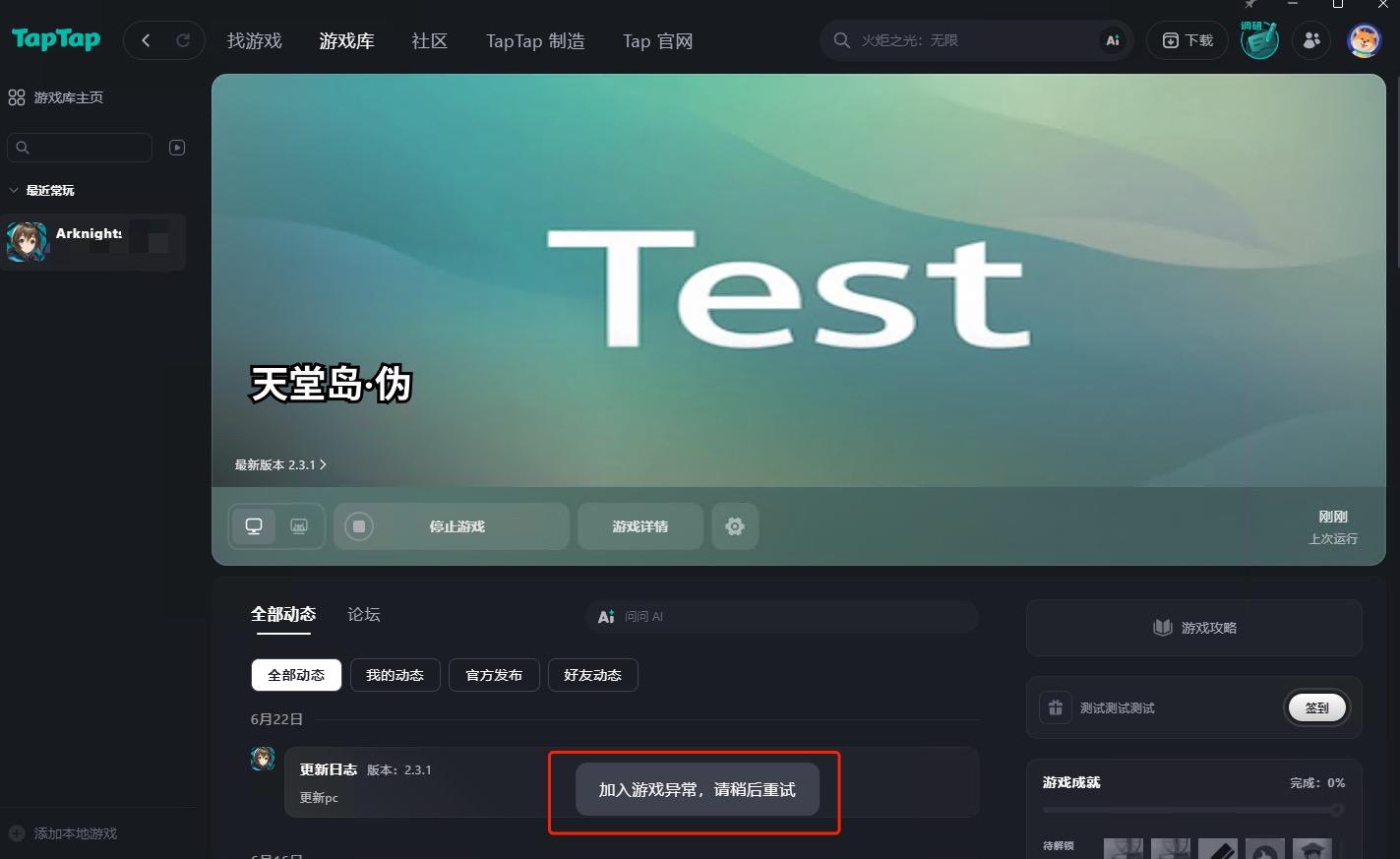
- If TapSDK is initialized but the invitation-received event callback is not registered, the event is lost and the invitee sees no prompt.
- If the game process exits at exactly the same moment the invitation is accepted, it's possible that the invitation can neither be delivered to the game nor launch the game, and the invitee sees no prompt either.
Debugging
- When integrating the invite-friends feature, neither local testing nor package-upload testing can exercise the full end-to-end interaction between the TapTap launcher and the game. However, as long as the following tests pass, things will work fine — just verify again after official release.
- The test cases below assume the game has successfully initialized TapSDK and has registered callbacks for
TapEventID::RelationGameInviteReceivedandTapEventID::RelationTeamInviteReceived.
Accept invitation while the game is running
- The game receives the event notification.
- In local testing, the game will not be automatically brought to the foreground. The game process must have been launched via the TapTap launcher to be auto-foregrounded.
- In package-upload testing, if the game is launched via TapTap, the game will be brought to the foreground.
Accept invitation while the game is not running
- When the invitation is accepted, the TapTap launcher launches the officially released build of the game — it cannot launch the test build (whether from local testing or package-upload testing).
- Therefore, the only way to test is to launch the game directly with the
--tap_invite_schemeargument from the command line to simulate accepting an invitation and launching the game. For example:yourgame.exe --tap_invite_scheme="tds<client_id>://invite_team?open_id=xxx&union_id=yyy&team_id=team_123" - If the game has correctly integrated the cold-start flow, it will receive the corresponding event notification after launch.