Data Transfer
- This page describes how to implement state sync and frame sync with the Online Multiplayer SDK, and when to use each.
- For full API details, enums, and request/response struct definitions, see the Online Multiplayer API Reference.
State sync
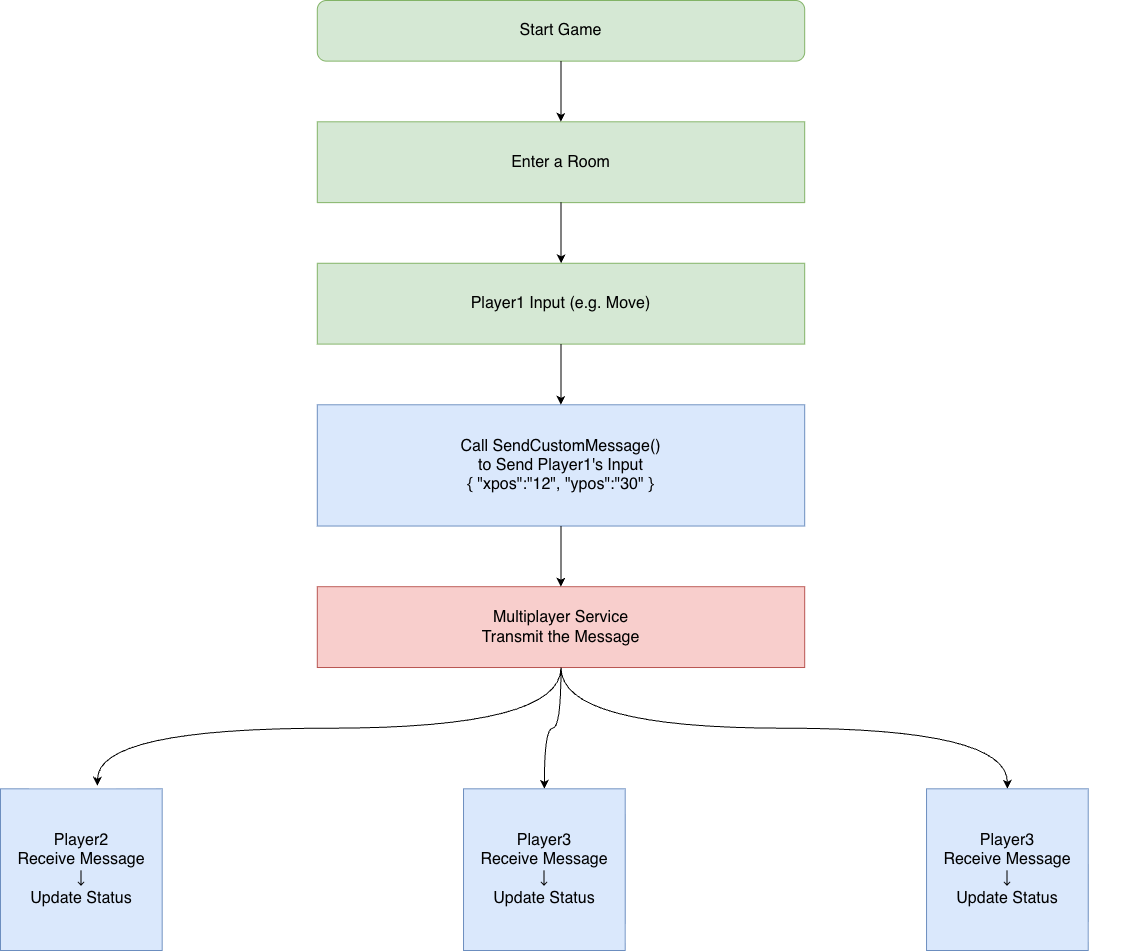
Use custom messages to sync player actions or state inside a room. This fits turn-based, card, and other games that do not need high real-time updates. Flow: one side sends a custom message → server forwards it → target players receive it in a callback and parse it to update game state.
Suitable game types
State sync via custom messages fits turn-based or casual games that do not need high real-time updates, for example:
- Card / board: Gomoku, chess, poker, mahjong, etc.
- Turn-based: Tactical RPG, strategy, turn-based RPG, etc.
- Casual: Pictionary-style, Werewolf, trivia, etc.
- Co-op: Simple multiplayer levels, co-op puzzles, etc.
Send custom message
This API shares a 15 calls per second limit with update player custom status, update player custom properties, and update room properties.
- Encode player actions or state as a UTF-8 string (max 2048 bytes) and send it with
TapOnlineGame_AsyncSendCustomMessage. Receivers parse and update game state inTapOnlineGameEventID_CustomMessageNotification.
TapOnlineGameSendCustomMessageRequest req{};
req.msg = "{\"x\":1,\"y\":0}";  // Custom format, UTF-8, max 2048 bytes
req.receiver_type = 0;           // 0 = everyone in room (excluding sender), 1 = specific players
req.receiver_count = 0;          // Set when receiver_type is 1, max 20
req.receivers = nullptr;         // Player ID array when receiver_type is 1

TapOnlineGame_AsyncSendCustomMessage(TapOnlineGame(), ++gRequestID, &req);
// Result in TapOnlineGameEventID_SendCustomMessageResponse
- Example for specific players (
receiver_type = 1):
const char* ids[] = { "player_id_1", "player_id_2" };
TapOnlineGameSendCustomMessageRequest req{};
req.msg = "{\"action\":\"ready\"}";
req.receiver_type = 1;
req.receiver_count = 2;
req.receivers = ids;
TapOnlineGame_AsyncSendCustomMessage(TapOnlineGame(), ++gRequestID, &req);
Receive custom message
Handle the callback event TapOnlineGameEventID_CustomMessageNotification: cast event_data to TapOnlineGameCustomMessageNotification*, parse msg, and update game state.
case TapOnlineGameEventID_CustomMessageNotification: {
    auto* n = static_cast<const TapOnlineGameCustomMessageNotification*>(event->event_data);
    // n->player_id: sender player ID
    // n->msg: custom message body
    // Parse n->msg and update game state or UI
    break;
}
Frame sync
For high real-time games (e.g. fighting, MOBA), use frame sync: the room owner starts frame sync, all clients send frame input to sync actions, and the owner stops frame sync to end the match.
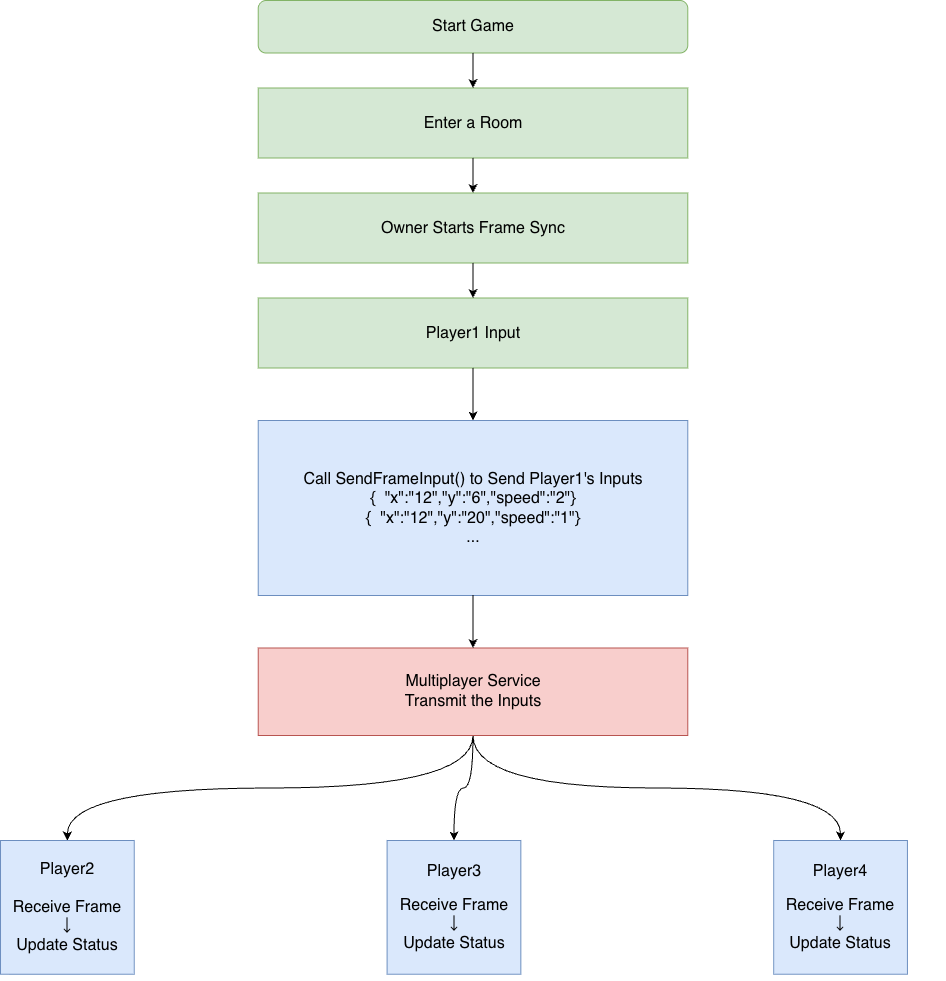
- Start match: Room owner calls start frame sync; all players in the room enter frame sync.
- During match: Players send frame input for frame-by-frame data sync.
- End match: Room owner calls stop frame sync, or the server forces stop after timeout.
- Frame rate: 30 FPS
- Each player can send at most 5 inputs per frame
- Max session length 30 minutes; server will force stop after that
Suitable game types
Frame sync is a sync technique for high real-time competitive games, such as fighting, MOBA, and FPS.
Start frame sync (room owner only)
- After players in the room are ready, the room owner calls start frame sync.
- All players in the room receive
TapOnlineGameEventID_FrameSyncStartNotification, which includesroom_info,frame_sync_id,seed(for a deterministic random number generator),server_tms, etc.
TapOnlineGame_AsyncStartFrameSync(TapOnlineGame(), ++gRequestID);
// Result in TapOnlineGameEventID_StartFrameSyncResponse
- Handling the start notification (including seed):
case TapOnlineGameEventID_FrameSyncStartNotification: {
    auto* n = static_cast<const TapOnlineGameFrameSyncStartNotification*>(event->event_data);
    // n->room_info, n->frame_sync_id, n->seed, n->server_tms
    // Use n->seed to init deterministic RNG; see below
    break;
}
Send frame input
- During the match, serialize player input as a UTF-8 string (max 1024 bytes) and send it.
- All players in the room receive the full frame data (including all players’ inputs) in
TapOnlineGameEventID_FrameNotification.
TapOnlineGameSendFrameInputRequest req{};
req.data = "{\"x\":1,\"y\":0}";  // UTF-8 string, max 1024 bytes

TapOnlineGame_AsyncSendFrameInput(TapOnlineGame(), ++gRequestID, &req);
// Result in TapOnlineGameEventID_SendFrameInputResponse
Receive frame data
- Callback event is
TapOnlineGameEventID_FrameNotification;event_dataisTapOnlineGameFrame*, containing the current frame ID and the list of all players’ inputs for that frame. - The input list is ordered by server receive order.
case TapOnlineGameEventID_FrameNotification: {
    auto* frame = static_cast<const TapOnlineGameFrame*>(event->event_data);
    // frame->id: current frame ID, starting at 1
    // frame->input_count: number of inputs this frame
    // frame->inputs: TapOnlineGameFrameInput array; each has player_id, data, server_tms
    for (uint32_t i = 0; i < frame->input_count; ++i) {
        const TapOnlineGameFrameInput& input = frame->inputs[i];
        // input.player_id, input.data, input.server_tms
    }
    break;
}
Stop frame sync (room owner only)
- The room owner can call stop frame sync to end the match.
- Everyone in the room receives
TapOnlineGameEventID_FrameSyncStopNotification;reasonis 0 when the owner stopped, 1 when the server stopped due to 30-minute timeout.
TapOnlineGame_AsyncStopFrameSync(TapOnlineGame(), ++gRequestID);
// Result in TapOnlineGameEventID_StopFrameSyncResponse
Deterministic random numbers
- To keep random outcomes (e.g. drops, crits) identical on all clients, create a random number generator using the
seedfromTapOnlineGameEventID_FrameSyncStartNotification. - You can implement your own deterministic RNG or use the SDK APIs:
TapSDK_CreateRandomNumberGenerator(seed): create generator, returns generator IDTapSDK_RandomInt(rand_generator_id): next random integerTapSDK_DestroyRandomNumberGenerator(rand_generator_id): destroy generator
Create the generator in the frame sync start callback and destroy it when the match ends or it is no longer needed. See Deterministic random number generator.
case TapOnlineGameEventID_FrameSyncStartNotification: {
    auto* n = static_cast<const TapOnlineGameFrameSyncStartNotification*>(event->event_data);
    int64_t randGenID = TapSDK_CreateRandomNumberGenerator(n->seed);
    if (randGenID != 0) {
        // Use TapSDK_RandomInt(randGenID) in game logic
        // Call TapSDK_DestroyRandomNumberGenerator(randGenID) when match ends
    }
    break;
}