Quick Start
Overview
- Online Multiplayer provides stable, easy-to-integrate real-time multiplayer capabilities, including room management, player management and real-time messaging, suitable for casual games, competitive games, and real-time games with strong consistency.
- For a more detailed feature overview, see Online Multiplayer Features.
Integration
- This guide uses C++ to demonstrate integration; other languages can refer to the corresponding DLL calling methods.
- Before integrating online multiplayer, read Quick Start to understand the basic integration process, and complete SDK initialization and launch verification.
This page focuses on the integration flow. For full API details, enums, and struct definitions, see the Online Multiplayer API Reference.
Flow Overview
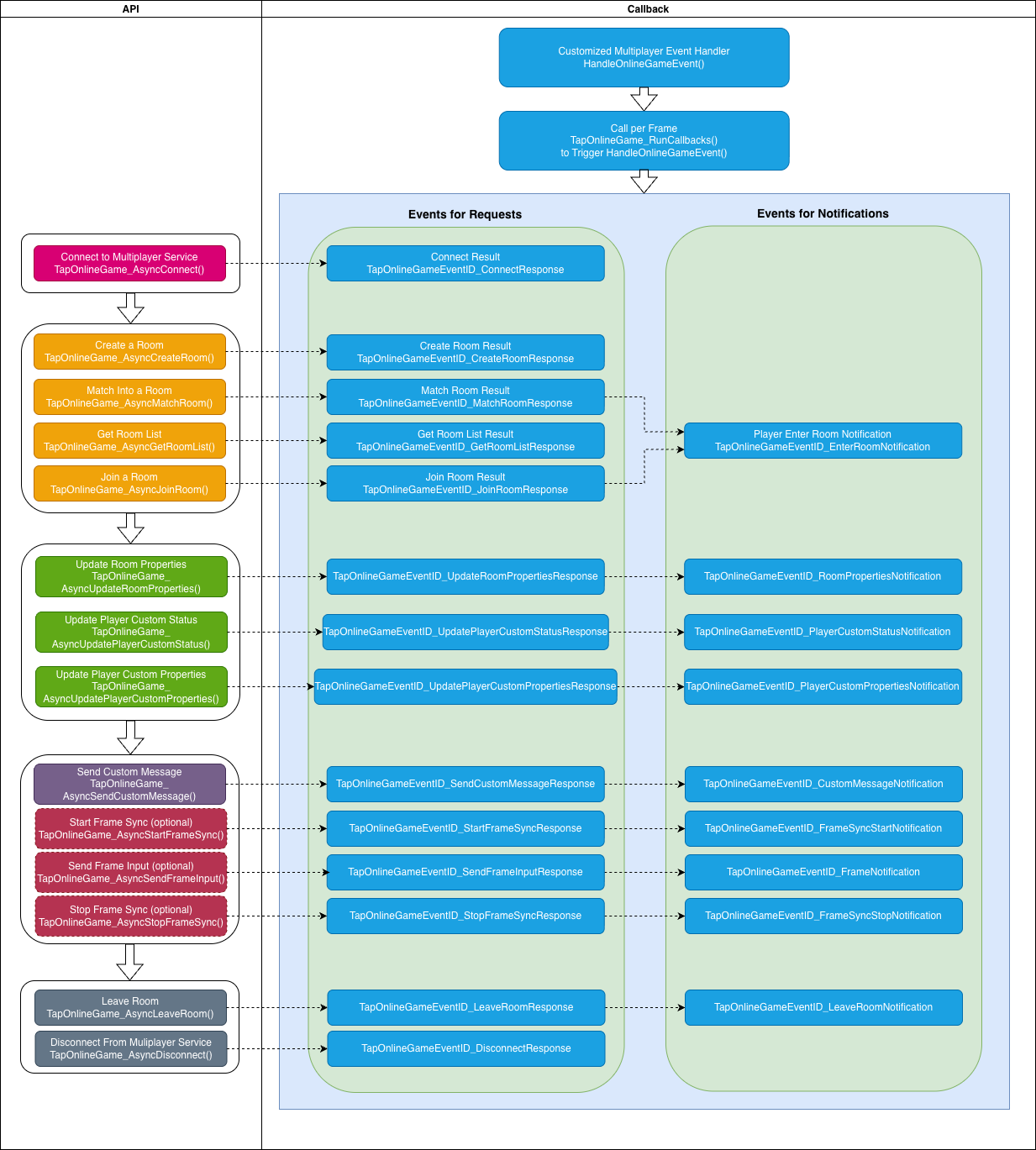
The main flow is shown below. Use it to decide when to call each API:
- Game start: Complete C++ SDK initialization and launch verification.
- Lobby: Connect to the online multiplayer service; after a successful connection, proceed with room operations.
- Join a room: Either create a room, match into a room, or get the room list and then join by room ID.
- In room: Update player custom status/properties, room properties, kick players; use custom messages for turn-based or card games, or frame sync for real-time games (e.g. fighting, MOBA).
- End: Leave the room and disconnect.
Establish Connection
After entering the lobby, establish a long-lived connection to the online multiplayer service before creating, matching, or joining rooms.
Register callback and poll it every frame
All async results and server notifications are delivered through a single callback. Call TapOnlineGame_RunCallbacks() every frame in your main loop and dispatch by event_id inside the callback.
#include "taptap_onlinegame.h" // Include online multiplayer header

static int64_t gRequestID = 0;

void HandleOnlineGameEvent(const TapOnlineGameEvent* event) {
    // Note: event and its referenced memory are released by the SDK after the callback returns;
    // copy if you need to keep it
    switch (event->event_id) {
    case TapOnlineGameEventID_ConnectResponse: {
        if (event->error) {
            // Request failed; handle event->error->code
            return;
        }

        auto* resp = static_cast<const TapOnlineGameConnectResponse*>(event->event_data);
        if (resp) {
            // Connection success; resp->player_id is the current player ID;
            // you can now create/match/join rooms
        }
        break;
    }
    case TapOnlineGameEventID_CreateRoomResponse:
        // Create room result; event_data is TapOnlineGameCreateRoomResponse*
        break;
    case TapOnlineGameEventID_MatchRoomResponse:
        // Match room result; event_data is TapOnlineGameMatchRoomResponse*
        break;
    case TapOnlineGameEventID_JoinRoomResponse:
        // Join room result; event_data is TapOnlineGameJoinRoomResponse*
        break;
    case TapOnlineGameEventID_EnterRoomNotification:
        // A player entered the room; event_data is TapOnlineGamePlayerEnterRoomNotification*
        break;
    case TapOnlineGameEventID_LeaveRoomNotification:
        // A player left the room; event_data is TapOnlineGamePlayerLeaveRoomNotification*
        break;
    case TapOnlineGameEventID_CustomMessageNotification:
        // Custom message received; event_data is TapOnlineGameCustomMessageNotification*
        break;
    case TapOnlineGameEventID_FrameSyncStartNotification:
        // Frame sync started; event_data is TapOnlineGameFrameSyncStartNotification* (includes seed)
        break;
    case TapOnlineGameEventID_FrameNotification:
        // Frame sync data received; event_data is TapOnlineGameFrame*
        break;
    case TapOnlineGameEventID_FrameSyncStopNotification:
        // Frame sync stopped
        break;
    case TapOnlineGameEventID_DisconnectNotification:
        // Kicked or disconnected;
        // use event->error to decide whether to reconnect (do not reconnect if kicked)
        break;
    // Other events: see API reference
    default:
        break;
    }
}

int main() {
    // Assume TapSDK_Init is done successfully

    // 1. Connect
    TapSDK_Result ret = TapOnlineGame_AsyncConnect(TapOnlineGame(), ++gRequestID);
    if (ret != TapSDK_Result_OK) {
        // Failed to start request; no callback will be invoked
        return -1;
    }

    // 2. Process online game events every frame
    bool running = true;
    while (running) {
        uint32_t left = 0;
        auto handledEvents = TapOnlineGame_RunCallbacks( // Returns number of events processed this call
            TapOnlineGame(),
            HandleOnlineGameEvent, // Callback for events
            10, // Max events to process this call; 0 = process all. Typically use 10.
            &left // Out: number of events still in queue;
                  //      use to decide if you need to call TapOnlineGame_RunCallbacks again
        );

        TapSDK_RunCallbacks();

        // Game logic...

        Sleep(33);
    }

    TapSDK_Shutdown();
    return 0;
}
Disconnect
When the user leaves the lobby or no longer needs online multiplayer, call TapOnlineGame_AsyncDisconnect() to disconnect. After disconnecting, you cannot create, match, or join rooms until TapOnlineGame_AsyncConnect() succeeds again.
TapOnlineGame_AsyncDisconnect(TapOnlineGame(), ++gRequestID);
Join a Room
Room concepts
- Room: A virtual space for players; each room has a unique room ID.
- Room owner: The player who created the room; can kick players and update room properties. When the owner leaves, the server assigns a new owner from the room.
- Callbacks: When a player enters or leaves, the SDK notifies others via
TapOnlineGameEventID_EnterRoomNotificationandTapOnlineGameEventID_LeaveRoomNotification.
Ways to join
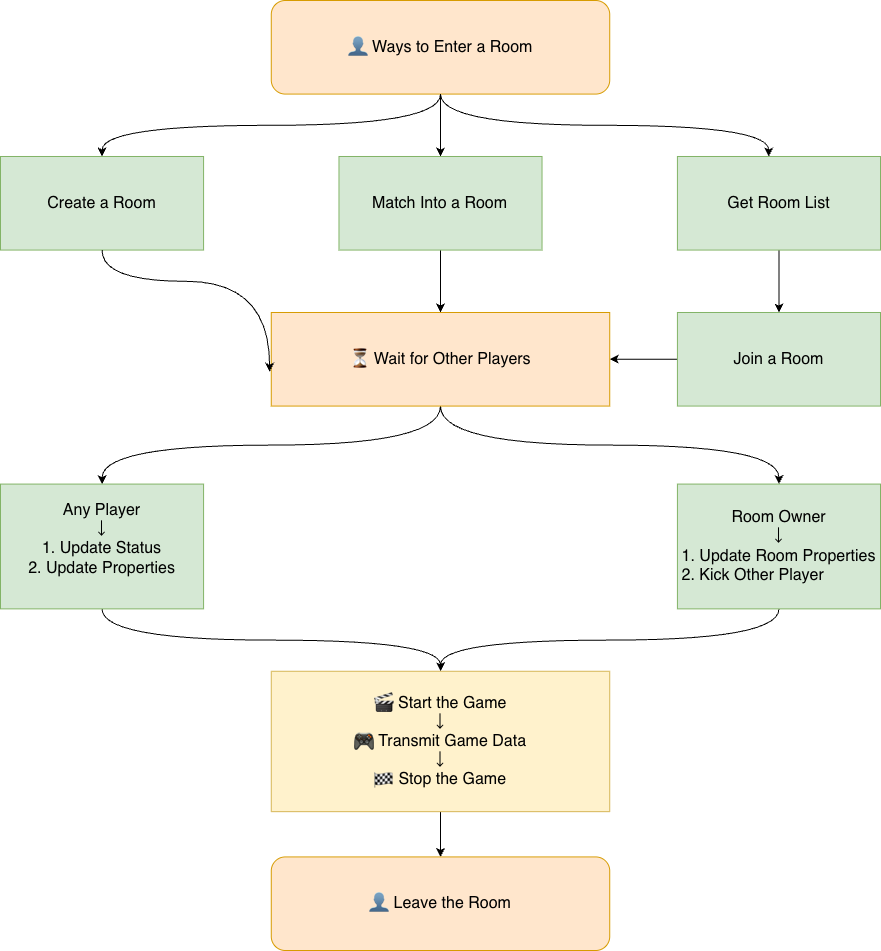
You can create a room, match into a room, or get the room list and then join by room ID.
Create room
On success, you become the room owner.
TapOnlineGameCreateRoomRequest req = {};
req.room_cfg.max_player_count = 4;
req.room_cfg.room_type = "ranked";
req.room_cfg.name = "MyRoom";
req.room_cfg.custom_properties = "{}";
req.player_cfg.custom_status = 0;
req.player_cfg.custom_properties = "{}";

TapSDK_Result ret = TapOnlineGame_AsyncCreateRoom(TapOnlineGame(), ++gRequestID, &req);
// Result in TapOnlineGameEventID_CreateRoomResponse; event_data is TapOnlineGameCreateRoomResponse*
Match room
- Use the same room and player config as for create room. If no matching room exists, a new room is created and you become the owner.
- A room matches only when
room_cfg.max_player_count+room_cfg.room_type+room_cfg.match_paramsmatch the values used when that room was created.
TapOnlineGameMatchRoomRequest req = {};
req.room_cfg.max_player_count = 4;
req.room_cfg.room_type = "ranked";
req.room_cfg.name = "MyRoom"; // Used when creating a new room when no match is found
req.room_cfg.custom_properties = "{}"; // Used when creating a new room when no match is found
req.player_cfg.custom_status = 0;
req.player_cfg.custom_properties = "{}";

TapOnlineGame_AsyncMatchRoom(TapOnlineGame(), ++gRequestID, &req);
// Result in TapOnlineGameEventID_MatchRoomResponse; if an existing room is matched,
// other players get TapOnlineGameEventID_EnterRoomNotification
Get room list and join
Fetch the list by room type (with pagination), then join by room ID.
// Get list
TapOnlineGameGetRoomListRequest listReq = {};
listReq.room_type = "ranked";  // Omit to get all types
listReq.offset = 0; // Use 0 for first page; use returned offset for next page
listReq.limit = 20;
TapOnlineGame_AsyncGetRoomList(TapOnlineGame(), ++gRequestID, &listReq);
// Result in TapOnlineGameEventID_GetRoomListResponse; contains rooms, offset, has_more

// Join by room_id (from the list result)
TapOnlineGameJoinRoomRequest joinReq = {};
joinReq.room_id = "room_id_from_list";
joinReq.player_cfg.custom_status = 0;
joinReq.player_cfg.custom_properties = "{}";
TapOnlineGame_AsyncJoinRoom(TapOnlineGame(), ++gRequestID, &joinReq);
// Result in TapOnlineGameEventID_JoinRoomResponse;
// other players in the room get TapOnlineGameEventID_EnterRoomNotification
- After joining, use the returned
TapOnlineGameRoomInfoto get the player list, owner, and room properties. - Other players entering or leaving are reported via
TapOnlineGameEventID_EnterRoomNotificationandTapOnlineGameEventID_LeaveRoomNotification.
Room Management
Update player custom status
Use for states like "not ready" / "ready". All players in the room receive TapOnlineGameEventID_PlayerCustomStatusNotification.
// e.g. 0 = not ready, 1 = ready
TapOnlineGame_AsyncUpdatePlayerCustomStatus(TapOnlineGame(), ++gRequestID, 1);
// Result in TapOnlineGameEventID_UpdatePlayerCustomStatusResponse
Update player custom properties
Any player can update their own custom properties (e.g. nickname, level). All players in the room receive TapOnlineGameEventID_PlayerCustomPropertiesNotification.
const char* properties = "{\"nick\":\"Alice\",\"level\":10}";  // UTF-8, max 2048 bytes, may be empty
TapOnlineGame_AsyncUpdatePlayerCustomProperties(TapOnlineGame(), ++gRequestID, properties);
// Result in TapOnlineGameEventID_UpdatePlayerCustomPropertiesResponse
Update room properties
- Room owner only, and frame sync must not have started.
- Update room name and custom properties. All players in the room receive
TapOnlineGameEventID_RoomPropertiesNotification.
TapOnlineGameUpdateRoomPropertiesRequest req = {};
req.name = "NewRoomName";
req.custom_properties = "{}";
TapOnlineGame_AsyncUpdateRoomProperties(TapOnlineGame(), ++gRequestID, &req);
// Result in TapOnlineGameEventID_UpdateRoomPropertiesResponse
Kick player
- Room owner only, and frame sync must not have started.
- After a kick, all players in the room receive
TapOnlineGameEventID_RoomPlayerKickedNotification.
TapOnlineGame_AsyncKickRoomPlayer(TapOnlineGame(), ++gRequestID, "player_id_to_kick");
// Result in TapOnlineGameEventID_KickRoomPlayerResponse
Leave room
When frame sync has not started, a player can leave at any time. Other players receive TapOnlineGameEventID_LeaveRoomNotification. If the room owner leaves, the server assigns a new owner.
TapOnlineGame_AsyncLeaveRoom(TapOnlineGame(), ++gRequestID);
// Result in TapOnlineGameEventID_LeaveRoomResponse
In-Room Data Transfer
After joining a room, you can send game data via custom messages or frame input (after the owner starts frame sync). The two options suit different game types:
- Custom messages: State sync; good for turn-based, card games, and other low real-time needs.
- Frame sync: Good for real-time games such as fighting and MOBA.
For details, see Data Transfer.
Error Handling
- All API calls return
TapSDK_Result; use it for user feedback or retry. See TapSDK_Result.- If the return value is not
TapSDK_Result_OK, the call failed and no callback will be invoked.
- If the return value is not
- When
event->erroris non-null in the callback, the request failed; useTapSDK_ErrorCodefor feedback or retry. See TapSDK_ErrorCode.- Relevant enums are those with prefix
TapSDK_ErrorCode_(general) andTapSDK_ErrorCode_OnlineGame_(online multiplayer).
- Relevant enums are those with prefix