iOS SDK 开发指南
本文介绍如何在 iOS 原生项目中接入多人联机。
集成 SDK
集成前准备
- 参考 开发者中心配置 创建应用、配置包名与签名证书
- 参考 iOS 集成指南 完成基础接入
- 多人联机 SDK 依赖 TapTap 登录开发指南 ,接入前需确保已接入
权限说明
该模块需要如下权限:
| 权限 | 使用目的 | 权限申请时机 |
|---|---|---|
| 网络权限 | 用于正常网络访问 | 用户首次使用该功能时会申请权限 |
SDK 获取
在 Podfile 文件中添加:
pod 'TapTapSDK/Battle', '~> 4.11.0'
业务流程接入
主要业务模块及流程如下图,开发者可根据该图了解不同功能接口调用时机:
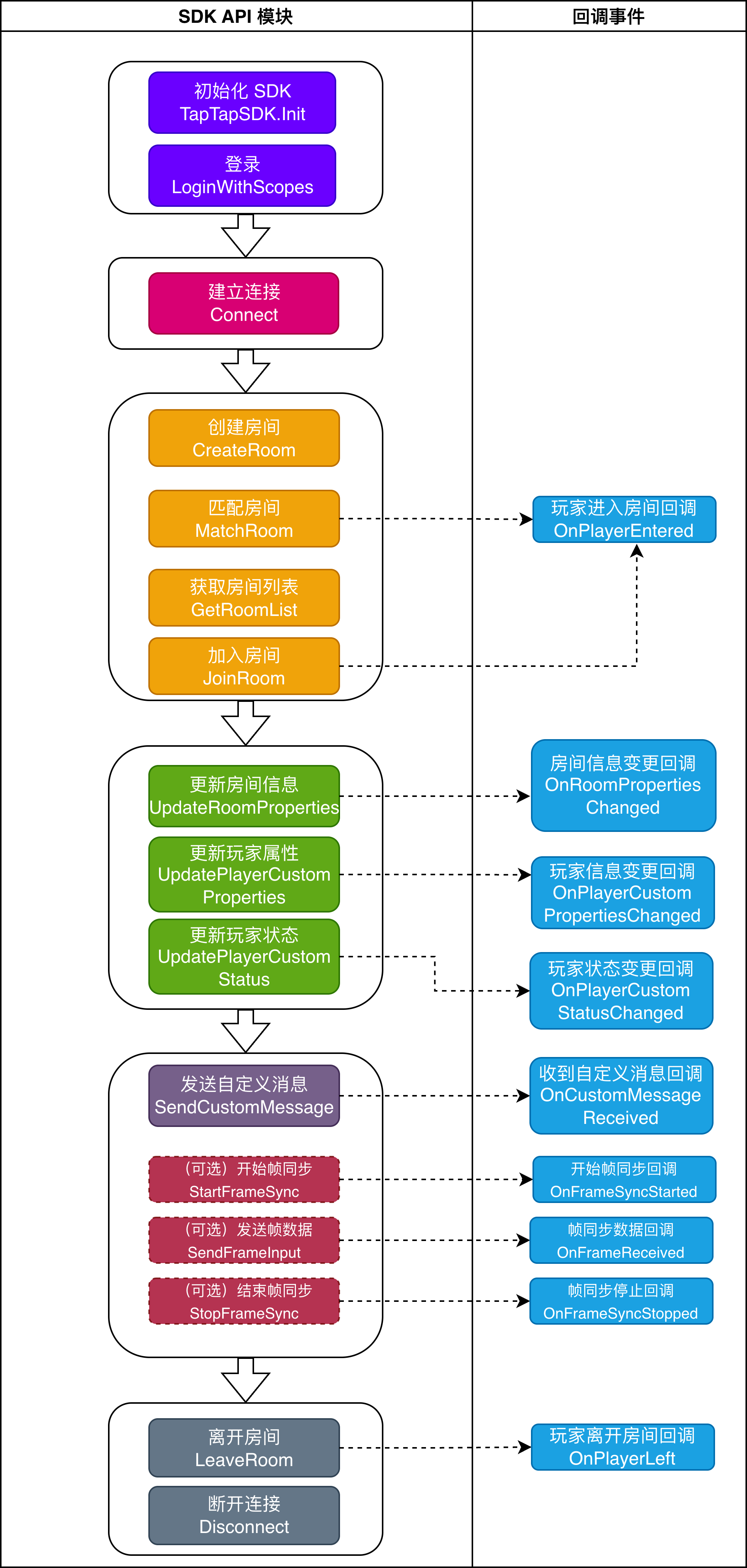
连接管理
注册回调
通过实现 SDK 通知回调接口 TapOnlineBattleCallback 来接收玩家、房间信息及同步消息回调,渲染对应场景游戏页面,示例如下:
- Swift
- Objective-C
import TapOnlineBattleSDK

// 通知回调协议继承自 NSObjectProtocol,实现类需继承 NSObject
class BattleManager: NSObject, TapOnlineBattleCallback {

    // 注册回调
    func registerCallback() {
        TapTapOnlineBattle.registerOnlineBattleCallback(self)
    }

    // SDK 回调实现(协议方法均为 optional,按需实现即可)

    // 收到玩家自定义消息
    func onCustomMessageReceived(playerId: String, msg: String) {
        // TODO: 解析 msg,渲染对战状态或其他信息
    }

    // 与服务端连接断开,建议当错误码为网络异常时进行重连
    func onDisconnected(code: Int, msg: String) {
        // 当错误码为网络异常时进行重连
    }

    // 玩家更新自定义属性
    func onPlayerCustomPropertiesChanged(playerId: String, properties: String) {
        print("receive onPlayerCustomPropertiesChanged \(playerId):\(properties)")
    }

    // 玩家更新自定义状态
    func onPlayerCustomStatusChanged(playerId: String, status: Int) {
        print("receive onPlayerCustomStatusChanged \(playerId):\(status)")
    }

    // 玩家进入房间
    func onPlayerEntered(roomId: String, playerInfo: PlayerInfo) {
        print("receive onPlayerEntered \(roomId):\(playerInfo)")
    }

    // 玩家被踢出
    func onPlayerKicked(roomId: String, playerId: String) {
        print("receive onPlayerKicked \(roomId):\(playerId)")
    }

    // 玩家离开房间
    func onPlayerLeft(roomId: String, roomOwnerId: String, playerId: String) {
        print("receive onPlayerLeft \(roomId):\(roomOwnerId):\(playerId)")
    }

    // 玩家离线
    func onPlayerOffline(roomId: String, roomOwnerId: String, playerId: String) {
        print("receive onPlayerOffline \(roomId):\(roomOwnerId):\(playerId)")
    }

    // 房间属性变更
    func onRoomPropertiesChanged(id: String, name: String, customProperties: String) {
        print("receive onRoomPropertiesChanged \(id):\(name):\(customProperties)")
    }

    // 开始帧同步
    func onFrameSyncStarted(frameSyncInfo: FrameSyncInfo) {
        print("receive onFrameSyncStarted \(frameSyncInfo)")
    }

    // 收到帧同步数据回调
    func onFrameReceived(frameData: FrameData) {
        if !frameData.inputs.isEmpty {
            print("receive onFrameReceived \(frameData)")
        }
    }

    // 停止帧同步
    func onFrameSyncStopped(roomId: String, frameSyncId: Int, reason: Int) {
        print("receive onFrameSyncStopped \(roomId):\(frameSyncId):\(reason)")
    }

    // 对战服务端异常,开发者需要退出对战、房间、队伍等状态,此时处于 connect 之后的状态
    func onBattleServiceError() {
        print("receive onBattleServiceError")
    }
}
#import <TapOnlineBattleSDK/TapOnlineBattleSDK-Swift.h>

@interface BattleManager : NSObject <TapOnlineBattleCallback>
@end

@implementation BattleManager

// 注册回调
- (void)registerCallback {
    [TapTapOnlineBattle registerOnlineBattleCallback:self];
}

// SDK 回调实现(所有方法均可选)

// 收到玩家自定义消息
- (void)onCustomMessageReceivedWithPlayerId:(NSString *)playerId msg:(NSString *)msg {
    // TODO: 解析 msg,渲染对战状态或其他信息
}

// 与服务端连接断开,建议当错误码为网络异常时进行重连
- (void)onDisconnectedWithCode:(NSInteger)code msg:(NSString *)msg {
    // 当错误码为网络异常时进行重连
}

// 玩家更新自定义属性
- (void)onPlayerCustomPropertiesChangedWithPlayerId:(NSString *)playerId properties:(NSString *)properties {
    NSLog(@"receive onPlayerCustomPropertiesChanged %@:%@", playerId, properties);
}

// 玩家更新自定义状态
- (void)onPlayerCustomStatusChangedWithPlayerId:(NSString *)playerId status:(NSInteger)status {
    NSLog(@"receive onPlayerCustomStatusChanged %@:%ld", playerId, (long)status);
}

// 玩家进入房间
- (void)onPlayerEnteredWithRoomId:(NSString *)roomId playerInfo:(PlayerInfo *)playerInfo {
    NSLog(@"receive onPlayerEntered %@:%@", roomId, playerInfo);
}

// 玩家被踢出
- (void)onPlayerKickedWithRoomId:(NSString *)roomId playerId:(NSString *)playerId {
    NSLog(@"receive onPlayerKicked %@:%@", roomId, playerId);
}

// 玩家离开房间
- (void)onPlayerLeftWithRoomId:(NSString *)roomId roomOwnerId:(NSString *)roomOwnerId playerId:(NSString *)playerId {
    NSLog(@"receive onPlayerLeft %@:%@:%@", roomId, roomOwnerId, playerId);
}

// 玩家离线
- (void)onPlayerOfflineWithRoomId:(NSString *)roomId roomOwnerId:(NSString *)roomOwnerId playerId:(NSString *)playerId {
    NSLog(@"receive onPlayerOffline %@:%@:%@", roomId, roomOwnerId, playerId);
}

// 房间属性变更
- (void)onRoomPropertiesChangedWithId:(NSString *)id name:(NSString *)name customProperties:(NSString *)customProperties {
    NSLog(@"receive onRoomPropertiesChanged %@:%@:%@", id, name, customProperties);
}

// 开始帧同步
- (void)onFrameSyncStartedWithFrameSyncInfo:(FrameSyncInfo *)frameSyncInfo {
    NSLog(@"receive onFrameSyncStarted %@", frameSyncInfo);
}

// 收到帧同步数据回调
- (void)onFrameReceivedWithFrameData:(FrameData *)frameData {
    if (frameData.inputs.count > 0) {
        NSLog(@"receive onFrameReceived %@", frameData);
    }
}

// 停止帧同步
- (void)onFrameSyncStoppedWithRoomId:(NSString *)roomId frameSyncId:(NSInteger)frameSyncId reason:(NSInteger)reason {
    NSLog(@"receive onFrameSyncStopped %@:%ld:%ld", roomId, (long)frameSyncId, (long)reason);
}

// 对战服务端异常,开发者需要退出对战、房间、队伍等状态,此时处于 connect 之后的状态
- (void)onBattleServiceError {
    NSLog(@"receive onBattleServiceError");
}

@end
建立连接
当玩家登录成功后,需建立连接后才能调用其他主要 API 业务接口,连接成功时会返回用户 ID 。示例如下:
- Swift
- Objective-C
import TapOnlineBattleSDK

class MyConnectListener: ConnectListener {
    func onSuccess(playerId: String) {
        print("Connect success \(playerId)")
    }
    func onFailure(error: ErrorResponse) {
        print("Connect error \(error.code) \(error.msg)")
    }
}

TapTapOnlineBattle.connect(listener: MyConnectListener())
#import <TapOnlineBattleSDK/TapOnlineBattleSDK-Swift.h>

@interface MyConnectListener : NSObject <ConnectListener>
@end

@implementation MyConnectListener

- (void)onSuccessWithPlayerId:(NSString *)playerId {
    NSLog(@"Connect success %@", playerId);
}

- (void)onFailureWithError:(ErrorResponse *)error {
    NSLog(@"Connect error %ld %@", (long)error.code, error.msg);
}

@end

// 建立连接
[TapTapOnlineBattle connectWithListener:[[MyConnectListener alloc] init]];
断开连接
当用户不再需要使用对战服务时,可调用该接口断开连接。当用户登出、重新登录时, SDK 会自动调用该接口断开连接。
- Swift
- Objective-C
import TapOnlineBattleSDK

class MyDisconnectListener: DisconnectListener {
    func onSuccess() {
        print("Disconnect success")
    }
    func onFailure(error: ErrorResponse) {
        print("Disconnect error \(error.code) \(error.msg)")
    }
}

TapTapOnlineBattle.disconnect(listener: MyDisconnectListener())
#import <TapOnlineBattleSDK/TapOnlineBattleSDK-Swift.h>

@interface MyDisconnectListener : NSObject <DisconnectListener>
@end

@implementation MyDisconnectListener

- (void)onSuccess {
    NSLog(@"Disconnect success");
}

- (void)onFailureWithError:(ErrorResponse *)error {
    NSLog(@"Disconnect error %ld %@", (long)error.code, error.msg);
}

@end

// 断开连接
[TapTapOnlineBattle disconnectWithListener:[[MyDisconnectListener alloc] init]];
房间管理

- 房间:玩家联机的虚拟空间,每个房间有唯一的房间 ID
- 房主:创建房间的玩家,拥有踢人、修改房间属性等权限;房主离开后,服务端会自动选择房间内一个玩家为新房主
- 监听回调:玩家进入或离开房间时,SDK 会通过回调通知房间内其他玩家
房间信息
当通过不同方式进入房间后,SDK 会返回房间内具体信息,包括房间属性和房间内所有玩家属性,具体参数如下:
| 参数名 | 类型 | 说明 |
|---|---|---|
| id | string | 房间 ID |
| name | string | 房间名称,如果创建或更新时未设置,默认为空字符串 |
| type | string | 房间类型 |
| ownerId | string | 房主 ID ,当原房主离开房间且房间内有其他玩家时,该值会变更为房间内其他玩家 |
| status | int | 0-未开始帧同步,1-帧同步中 |
| customProperties | string | 自定义房间属性 |
| maxPlayerCount | int | 房间最大支持人数 |
| players | List | 房间内玩家信息集合 |
| createTime | string | 房间创建时间,1970 年开始的秒数 |
其中玩家信息如下:
| 参数名 | 类型 | 说明 |
|---|---|---|
| id | string | 玩家 ID |
| status | int | 玩家状态:0-离线、1-在线 |
| customStatus | int | 自定义玩家状态,开发者可随意设置任何值,意义由开发者自行判断 |
| customProperties | string | 自定义玩家属性,开发者可以随意设置任何数据,最大为 2048 字节 |
进入房间
进入房间有三种不同的方式,创建房间、匹配房间以及获取房间列表后加入指定房间等,通过创建房间加入时会自动成为房主。
创建房间
在创建和匹配房间时,需要设置房间配置(必选)和玩家配置(可选),具体参数如下:
房间配置
| 参数名 | 类型 | 说明 | 是否必选 |
|---|---|---|---|
| maxPlayerCount | int | 房间最大支持人数,取值范围为 1 ~ 20 | 是 |
| type | string | 房间类型,最大 32 字节 | 是 |
| name | string | 房间名称,最大 64 字节,当匹配房间时,无需设置该参数 | 否 |
| customProperties | string | 自定义房间属性,最大 2048 字节 | 否 |
| matchParams | Dictionary | 房间匹配参数,最大支持 3 个 K/V 对, K/V 取值由开发者决定,K 最大 32 字节,V 最大 64 字节 | 否 |
玩家配置
| 参数名 | 类型 | 说明 | 是否必选 |
|---|---|---|---|
| customStatus | int | 自定义玩家状态,开发者可随意设置任何值,意义由开发者自行判断 | 否 |
| customProperties | string | 自定义玩家属性,开发者可以随意设置任何数据,最大为 2048 字节 | 否 |
请求成功后,会返回对应房间的具体信息,示例如下:
- Swift
- Objective-C
import TapOnlineBattleSDK

// 定义匹配参数
let matchParams: [String: String] = [:]
// 定义房间配置
let roomConfig = RoomConfig(
    maxPlayerCount: roomMaxPlayerCount, // 房间最大支持人数,取值范围为[1, 20],必填
    type: roomType,                     // 房间类型,最大32字节,必填
    matchParams: matchParams,           // 房间匹配参数,选填
    name: roomName,                     // 房间名称,最大64个字节,选填
    customProperties: roomProperty      // 自定义房间属性,最大2048字节,选填
)

// 定义玩家配置
let playerConfig = PlayerConfig(
    customStatus: playerCustomStatus, // 自定义玩家状态,整型,选填
    customProperties: playerProperty  // 自定义玩家属性,选填
)

// 创建房间配置
let config = CreateRoomConfig(roomConfig: roomConfig, playerConfig: playerConfig)

class MyCreateRoomListener: CreateRoomListener {
    func onSuccess(roomInfo: RoomInfo) {
        print("创建房间成功 \(roomInfo)")
    }
    func onFailure(error: ErrorResponse) {
        print("创建房间 error \(error.code) \(error.msg)")
    }
}

TapTapOnlineBattle.createRoom(request: config, listener: MyCreateRoomListener())
#import <TapOnlineBattleSDK/TapOnlineBattleSDK-Swift.h>

// 定义匹配参数
NSDictionary<NSString *, NSString *> *matchParams = @{};
// 定义房间配置(maxPlayerCount, type, matchParams, name, customProperties)
RoomConfig *roomConfig = [[RoomConfig alloc] initWithMaxPlayerCount:roomMaxPlayerCount
                                                               type:roomType
                                                        matchParams:matchParams
                                                               name:roomName
                                                   customProperties:roomProperty];

// 定义玩家配置(customStatus, customProperties)
PlayerConfig *playerConfig = [[PlayerConfig alloc] initWithCustomStatus:playerCustomStatus
                                                       customProperties:playerProperty];

// 创建房间配置
CreateRoomConfig *config = [[CreateRoomConfig alloc] initWithRoomConfig:roomConfig playerConfig:playerConfig];

[TapTapOnlineBattle createRoomWithRequest:config listener:[[MyCreateRoomListener alloc] init]];
匹配房间
匹配房间时使用的配置参数和创建房间一致,当没有满足条件的房间存在时,会自动创建一个新房间, 匹配成功后返回对应的房间信息。
- Swift
- Objective-C
import TapOnlineBattleSDK

// 定义匹配参数
let matchParams: [String: String] = [:]
// 定义房间配置
let roomConfig = RoomConfig(
    maxPlayerCount: roomMaxPlayerCount, // 房间最大支持人数,取值范围为[1, 20],必填
    type: roomType,                     // 房间类型,最大32字节,必填
    matchParams: matchParams,           // 房间匹配参数,选填
    name: "",                           // 房间名称,匹配房间时无需设置
    customProperties: roomProperty      // 自定义房间属性,最大2048字节,选填
)

// 定义玩家配置
let playerConfig = PlayerConfig(
    customStatus: playerCustomStatus, // 自定义玩家状态,整型,选填
    customProperties: playerProperty  // 自定义玩家属性,选填
)

// 匹配房间配置
let config = MatchRoomConfig(roomConfig: roomConfig, playerConfig: playerConfig)

class MyMatchRoomListener: MatchRoomListener {
    func onSuccess(roomInfo: RoomInfo) {
        print("匹配房间成功 \(roomInfo)")
        // 如果此时是加入已存在的房间,房间内其他玩家会通过 onPlayerEntered 回调收到通知
    }
    func onFailure(error: ErrorResponse) {
        print("匹配房间 error \(error.code) \(error.msg)")
    }
}

TapTapOnlineBattle.matchRoom(request: config, listener: MyMatchRoomListener())
#import <TapOnlineBattleSDK/TapOnlineBattleSDK-Swift.h>

// 定义匹配参数
NSDictionary<NSString *, NSString *> *matchParams = @{};
// 定义房间配置(maxPlayerCount, type, matchParams, name, customProperties)
RoomConfig *roomConfig = [[RoomConfig alloc] initWithMaxPlayerCount:roomMaxPlayerCount
                                                               type:roomType
                                                        matchParams:matchParams
                                                               name:@""
                                                   customProperties:roomProperty];

// 定义玩家配置(customStatus, customProperties)
PlayerConfig *playerConfig = [[PlayerConfig alloc] initWithCustomStatus:playerCustomStatus
                                                       customProperties:playerProperty];

// 匹配房间配置
MatchRoomConfig *config = [[MatchRoomConfig alloc] initWithRoomConfig:roomConfig playerConfig:playerConfig];

[TapTapOnlineBattle matchRoomWithRequest:config listener:[[MyMatchRoomListener alloc] init]];
如果此时是加入已存在的房间,房间内其他玩家会通过 SDK 的 OnPlayerEntered 回调收到通知:
- Swift
- Objective-C
// 玩家进入房间
func onPlayerEntered(roomId: String, playerInfo: PlayerInfo) {
    print("receive OnPlayerEntered \(roomId):\(playerInfo)")
}
// 玩家进入房间
- (void)onPlayerEnteredWithRoomId:(NSString *)roomId playerInfo:(PlayerInfo *)playerInfo {
    NSLog(@"receive OnPlayerEntered %@:%@", roomId, playerInfo);
}
获取房间列表
开发者可通过具体房间类型获取对应房间列表数据,示例如下:
- Swift
- Objective-C
import TapOnlineBattleSDK

class MyGetRoomListListener: GetRoomListListener {
    func onSuccess(data: RoomListData) {
        print("查询房间列表成功 \(data)")
    }
    func onFailure(error: ErrorResponse) {
        print("查询房间列表 error \(error.code) \(error.msg)")
    }
}

TapTapOnlineBattle.getRoomList(roomType: roomType, offset: offset, limit: limit, listener: MyGetRoomListListener())
#import <TapOnlineBattleSDK/TapOnlineBattleSDK-Swift.h>

[TapTapOnlineBattle getRoomListWithRoomType:roomType offset:offset limit:limit listener:[[MyGetRoomListListener alloc] init]];
首次请求时,请求参数中 offset 传 0 即可。拉取下一页房间列表时,请传递上一次请求结果中的 offset 字段的值。
返回结果 RoomListData 包含三个字段 :
offset:用于请求下一页房间列表的offset值hasMore:表示是否还有更多房间,true 表示有更多房间,false 表示没有rooms: 房间列表数据,包含对应类型房间的信息集合
rooms 中各房间信息字段如下:
| 参数名 | 类型 | 说明 |
|---|---|---|
| id | string | 房间 ID |
| name | string | 房间名称,如果创建或更新时未设置,默认为空字符串 |
| type | string | 房间类型 |
| status | int | 0-未开始帧同步,1-帧同步中 |
| customProperties | string | 自定义房间属性 |
| maxPlayerCount | int | 房间最大支持人数 |
| createTime | string | 房间创建时间,1970 年开始的秒数 |
加入房间
使用目标房间的房间 ID 可加入对应房间,成功后,会返回包含所有玩家的具体房间信息。示例如下:
- Swift
- Objective-C
import TapOnlineBattleSDK

// 玩家配置
let playerConfig = PlayerConfig(
    customStatus: joinPlayerStatus,      // 自定义玩家状态,整形,选填
    customProperties: joinPlayerProperty // 自定义玩家属性,选填
)

class MyJoinRoomListener: JoinRoomListener {
    func onSuccess(roomInfo: RoomInfo) {
        print("加入房间成功 \(roomInfo)")
        // 其他玩家会通过 onPlayerEntered 回调收到通知
    }
    func onFailure(error: ErrorResponse) {
        print("加入房间 error \(error.code) \(error.msg)")
    }
}

TapTapOnlineBattle.joinRoom(roomId: joinRoomId, playerConfig: playerConfig, listener: MyJoinRoomListener())
#import <TapOnlineBattleSDK/TapOnlineBattleSDK-Swift.h>

// 玩家配置(customStatus, customProperties)
PlayerConfig *playerConfig = [[PlayerConfig alloc] initWithCustomStatus:joinPlayerStatus
                                                       customProperties:joinPlayerProperty];

[TapTapOnlineBattle joinRoomWithRoomId:joinRoomId playerConfig:playerConfig listener:[[MyJoinRoomListener alloc] init]];
加入成功后其他玩家也会通过 OnPlayerEntered 回调收到通知:
- Swift
- Objective-C
// 玩家进入房间
func onPlayerEntered(roomId: String, playerInfo: PlayerInfo) {
    print("receive OnPlayerEntered \(roomId):\(playerInfo)")
}
// 玩家进入房间
- (void)onPlayerEnteredWithRoomId:(NSString *)roomId playerInfo:(PlayerInfo *)playerInfo {
    NSLog(@"receive OnPlayerEntered %@:%@", roomId, playerInfo);
}
管理房间
更新房间信息
只有房主可更新当前房间信息,包含名称和自定义属性等,示例如下:
- Swift
- Objective-C
import TapOnlineBattleSDK

class MyUpdateRoomPropertiesListener: UpdateRoomPropertiesListener {
    func onSuccess() {
        print("更新房间属性 成功")
        // 所有玩家会通过 onRoomPropertiesChanged 回调收到通知
    }
    func onFailure(error: ErrorResponse) {
        print("更新房间属性 error \(error.code) \(error.msg)")
    }
}

TapTapOnlineBattle.updateRoomProperties(
    roomName: updateRoomName,
    properties: updateRoomProperty,
    listener: MyUpdateRoomPropertiesListener()
)
#import <TapOnlineBattleSDK/TapOnlineBattleSDK-Swift.h>

[TapTapOnlineBattle updateRoomPropertiesWithRoomName:updateRoomName
                                       properties:updateRoomProperty
                                         listener:[[MyUpdateRoomPropertiesListener alloc] init]];
更新成功后所有玩家会通过 SDK 的 OnRoomPropertiesChanged 回调收到通知:
- Swift
- Objective-C
// 房间属性变更
func onRoomPropertiesChanged(id: String, name: String, customProperties: String) {
    print("receive OnRoomPropertiesChanged \(id):\(name):\(customProperties)")
}
// 房间属性变更
- (void)onRoomPropertiesChangedWithId:(NSString *)id name:(NSString *)name customProperties:(NSString *)customProperties {
    NSLog(@"receive OnRoomPropertiesChanged %@:%@:%@", id, name, customProperties);
}
更新玩家自定义状态
每个玩家均可更新自身的当前自定义状态,用于标识玩家在房间或对战过程中的关键状态,例如未就绪、已就绪等,示例如下:
- Swift
- Objective-C
import TapOnlineBattleSDK

class MyUpdateStatusListener: UpdatePlayerCustomStatusListener {
    func onSuccess() {
        print("更新玩家状态 成功")
        // 房间内玩家会通过 onPlayerCustomStatusChanged 回调收到通知
    }
    func onFailure(error: ErrorResponse) {
        print("更新玩家状态 error \(error.code) \(error.msg)")
    }
}

// updatePlayerStatus 玩家自定义状态,例如 0 未就绪 1 已就绪
TapTapOnlineBattle.updatePlayerCustomStatus(status: updatePlayerStatus, listener: MyUpdateStatusListener())
#import <TapOnlineBattleSDK/TapOnlineBattleSDK-Swift.h>

// updatePlayerStatus 玩家自定义状态,例如 0 未就绪 1 已就绪
[TapTapOnlineBattle updatePlayerCustomStatusWithStatus:updatePlayerStatus listener:[[MyUpdateStatusListener alloc] init]];
更新成功后,房间内玩家会通过 SDK 的 OnPlayerCustomStatusChanged 回调收到通知:
- Swift
- Objective-C
// 玩家更新自定义状态
func onPlayerCustomStatusChanged(playerId: String, status: Int) {
    print("receive OnPlayerCustomStatusChanged \(playerId):\(status)")
}
// 玩家更新自定义状态
- (void)onPlayerCustomStatusChangedWithPlayerId:(NSString *)playerId status:(NSInteger)status {
    NSLog(@"receive OnPlayerCustomStatusChanged %@:%ld", playerId, (long)status);
}
更新玩家自定义属性
每个玩家均可更新自身的自定义属性数据,可用于设置玩家的基础用户信息、游戏等级等数据,示例如下:
- Swift
- Objective-C
import TapOnlineBattleSDK

class MyUpdatePropertiesListener: UpdatePlayerCustomPropertiesListener {
    func onSuccess() {
        print("更新玩家属性 成功")
        // 房间内玩家会通过 onPlayerCustomPropertiesChanged 回调收到通知
    }
    func onFailure(error: ErrorResponse) {
        print("更新玩家属性 error \(error.code) \(error.msg)")
    }
}

TapTapOnlineBattle.updatePlayerCustomProperties(properties: updatePlayerProperty, listener: MyUpdatePropertiesListener())
#import <TapOnlineBattleSDK/TapOnlineBattleSDK-Swift.h>

[TapTapOnlineBattle updatePlayerCustomPropertiesWithProperties:updatePlayerProperty listener:[[MyUpdatePropertiesListener alloc] init]];
更新成功后,房间内玩家会通过 SDK 的 OnPlayerCustomPropertiesChanged 回调收到通知:
- Swift
- Objective-C
// 玩家更新自定义属性
func onPlayerCustomPropertiesChanged(playerId: String, properties: String) {
    print("receive OnPlayerCustomPropertiesChanged \(playerId):\(properties)")
}
// 玩家更新自定义属性
- (void)onPlayerCustomPropertiesChangedWithPlayerId:(NSString *)playerId properties:(NSString *)properties {
    NSLog(@"receive OnPlayerCustomPropertiesChanged %@:%@", playerId, properties);
}
离开房间
当房间内玩家需要离开当前房间时,可调用如下接口:
- Swift
- Objective-C
import TapOnlineBattleSDK

class MyLeaveRoomListener: LeaveRoomListener {
    func onSuccess() {
        print("离开房间成功")
        // 房间内其他玩家通过 onPlayerLeft 收到通知
    }
    func onFailure(error: ErrorResponse) {
        print("离开房间 error \(error.code) \(error.msg)")
    }
}

TapTapOnlineBattle.leaveRoom(listener: MyLeaveRoomListener())
#import <TapOnlineBattleSDK/TapOnlineBattleSDK-Swift.h>

[TapTapOnlineBattle leaveRoomWithListener:[[MyLeaveRoomListener alloc] init]];
调用成功后,房间内其他玩家通过 SDK 的 OnPlayerLeft 收到通知,如果离开的玩家是房主,则会重新指定房间内其他玩家为房主。
- Swift
- Objective-C
// 玩家离开房间
func onPlayerLeft(roomId: String, roomOwnerId: String, playerId: String) {
    print("receive OnPlayerLeft \(roomId):\(roomOwnerId):\(playerId)")
}
// 玩家离开房间
- (void)onPlayerLeftWithRoomId:(NSString *)roomId roomOwnerId:(NSString *)roomOwnerId playerId:(NSString *)playerId {
    NSLog(@"receive OnPlayerLeft %@:%@:%@", roomId, roomOwnerId, playerId);
}
踢出玩家
当房主需要将玩家踢出房间时,可调用如下接口:
- Swift
- Objective-C
import TapOnlineBattleSDK

class MyKickPlayerListener: KickRoomPlayerListener {
    func onSuccess() {
        print("踢出玩家 成功")
    }
    func onFailure(error: ErrorResponse) {
        print("踢出玩家 error \(error.code) \(error.msg)")
    }
}

// kickPlayerId 玩家 ID
TapTapOnlineBattle.kickRoomPlayer(playerID: kickPlayerId, listener: MyKickPlayerListener())
#import <TapOnlineBattleSDK/TapOnlineBattleSDK-Swift.h>

// kickPlayerId 玩家 ID
[TapTapOnlineBattle kickRoomPlayerWithPlayerID:kickPlayerId listener:[[MyKickPlayerListener alloc] init]];
调用成功后,对应玩家会通过 SDK 的 OnPlayerKicked 回调收到通知:
- Swift
- Objective-C
// 玩家被踢出
func onPlayerKicked(roomId: String, playerId: String) {
    print("receive OnPlayerKicked \(roomId):\(playerId)")
}
// 玩家被踢出
- (void)onPlayerKickedWithRoomId:(NSString *)roomId playerId:(NSString *)playerId {
    NSLog(@"receive OnPlayerKicked %@:%@", roomId, playerId);
}
房间内数据传输
进入房间后,可通过发送自定义消息或发送帧输入(房主开启帧同步后)同步游戏数据。
- 自定义消息:适合回合制、棋牌等对实时性要求不高的场景
- 帧同步:适合格斗、MOBA、FPS 等高实时性游戏
详细用法见数据传输。