快速入门
业务流程简介
主要业务模块及流程如下图,开发者可根据该图了解不同功能接口调用时机:
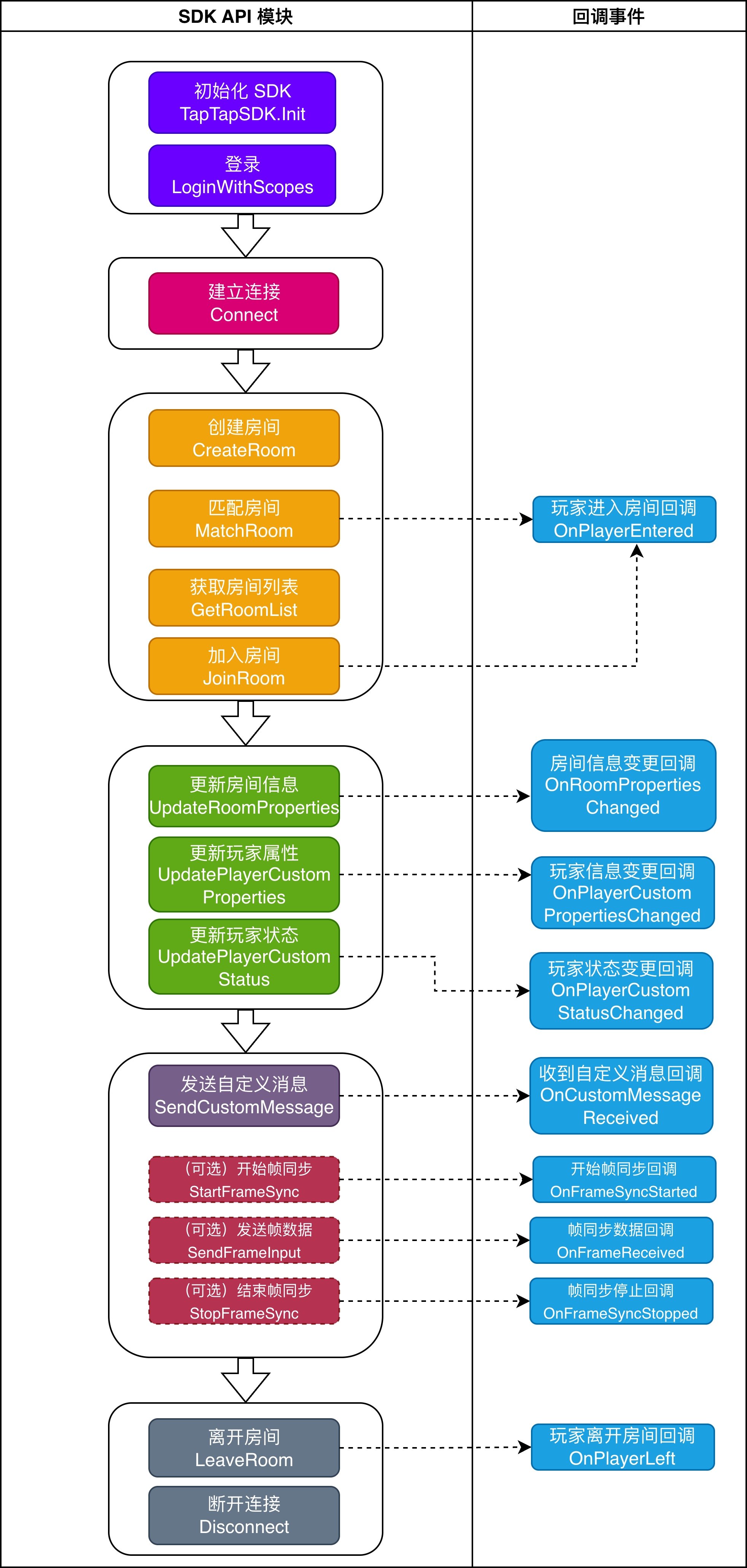
实现多人游戏
通过模拟一个简单的 Unity 象棋游戏项目,在不同游戏页面中调用对应 SDK 接口 ,让开发者快速了解接入流程。
该项目中主要游戏页面及流程如下:
游戏启动页面 -> 登录页面 -> 游戏大厅页 -> 房间列表及房间内页面 -> 象棋对战页面
游戏启动与登录页面
在游戏启动页面,调用 SDK 初始化接口,示例如下:
- Unity
- Android Java
- Android Kotlin
- iOS Swift
- iOS Objective-C
using TapSDK.Core;

// 核心配置
TapTapSdkOptions coreOptions = new TapTapSdkOptions
{
   // 客户端 ID,开发者后台获取
   clientId = clientId,
   // 客户端令牌,开发者后台获取
   clientToken = clientToken,
   // 地区,CN 为国内,Overseas 为海外
   region = TapTapRegionType.CN
};
// TapSDK 初始化
TapTapSDK.Init(coreOptions);
import com.taptap.sdk.core.TapTapRegion;
import com.taptap.sdk.core.TapTapSdk;
import com.taptap.sdk.core.TapTapSdkOptions;

// 开发者中心对应 Client ID
String clientId = "";
// 开发者中心对应 Client Token
String clientToken = "";

TapTapSdkOptions tapSdkOptions = new TapTapSdkOptions(
    clientId, // 游戏 Client ID
    clientToken, // 游戏 Client Token
    TapTapRegion.CN // 游戏可玩区域
);
// 初始化 TapSDK
TapTapSdk.init(context, tapSdkOptions);
import com.taptap.sdk.core.TapTapSdk
import com.taptap.sdk.core.TapTapSdkOptions
import com.taptap.sdk.core.TapTapRegion

TapTapSdk.init(
    context = context,
    sdkOptions = TapTapSdkOptions(
        clientId = clientId, // 客户端 ID
        clientToken = clientToken, // 客户端令牌
        region = TapTapRegion.CN
    )
)
import TapTapCoreSDK

let options = TapTapSdkOptions()
options.clientId = "your_client_id" // 客户端 ID
options.clientToken = "your_client_token" // 客户端令牌
options.region = .CN

TapTapSDK.initWith(options)
#import <TapTapCoreSDK/TapTapSDK.h>

TapTapSdkOptions *options = [[TapTapSdkOptions alloc] init];
options.clientId = @"your_client_id"; // 客户端 ID
options.clientToken = @"your_client_token"; // 客户端令牌
options.region = TapTapRegionTypeCN;

[TapTapSDK initWithOptions:options];
在游戏登录页面,当玩家点击登录按钮后,调用 SDK 登录接口,获取用户信息:
- Unity
- Android Java
- Android Kotlin
- iOS Swift
- iOS Objective-C
using TapSDK.Login;

try
{
    // 定义授权范围
    List<string> scopes = new List<string>
    {
        TapTapLogin.TAP_LOGIN_SCOPE_PUBLIC_PROFILE
    };
    // 发起 Tap 登录
    var userInfo = await TapTapLogin.Instance.LoginWithScopes(scopes.ToArray());
    Debug.Log($"登录成功,当前用户 ID:{userInfo.unionId}");
    // TODO: 进入游戏大厅页面
}
catch (TaskCanceledException)
{
    Debug.Log("用户取消登录");
}
catch (Exception exception)
{
    Debug.Log($"登录失败,出现异常:{exception}");
}
import com.taptap.sdk.login.TapTapLogin;
import com.taptap.sdk.login.Scopes;
import com.taptap.sdk.login.TapTapAccount;
import com.taptap.sdk.kit.internal.callback.TapTapCallback;
import com.taptap.sdk.kit.internal.exception.TapTapException;
import androidx.annotation.NonNull;
import android.util.Log;

// 定义授权范围
String[] scopes = new String[]{Scopes.SCOPE_PUBLIC_PROFILE};

// 发起 Tap 登录
TapTapLogin.loginWithScopes(activity, scopes, new TapTapCallback<TapTapAccount>() {
    @Override
    public void onSuccess(TapTapAccount account) {
        Log.d("Login", "登录成功,当前用户 ID:" + account.getUnionId());
        // TODO: 进入游戏大厅页面
    }

    @Override
    public void onCancel() {
        Log.d("Login", "用户取消登录");
    }

    @Override
    public void onFail(@NonNull TapTapException exception) {
        Log.e("Login", "登录失败,出现异常:" + exception.getMessage());
    }
});
import com.taptap.sdk.login.TapTapLogin
import com.taptap.sdk.login.Scopes
import com.taptap.sdk.login.TapTapAccount
import com.taptap.sdk.kit.internal.callback.TapTapCallback
import com.taptap.sdk.kit.internal.exception.TapTapException
import android.util.Log

// 定义授权范围
val scopes = arrayOf(Scopes.SCOPE_PUBLIC_PROFILE)

// 发起 Tap 登录
TapTapLogin.loginWithScopes(activity, scopes, object : TapTapCallback<TapTapAccount> {
    override fun onSuccess(account: TapTapAccount) {
        Log.d("Login", "登录成功,当前用户 ID:${account.unionId}")
        // TODO: 进入游戏大厅页面
    }

    override fun onCancel() {
        Log.d("Login", "用户取消登录")
    }

    override fun onFail(exception: TapTapException) {
        Log.e("Login", "登录失败,出现异常:${exception.message}")
    }
})
import TapTapLoginSDK

// 定义授权范围
let scopes = [Scope.publicProfile]

// 发起 Tap 登录
TapTapLogin.login(with: scopes) { account, error, isCancel in
    if isCancel {
        print("用户取消登录")
    } else if let error = error {
        print("登录失败,出现异常:\(error.localizedDescription)")
    } else if let account = account {
        print("登录成功,当前用户 ID:\(account.unionId)")
        // TODO: 进入游戏大厅页面
    }
}
#import <TapTapLoginSDK/TapTapLoginSDK-Swift.h>

// 定义授权范围
NSArray *scopes = @[@"public_profile"];

// 发起 Tap 登录
[TapTapLogin LoginWithScopes:scopes handler:^(BOOL isCancel, NSError *error, TapTapAccount *account) {
    if (isCancel) {
        NSLog(@"用户取消登录");
    } else if (error) {
        NSLog(@"登录失败,出现异常:%@", error.localizedDescription);
    } else {
        NSLog(@"登录成功,当前用户 ID:%@", account.unionId);
        // TODO: 进入游戏大厅页面
    }
}];
游戏大厅页
进入大厅后,先注册全局 SDK 回调,然后调用建立连接接口,示例如下:
- Unity
- Android Java
- Android Kotlin
- iOS Swift
- iOS Objective-C
using TapSDK.OnlineBattle;

/// 大厅页面,实现 SDK 回调接口
public class LobbyPanel : MonoBehaviour , ITapOnlineBattleCallback
{

    /// 注册回调
    public async void RegisterCallback()
    {
        TapTapOnlineBattle.RegisterOnlineBattleCallback(this);
    }

    /// 建立连接
    public async void Connect()
    {
        try
        {
            string playerId = await TapTapOnlineBattle.Connect();
            LogMessage("Connect success " + playerId);
        }
        catch (TapException e)
        {
            LogMessage($"Connect error {e.Code}  {e.Message}");
        }
    }

    public void OnPlayerEntered(string roomId, TapSDK.OnlineBattle.PlayerInfo playerInfo)
    {
        // 有玩家进入房间,根据 playerInfo 渲染房间内玩家 UI
    }


    public void OnPlayerLeft(string roomId, string roomOwnerId, string playerId)
    {
        // 有玩家离开房间,根据 playerID 移除房间内玩家 UI
    }

    public void OnRoomPropertiesChanged(string id, string name, string customProperties)
    {
        // 房主修改了房间属性,根据数据修改房间内页面 UI
    }

    public void OnCustomMessageReceived(string playerId, string msg)
    {
        // 收到玩家操作,根据 msg 中玩家操作数据渲染对战页面棋盘 UI
    }

    public void OnPlayerCustomStatusChanged(string playerId, int status)
    {
        // 玩家更改了对战就绪状态,更新房间内 UI
    }
}
import com.taptap.sdk.battle.TapTapOnlineBattle;
import com.taptap.sdk.battle.TapOnlineBattleCallback;
import com.taptap.sdk.battle.ConnectListener;
import com.taptap.sdk.battle.model.ErrorResponse;
import com.taptap.sdk.battle.model.PlayerInfo;

// 大厅页面,实现 SDK 回调接口
public class LobbyActivity extends AppCompatActivity implements TapOnlineBattleCallback {

    // 注册回调
    public void registerCallback() {
        TapTapOnlineBattle.registerOnlineBattleCallback(this);
    }

    // 建立连接
    public void connect() {
        TapTapOnlineBattle.connect(new ConnectListener() {
            @Override
            public void onSuccess(String playerId) {
                Log.d("Battle", "Connect success " + playerId);
            }

            @Override
            public void onFailure(ErrorResponse error) {
                Log.e("Battle", "Connect error " + error.getCode() + " " + error.getMsg());
            }
        });
    }

    @Override
    public void onPlayerEntered(String roomId, PlayerInfo playerInfo) {
        // 有玩家进入房间,根据 playerInfo 渲染房间内玩家 UI
    }

    @Override
    public void onPlayerLeft(String roomId, String roomOwnerId, String playerId) {
        // 有玩家离开房间,根据 playerId 移除房间内玩家 UI
    }

    @Override
    public void onRoomPropertiesChanged(String id, String name, String customProperties) {
        // 房主修改了房间属性,根据 customProperties 修改房间内页面 UI
    }

    @Override
    public void onCustomMessageReceived(String playerId, String msg) {
        // 收到玩家操作,根据 msg 中玩家操作数据渲染对战页面棋盘 UI
    }

    @Override
    public void onPlayerCustomStatusChanged(String playerId, int status) {
        // 玩家更改了对战就绪状态,更新房间内 UI
    }
}
import com.taptap.sdk.battle.TapTapOnlineBattle
import com.taptap.sdk.battle.TapOnlineBattleCallback
import com.taptap.sdk.battle.ConnectListener
import com.taptap.sdk.battle.model.ErrorResponse
import com.taptap.sdk.battle.model.PlayerInfo
import android.util.Log

// 大厅页面,实现 SDK 回调接口
class LobbyActivity : AppCompatActivity(), TapOnlineBattleCallback {

    // 注册回调
    fun registerCallback() {
        TapTapOnlineBattle.registerOnlineBattleCallback(this)
    }

    // 建立连接
    fun connect() {
        TapTapOnlineBattle.connect(object : ConnectListener {
            override fun onSuccess(playerId: String) {
                Log.d("Battle", "Connect success $playerId")
            }

            override fun onFailure(error: ErrorResponse) {
                Log.e("Battle", "Connect error ${error.code} ${error.msg}")
            }
        })
    }

    override fun onPlayerEntered(roomId: String, playerInfo: PlayerInfo) {
        // 有玩家进入房间,根据 playerInfo 渲染房间内玩家 UI
    }

    override fun onPlayerLeft(roomId: String, roomOwnerId: String, playerId: String) {
        // 有玩家离开房间,根据 playerId 移除房间内玩家 UI
    }

    override fun onRoomPropertiesChanged(id: String, name: String, customProperties: String) {
        // 房主修改了房间属性,根据 customProperties 修改房间内页面 UI
    }

    override fun onCustomMessageReceived(playerId: String, msg: String) {
        // 收到玩家操作,根据 msg 中玩家操作数据渲染对战页面棋盘 UI
    }

    override fun onPlayerCustomStatusChanged(playerId: String, status: Int) {
        // 玩家更改了对战就绪状态,更新房间内 UI
    }
}
import TapOnlineBattleSDK

// ConnectListener 实现
class MyConnectListener: ConnectListener {
    func onSuccess(playerId: String) {
        print("Connect success \(playerId)")
    }

    func onFailure(error: ErrorResponse) {
        print("Connect error \(error.code) \(error.msg)")
    }
}

// 大厅页面,实现 SDK 回调接口(通知回调协议继承自 NSObjectProtocol,实现类需继承 NSObject)
class LobbyViewController: UIViewController, TapOnlineBattleCallback {

    // 注册回调
    func registerCallback() {
        TapTapOnlineBattle.registerOnlineBattleCallback(self)
    }

    // 建立连接
    func connect() {
        TapTapOnlineBattle.connect(listener: MyConnectListener())
    }

    func onPlayerEntered(roomId: String, playerInfo: PlayerInfo) {
        // 有玩家进入房间,根据 playerInfo 渲染房间内玩家 UI
    }

    func onPlayerLeft(roomId: String, roomOwnerId: String, playerId: String) {
        // 有玩家离开房间,根据 playerId 移除房间内玩家 UI
    }

    func onRoomPropertiesChanged(id: String, name: String, customProperties: String) {
        // 房主修改了房间属性,根据 customProperties 修改房间内页面 UI
    }

    func onCustomMessageReceived(playerId: String, msg: String) {
        // 收到玩家操作,根据 msg 中玩家操作数据渲染对战页面棋盘 UI
    }

    func onPlayerCustomStatusChanged(playerId: String, status: Int) {
        // 玩家更改了对战就绪状态,更新房间内 UI
    }
}
#import <TapOnlineBattleSDK/TapOnlineBattleSDK-Swift.h>

@interface LobbyViewController : UIViewController <TapOnlineBattleCallback>
@end

@implementation LobbyViewController

// 注册回调
- (void)registerCallback {
    [TapTapOnlineBattle registerOnlineBattleCallback:self];
}

// 建立连接
- (void)connect {
    MyConnectListener *listener = [[MyConnectListener alloc] init];
    [TapTapOnlineBattle connectWithListener:listener];
}

// SDK 回调实现(所有方法均可选)

// 玩家进入房间
- (void)onPlayerEnteredWithRoomId:(NSString *)roomId playerInfo:(PlayerInfo *)playerInfo {
    // 有玩家进入房间,根据 playerInfo 渲染房间内玩家 UI
}

// 玩家离开房间
- (void)onPlayerLeftWithRoomId:(NSString *)roomId roomOwnerId:(NSString *)roomOwnerId playerId:(NSString *)playerId {
    // 有玩家离开房间,根据 playerId 移除房间内玩家 UI
}

// 房间属性变更
- (void)onRoomPropertiesChangedWithId:(NSString *)id name:(NSString *)name customProperties:(NSString *)customProperties {
    // 房主修改了房间属性,根据数据修改房间内页面 UI
}

// 收到玩家操作
- (void)onCustomMessageReceivedWithPlayerId:(NSString *)playerId msg:(NSString *)msg {
    // 收到玩家操作,根据 msg 中玩家操作数据渲染对战页面棋盘 UI
}

// 玩家更新自定义状态
- (void)onPlayerCustomStatusChangedWithPlayerId:(NSString *)playerId status:(NSInteger)status {
    // 玩家更改了对战就绪状态,更新房间内 UI
}

@end
根据玩家选择,调用匹配房间或搜索房间列表来加入房间:
- Unity
- Android Java
- Android Kotlin
- iOS Swift
- iOS Objective-C
using TapSDK.OnlineBattle;

/// 匹配房间
public async void MatchRoom(){
    Dictionary<string, string> matchParams; // 匹配参数
    // TODO: 设置具体匹配参数
    var config = new MatchRoomConfig()
    {
        roomConfig = new RoomConfig()
        {
            maxPlayerCount = roomMaxPlayerCount, // 最大玩家数量
            type = roomType, // 房间类型
            matchParams = matchParams, // 匹配参数
        }
        playerConfig = new PlayerConfig()
        {
            customStatus = playerCustomStatus, //  玩家状态,自定义: 0 未就绪 1 已就绪
            customProperties = playerProperty, // 玩家属性,设置昵称、头像等
        },
    };
    try
    {
        RoomInfo data = await TapTapOnlineBattle.MatchRoom(config);
        LogMessage(" 匹配房间成功 " + JsonConvert.SerializeObject(data));
        // TODO: 跳转到房间内页面
    }
    catch (TapException e)
    {
        LogMessage($"匹配房间失败 error {e.Code}  {e.Message}");
    }
}

// 获取房间列表数据
public async void GetRoomList()
{
    try
    {
        RoomListData data = await TapTapOnlineBattle.GetRoomList(
            queryRoomType, // 房间类型
        );
        LogMessage(" 查询房间列表成功 " + JsonConvert.SerializeObject(data));
        // TODO: 跳转到房间列表页面,展示可选房间数据
    }
    catch (TapException e)
    {
        LogMessage($"查询房间列表 error {e.Code}  {e.Message}");
    }
}

// 根据房间 ID 加入房间,当玩家在房间列表选择房间后,调用该方法加入房间
public async void JoinRoom()
{
    /// 当前玩家信息配置
    var playerConfig = new PlayerConfig()
    {
        customStatus = joinPlayerStatus, // 玩家状态,自定义: 0 未就绪 1 已就绪
        customProperties = joinPlayerProperty, // 玩家信息,例如头像、昵称等
    };
    try
    {
        RoomInfo data = await TapTapOnlineBattle.JoinRoom(
            joinRoomId, // 房间 ID
            playerConfig
        );
        LogMessage(" 加入房间成功 " + JsonConvert.SerializeObject(data));
        // TODO: 跳转到房间内页面, 根据 RoomInfo 的 players 字段获取所有玩家信息
    }
    catch (TapException e)
    {
        LogMessage($"加入房间 error {e.Code}  {e.Message}");
    }
}
import com.taptap.sdk.battle.TapTapOnlineBattle;
import com.taptap.sdk.battle.MatchRoomListener;
import com.taptap.sdk.battle.GetRoomListListener;
import com.taptap.sdk.battle.JoinRoomListener;
import com.taptap.sdk.battle.model.MatchRoomConfig;
import com.taptap.sdk.battle.model.RoomConfig;
import com.taptap.sdk.battle.model.PlayerConfig;
import com.taptap.sdk.battle.model.RoomInfo;
import com.taptap.sdk.battle.model.RoomListData;
import com.taptap.sdk.battle.model.ErrorResponse;
import java.util.Map;
import java.util.HashMap;

// 匹配房间
public void matchRoom() {
    Map<String, String> matchParams = new HashMap<>(); // 匹配参数
    // TODO: 设置具体匹配参数

    RoomConfig roomConfig = new RoomConfig(
        roomMaxPlayerCount, // 最大玩家数量
        roomType,           // 房间类型
        matchParams,        // 匹配参数
        "",                 // 房间名称(选填)
        ""                  // 自定义房间属性(选填)
    );

    PlayerConfig playerConfig = new PlayerConfig(
        playerCustomStatus, // 玩家状态,自定义: 0 未就绪 1 已就绪
        playerProperty      // 玩家属性,设置昵称、头像等
    );

    MatchRoomConfig config = new MatchRoomConfig(roomConfig, playerConfig);

    TapTapOnlineBattle.matchRoom(config, new MatchRoomListener() {
        @Override
        public void onSuccess(RoomInfo roomInfo) {
            Log.d("Battle", "匹配房间成功 " + roomInfo);
            // TODO: 跳转到房间内页面
        }

        @Override
        public void onFailure(ErrorResponse error) {
            Log.e("Battle", "匹配房间失败 error " + error.getCode() + " " + error.getMsg());
        }
    });
}

// 获取房间列表数据
public void getRoomList() {
    TapTapOnlineBattle.getRoomList(queryRoomType, 0, 20, new GetRoomListListener() {
        @Override
        public void onSuccess(RoomListData data) {
            Log.d("Battle", "查询房间列表成功 " + data);
            // TODO: 跳转到房间列表页面,展示可选房间数据
        }

        @Override
        public void onFailure(ErrorResponse error) {
            Log.e("Battle", "查询房间列表 error " + error.getCode() + " " + error.getMsg());
        }
    });
}

// 根据房间 ID 加入房间,当玩家在房间列表选择房间后,调用该方法加入房间
public void joinRoom() {
    // 当前玩家信息配置
    PlayerConfig playerConfig = new PlayerConfig(
        joinPlayerStatus,    // 玩家状态,自定义: 0 未就绪 1 已就绪
        joinPlayerProperty   // 玩家信息,例如头像、昵称等
    );

    TapTapOnlineBattle.joinRoom(joinRoomId, playerConfig, new JoinRoomListener() {
        @Override
        public void onSuccess(RoomInfo roomInfo) {
            Log.d("Battle", "加入房间成功 " + roomInfo);
            // TODO: 跳转到房间内页面, 根据 RoomInfo 的 players 字段获取所有玩家信息
        }

        @Override
        public void onFailure(ErrorResponse error) {
            Log.e("Battle", "加入房间 error " + error.getCode() + " " + error.getMsg());
        }
    });
}
import com.taptap.sdk.battle.TapTapOnlineBattle
import com.taptap.sdk.battle.MatchRoomListener
import com.taptap.sdk.battle.GetRoomListListener
import com.taptap.sdk.battle.JoinRoomListener
import com.taptap.sdk.battle.model.MatchRoomConfig
import com.taptap.sdk.battle.model.RoomConfig
import com.taptap.sdk.battle.model.PlayerConfig
import com.taptap.sdk.battle.model.RoomInfo
import com.taptap.sdk.battle.model.RoomListData
import com.taptap.sdk.battle.model.ErrorResponse
import android.util.Log

// 匹配房间
fun matchRoom() {
    val matchParams: MutableMap<String, String> = mutableMapOf() // 匹配参数
    // TODO: 设置具体匹配参数

    val roomConfig = RoomConfig(
        maxPlayerCount = roomMaxPlayerCount, // 最大玩家数量
        type = roomType,                     // 房间类型
        matchParams = matchParams            // 匹配参数
    )

    val playerConfig = PlayerConfig(
        customStatus = playerCustomStatus,   // 玩家状态,自定义: 0 未就绪 1 已就绪
        customProperties = playerProperty    // 玩家属性,设置昵称、头像等
    )

    val config = MatchRoomConfig(roomConfig = roomConfig, playerConfig = playerConfig)

    TapTapOnlineBattle.matchRoom(request = config, listener = object : MatchRoomListener {
        override fun onSuccess(roomInfo: RoomInfo) {
            Log.d("Battle", "匹配房间成功 $roomInfo")
            // TODO: 跳转到房间内页面
        }

        override fun onFailure(error: ErrorResponse) {
            Log.e("Battle", "匹配房间失败 error ${error.code} ${error.msg}")
        }
    })
}

// 获取房间列表数据
fun getRoomList() {
    TapTapOnlineBattle.getRoomList(
        roomType = queryRoomType,
        offset = 0,
        limit = 20,
        listener = object : GetRoomListListener {
            override fun onSuccess(data: RoomListData) {
                Log.d("Battle", "查询房间列表成功 $data")
                // TODO: 跳转到房间列表页面,展示可选房间数据
            }

            override fun onFailure(error: ErrorResponse) {
                Log.e("Battle", "查询房间列表 error ${error.code} ${error.msg}")
            }
        }
    )
}

// 根据房间 ID 加入房间,当玩家在房间列表选择房间后,调用该方法加入房间
fun joinRoom() {
    // 当前玩家信息配置
    val playerConfig = PlayerConfig(
        customStatus = joinPlayerStatus,      // 玩家状态,自定义: 0 未就绪 1 已就绪
        customProperties = joinPlayerProperty // 玩家信息,例如头像、昵称等
    )

    TapTapOnlineBattle.joinRoom(
        roomId = joinRoomId,
        playerConfig = playerConfig,
        listener = object : JoinRoomListener {
            override fun onSuccess(roomInfo: RoomInfo) {
                Log.d("Battle", "加入房间成功 $roomInfo")
                // TODO: 跳转到房间内页面, 根据 RoomInfo 的 players 字段获取所有玩家信息
            }

            override fun onFailure(error: ErrorResponse) {
                Log.e("Battle", "加入房间 error ${error.code} ${error.msg}")
            }
        }
    )
}
import TapOnlineBattleSDK

// 匹配房间
class MyMatchRoomListener: MatchRoomListener {
    func onSuccess(roomInfo: RoomInfo) {
        print("匹配房间成功 \(roomInfo)")
        // TODO: 跳转到房间内页面
    }
    func onFailure(error: ErrorResponse) {
        print("匹配房间失败 error \(error.code) \(error.msg)")
    }
}

func matchRoom() {
    var matchParams: [String: String] = [:] // 匹配参数
    // TODO: 设置具体匹配参数

    let roomConfig = RoomConfig(
        maxPlayerCount: roomMaxPlayerCount, // 最大玩家数量
        type: roomType,                     // 房间类型
        matchParams: matchParams            // 匹配参数
    )

    let playerConfig = PlayerConfig(
        customStatus: playerCustomStatus,   // 玩家状态,自定义: 0 未就绪 1 已就绪
        customProperties: playerProperty    // 玩家属性,设置昵称、头像等
    )

    let config = MatchRoomConfig(roomConfig: roomConfig, playerConfig: playerConfig)
    TapTapOnlineBattle.matchRoom(request: config, listener: MyMatchRoomListener())
}

// 获取房间列表数据
class MyGetRoomListListener: GetRoomListListener {
    func onSuccess(data: RoomListData) {
        print("查询房间列表成功 \(data)")
        // TODO: 跳转到房间列表页面,展示可选房间数据
    }
    func onFailure(error: ErrorResponse) {
        print("查询房间列表 error \(error.code) \(error.msg)")
    }
}

func getRoomList() {
    TapTapOnlineBattle.getRoomList(roomType: queryRoomType, offset: 0, limit: 20, listener: MyGetRoomListListener())
}

// 根据房间 ID 加入房间,当玩家在房间列表选择房间后,调用该方法加入房间
class MyJoinRoomListener: JoinRoomListener {
    func onSuccess(roomInfo: RoomInfo) {
        print("加入房间成功 \(roomInfo)")
        // TODO: 跳转到房间内页面, 根据 RoomInfo 的 players 字段获取所有玩家信息
    }
    func onFailure(error: ErrorResponse) {
        print("加入房间 error \(error.code) \(error.msg)")
    }
}

func joinRoom() {
    // 当前玩家信息配置
    let playerConfig = PlayerConfig(
        customStatus: joinPlayerStatus,      // 玩家状态,自定义: 0 未就绪 1 已就绪
        customProperties: joinPlayerProperty // 玩家信息,例如头像、昵称等
    )

    TapTapOnlineBattle.joinRoom(roomId: joinRoomId, playerConfig: playerConfig, listener: MyJoinRoomListener())
}
#import <TapOnlineBattleSDK/TapOnlineBattleSDK-Swift.h>

// 匹配房间
- (void)matchRoom {
    RoomConfig *roomConfig = [[RoomConfig alloc] initWithMaxPlayerCount:roomMaxPlayerCount
                                                                   type:roomType
                                                            matchParams:matchParams
                                                                   name:@""
                                                       customProperties:@""];

    PlayerConfig *playerConfig = [[PlayerConfig alloc] initWithCustomStatus:playerCustomStatus
                                                           customProperties:playerProperty];

    MatchRoomConfig *config = [[MatchRoomConfig alloc] initWithRoomConfig:roomConfig playerConfig:playerConfig];
    [TapTapOnlineBattle matchRoomWithRequest:config listener:[[MyMatchRoomListener alloc] init]];
}

// 获取房间列表数据
- (void)getRoomList {
    [TapTapOnlineBattle getRoomListWithRoomType:queryRoomType offset:0 limit:20 listener:[[MyGetRoomListListener alloc] init]];
}

// 根据房间 ID 加入房间
- (void)joinRoom {
    PlayerConfig *playerConfig = [[PlayerConfig alloc] initWithCustomStatus:joinPlayerStatus
                                                           customProperties:joinPlayerProperty];

    [TapTapOnlineBattle joinRoomWithRoomId:joinRoomId playerConfig:playerConfig listener:[[MyJoinRoomListener alloc] init]];
}
房间内页面
当玩家进入房间后,通过点击 UI 更新状态为对战就绪,开发者调用以下接口:
- Unity
- Android Java
- Android Kotlin
- iOS Swift
- iOS Objective-C
using TapSDK.OnlineBattle;

public async void UpdatePlayerStatus()
{
    try
    {
        // 自定义玩家状态,0 对战未就绪  1 对战已就绪
        await TapTapOnlineBattle.UpdatePlayerCustomStatus(1);
        LogMessage(" 更新玩家状态 成功 ");
        // 房间内其他玩家通过 OnPlayerCustomStatusChanged回调 收到该变更通知
        // TODO: 更新玩家 UI 状态
    }
    catch (TapException e)
    {
        LogMessage($"更新玩家状态 error {e.Code}  {e.Message}");
    }
}
import com.taptap.sdk.battle.TapTapOnlineBattle;
import com.taptap.sdk.battle.UpdatePlayerCustomStatusListener;
import com.taptap.sdk.battle.model.ErrorResponse;

public void updatePlayerStatus() {
    // 自定义玩家状态,0 对战未就绪  1 对战已就绪
    TapTapOnlineBattle.updatePlayerCustomStatus(1, new UpdatePlayerCustomStatusListener() {
        @Override
        public void onSuccess() {
            Log.d("Battle", "更新玩家状态 成功");
            // 房间内其他玩家通过 onPlayerCustomStatusChanged 回调 收到该变更通知
            // TODO: 更新玩家 UI 状态
        }

        @Override
        public void onFailure(ErrorResponse error) {
            Log.e("Battle", "更新玩家状态 error " + error.getCode() + " " + error.getMsg());
        }
    });
}
import com.taptap.sdk.battle.TapTapOnlineBattle
import com.taptap.sdk.battle.UpdatePlayerCustomStatusListener
import com.taptap.sdk.battle.model.ErrorResponse
import android.util.Log

fun updatePlayerStatus() {
    // 自定义玩家状态,0 对战未就绪  1 对战已就绪
    TapTapOnlineBattle.updatePlayerCustomStatus(1, object : UpdatePlayerCustomStatusListener {
        override fun onSuccess() {
            Log.d("Battle", "更新玩家状态 成功")
            // 房间内其他玩家通过 onPlayerCustomStatusChanged 回调 收到该变更通知
            // TODO: 更新玩家 UI 状态
        }

        override fun onFailure(error: ErrorResponse) {
            Log.e("Battle", "更新玩家状态 error ${error.code} ${error.msg}")
        }
    })
}
import TapOnlineBattleSDK

class MyUpdateStatusListener: UpdatePlayerCustomStatusListener {
    func onSuccess() {
        print("更新玩家状态 成功")
        // 房间内其他玩家通过 onPlayerCustomStatusChanged 回调 收到该变更通知
        // TODO: 更新玩家 UI 状态
    }
    func onFailure(error: ErrorResponse) {
        print("更新玩家状态 error \(error.code) \(error.msg)")
    }
}

func updatePlayerStatus() {
    // 自定义玩家状态,0 对战未就绪  1 对战已就绪
    TapTapOnlineBattle.updatePlayerCustomStatus(status: 1, listener: MyUpdateStatusListener())
}
#import <TapOnlineBattleSDK/TapOnlineBattleSDK-Swift.h>

// 自定义玩家状态,0 对战未就绪  1 对战已就绪
[TapTapOnlineBattle updatePlayerCustomStatusWithStatus:1 listener:[[MyUpdateStatusListener alloc] init]];
当所有玩家状态就绪后,任意玩家可选择开始游戏,进入象棋对战页面,准备同步数据。
象棋对战页面
当玩家 1 操作棋盘后,可通过发送自定义消息同步给其他玩家,示例如下:
- Unity
- Android Java
- Android Kotlin
- iOS Swift
- iOS Objective-C
using TapSDK.OnlineBattle;

/// <summary>
/// 发送玩家数据
/// </summary>
/// <param name="x"> 棋子横坐标 </param>
/// <param name="y"> 棋子纵坐标 </param>
/// <param name="data"> 棋子数据 </param>
public async void SendPlayData(int x, int y, string data)
{
    try
    {
        Dictionary<string, object> sendData = new Dictionary<string, object>
        {
            { "x", x },
            { "y", y },
            { "data", data },
        };
        string playData = JsonConvert.SerializeObject(sendData);
        await TapTapOnlineBattle.SendCustomMessage(
            playData,
            0
        );
        LogMessage(" 发送消息 成功 ");
        // 其他玩家根据回调 OnCustomMessageReceived 接收数据
    }
    catch (TapException e)
    {
        LogMessage($"发送自定义消息 error {e.Code}  {e.Message}");
    }
}
import com.taptap.sdk.battle.TapTapOnlineBattle;
import com.taptap.sdk.battle.SendCustomMessageListener;
import com.taptap.sdk.battle.model.ErrorResponse;
import org.json.JSONObject;
import java.util.Collections;
import java.util.HashMap;
import java.util.Map;

/**
 * 发送玩家数据
 * @param x 棋子横坐标
 * @param y 棋子纵坐标
 * @param data 棋子数据
 */
public void sendPlayData(int x, int y, String data) {
    try {
        Map<String, Object> sendData = new HashMap<>();
        sendData.put("x", x);
        sendData.put("y", y);
        sendData.put("data", data);

        String playData = new JSONObject(sendData).toString();

        // msg:消息内容;type:0 房间内所有玩家(不含发送者),1 指定玩家;receivers:type==1 时有效
        TapTapOnlineBattle.sendCustomMessage(playData, 0, Collections.emptyList(), new SendCustomMessageListener() {
            @Override
            public void onSuccess() {
                Log.d("Battle", "发送消息 成功");
                // 其他玩家根据回调 onCustomMessageReceived 接收数据
            }

            @Override
            public void onFailure(ErrorResponse error) {
                Log.e("Battle", "发送自定义消息 error " + error.getCode() + " " + error.getMsg());
            }
        });
    } catch (Exception e) {
        Log.e("Battle", "发送自定义消息 error " + e.getMessage());
    }
}
import com.taptap.sdk.battle.TapTapOnlineBattle
import com.taptap.sdk.battle.SendCustomMessageListener
import com.taptap.sdk.battle.model.ErrorResponse
import android.util.Log
import org.json.JSONObject

/**
 * 发送玩家数据
 * @param x 棋子横坐标
 * @param y 棋子纵坐标
 * @param data 棋子数据
 */
fun sendPlayData(x: Int, y: Int, data: String) {
    try {
        val sendData = mapOf(
            "x" to x,
            "y" to y,
            "data" to data
        )

        val playData = JSONObject(sendData).toString()

        // msg:消息内容;type:0 房间内所有玩家(不含发送者),1 指定玩家;receivers:type==1 时有效
        TapTapOnlineBattle.sendCustomMessage(
            msg = playData,
            type = 0,
            receivers = emptyList(),
            listener = object : SendCustomMessageListener {
                override fun onSuccess() {
                    Log.d("Battle", "发送消息 成功")
                    // 其他玩家根据回调 onCustomMessageReceived 接收数据
                }

                override fun onFailure(error: ErrorResponse) {
                    Log.e("Battle", "发送自定义消息 error ${error.code} ${error.msg}")
                }
            }
        )
    } catch (e: Exception) {
        Log.e("Battle", "发送自定义消息 error ${e.message}")
    }
}
import TapOnlineBattleSDK

class MySendMsgListener: SendCustomMessageListener {
    func onSuccess() {
        print("发送消息 成功")
        // 其他玩家根据回调 onCustomMessageReceived 接收数据
    }
    func onFailure(error: ErrorResponse) {
        print("发送自定义消息 error \(error.code) \(error.msg)")
    }
}

/**
 * 发送玩家数据
 * @param x 棋子横坐标
 * @param y 棋子纵坐标
 * @param data 棋子数据
 */
func sendPlayData(x: Int, y: Int, data: String) {
    do {
        let sendData: [String: Any] = [
            "x": x,
            "y": y,
            "data": data
        ]

        let jsonData = try JSONSerialization.data(withJSONObject: sendData)
        let playData = String(data: jsonData, encoding: .utf8) ?? ""

        // msg:消息内容;type:0 房间内所有玩家(不含发送者),1 指定玩家;receivers:type==1 时有效
        TapTapOnlineBattle.sendCustomMessage(msg: playData, type: 0, receivers: [], listener: MySendMsgListener())
    } catch {
        print("发送自定义消息 error \(error.localizedDescription)")
    }
}
#import <TapOnlineBattleSDK/TapOnlineBattleSDK-Swift.h>

NSError *jsonError;
NSDictionary *sendData = @{@"x": @(x), @"y": @(y), @"data": data};
NSData *jsonData = [NSJSONSerialization dataWithJSONObject:sendData options:0 error:&jsonError];
if (jsonError) { return; }
NSString *playData = [[NSString alloc] initWithData:jsonData encoding:NSUTF8StringEncoding];

// msg:消息内容;type:0 房间内所有玩家(不含发送者),1 指定玩家;receivers:type==1 时有效
[TapTapOnlineBattle sendCustomMessageWithMsg:playData type:0 receivers:@[] listener:[[MySendMsgListener alloc] init]];
当对战结束后,返回到房间内页面,玩家可选择继续或退出房间
- Unity
- Android Java
- Android Kotlin
- iOS Swift
- iOS Objective-C
using TapSDK.OnlineBattle;

public async void LeaveRoom()
{
    try
    {
        await TapTapOnlineBattle.LeaveRoom();
        LogMessage(" 离开房间成功 ");
        // TODO: 切换到大厅页面
    }
    catch (TapException e)
    {
        LogMessage($"离开房间 error {e.Code}  {e.Message}");
    }
}
import com.taptap.sdk.battle.TapTapOnlineBattle;
import com.taptap.sdk.battle.LeaveRoomListener;
import com.taptap.sdk.battle.model.ErrorResponse;

public void leaveRoom() {
    TapTapOnlineBattle.leaveRoom(new LeaveRoomListener() {
        @Override
        public void onSuccess() {
            Log.d("Battle", "离开房间成功");
            // TODO: 切换到大厅页面
        }

        @Override
        public void onFailure(ErrorResponse error) {
            Log.e("Battle", "离开房间 error " + error.getCode() + " " + error.getMsg());
        }
    });
}
import com.taptap.sdk.battle.TapTapOnlineBattle
import com.taptap.sdk.battle.LeaveRoomListener
import com.taptap.sdk.battle.model.ErrorResponse
import android.util.Log

fun leaveRoom() {
    TapTapOnlineBattle.leaveRoom(object : LeaveRoomListener {
        override fun onSuccess() {
            Log.d("Battle", "离开房间成功")
            // TODO: 切换到大厅页面
        }

        override fun onFailure(error: ErrorResponse) {
            Log.e("Battle", "离开房间 error ${error.code} ${error.msg}")
        }
    })
}
import TapOnlineBattleSDK

class MyLeaveRoomListener: LeaveRoomListener {
    func onSuccess() {
        print("离开房间成功")
        // TODO: 切换到大厅页面
    }
    func onFailure(error: ErrorResponse) {
        print("离开房间 error \(error.code) \(error.msg)")
    }
}

func leaveRoom() {
    TapTapOnlineBattle.leaveRoom(listener: MyLeaveRoomListener())
}
#import <TapOnlineBattleSDK/TapOnlineBattleSDK-Swift.h>

[TapTapOnlineBattle leaveRoomWithListener:[[MyLeaveRoomListener alloc] init]];