数据传输
自定义消息同步
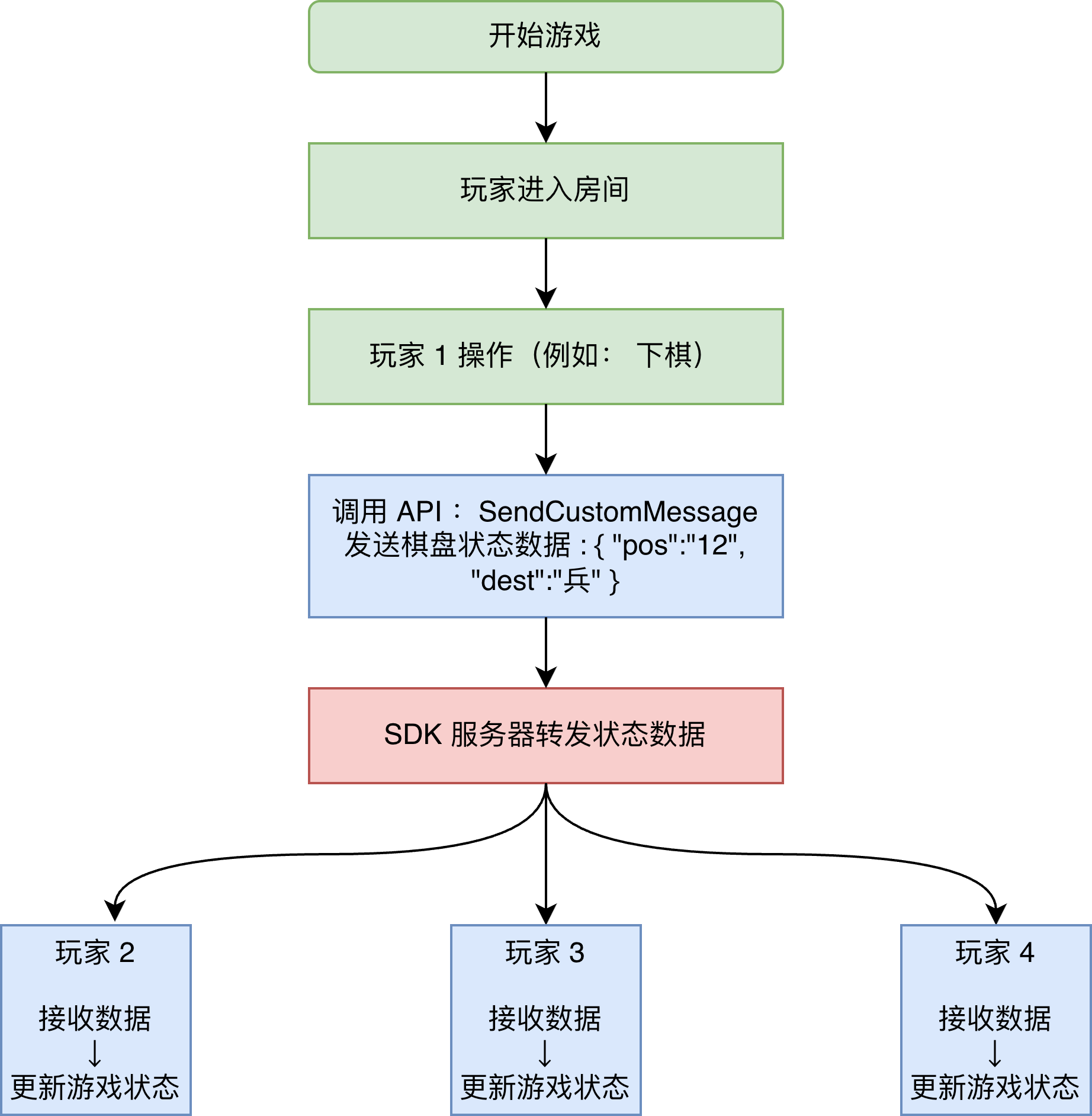
通过常见的象棋对战游戏来描述自定义消息在游戏中的使用方式,流程图如下:
建议游戏类型
通过发送自定义消息进行游戏各端的状态同步,适合不需要高实时性进行数据更新的回合制或简单休闲游戏,例如:
- 棋牌类游戏 - 五子棋、象棋、斗地主、麻将等
- 回合制游戏 - 战棋、策略游戏、回合制 RPG 等
- 休闲游戏 - 你画我猜、狼人杀、问答游戏等
- 合作游戏 - 简单的多人闯关、合作解谜等
发送自定义消息
该接口 和 更新玩家自定义状态(UpdatePlayerCustomStatus)、更新玩家自定义属性(UpdatePlayerCustomProperties)、更新房间信息(UpdateRoomProperties)共享每秒15次调用限制
开始游戏后,开发者通过将玩家操作数据封装为自定义消息内容同步给其他玩家,每秒最多 15 次,调用示例如下:
- Unity
- Android Java
- Android Kotlin
- iOS Swift
- iOS Objective-C
using TapSDK.OnlineBattle;

try
{
    await TapTapOnlineBattle.SendCustomMessage(
        customMsg, // 自定义消息,格式由开发者决定,必须是utf8字符串,最大2048字节
        customMsgType, // 消息接收者类型。0:房间内所有玩家,不包括发送者;1:发送给指定玩家
        playerIds // 当type==1时有效,发送给该字段指定的玩家,最多20个ID
    );
    LogMessage(" 发送自定义消息 成功 ");
    // 房间内对应玩家通过 OnCustomMessageReceived 回调收到通知
}
catch (TapException e)
{
    LogMessage($"发送自定义消息 error {e.Code}  {e.Message}");
}
import com.taptap.sdk.battle.TapTapOnlineBattle;
import com.taptap.sdk.battle.SendCustomMessageListener;
import com.taptap.sdk.battle.model.ErrorResponse;

// customMsg:消息内容,最大2048字节;customMsgType:0 广播,1 指定玩家;playerIds:type==1 时有效
TapTapOnlineBattle.sendCustomMessage(customMsg, customMsgType, playerIds, new SendCustomMessageListener() {
    @Override
    public void onSuccess() {
        Log.d(TAG, "发送自定义消息 成功");
        // 房间内对应玩家通过 onCustomMessageReceived 回调收到通知
    }

    @Override
    public void onFailure(ErrorResponse error) {
        Log.e(TAG, "发送自定义消息 error " + error.getCode() + " " + error.getMsg());
    }
});
import com.taptap.sdk.battle.TapTapOnlineBattle
import com.taptap.sdk.battle.SendCustomMessageListener
import com.taptap.sdk.battle.model.ErrorResponse
import android.util.Log

// customMsg:消息内容,最大2048字节;customMsgType:0 广播,1 指定玩家;playerIds:type==1 时有效
TapTapOnlineBattle.sendCustomMessage(
    msg = customMsg,
    type = customMsgType,
    receivers = playerIds,
    listener = object : SendCustomMessageListener {
        override fun onSuccess() {
            Log.d(TAG, "发送自定义消息 成功")
            // 房间内对应玩家通过 onCustomMessageReceived 回调收到通知
        }

        override fun onFailure(error: ErrorResponse) {
            Log.e(TAG, "发送自定义消息 error ${error.code} ${error.msg}")
        }
    }
)
import TapOnlineBattleSDK

class CustomMessageSender: SendCustomMessageListener {
    func onSuccess() {
        print("发送自定义消息 成功")
        // 房间内对应玩家通过 onCustomMessageReceived 回调收到通知
    }
    func onFailure(error: ErrorResponse) {
        print("发送自定义消息 error \(error.code) \(error.msg)")
    }
}

// customMsg:消息内容,最大2048字节;customMsgType:0 广播,1 指定玩家;playerIds:type==1 时有效
TapTapOnlineBattle.sendCustomMessage(msg: customMsg, type: customMsgType, receivers: playerIds, listener: CustomMessageSender())
#import <TapOnlineBattleSDK/TapOnlineBattleSDK-Swift.h>

// customMsg:消息内容,最大2048字节;customMsgType:0 广播,1 指定玩家;playerIds:type==1 时有效
[TapTapOnlineBattle sendCustomMessageWithMsg:customMsg type:customMsgType receivers:playerIds listener:[[MySendCustomMessageListener alloc] init]];
发送成功后,房间内对应玩家会通过 SDK 的 OnCustomMessageReceived 回调收到通知:
- Unity
- Android Java
- Android Kotlin
- iOS Swift
- iOS Objective-C
    /// <summary>
    /// 收到玩家自定义消息
    /// </summary>
    /// <param name="playerId"> 消息发送者玩家ID </param>
    /// <param name="msg"> 自定义消息,格式由开发者决定,必须是utf8字符串,最大2048字节 </param>
    public void OnCustomMessageReceived(string playerId, string msg)
    {
        // TODO: 解析 msg,渲染对战状态或其他信息
    }
// 实现 TapOnlineBattleCallback 接口后,重写以下方法接收自定义消息
@Override
public void onCustomMessageReceived(String playerId, String msg) {
    // playerId 为消息发送者玩家 ID,msg 为消息内容
    // TODO: 解析 msg,渲染对战状态或其他信息
}
// 实现 TapOnlineBattleCallback 接口后,重写以下方法接收自定义消息
override fun onCustomMessageReceived(playerId: String, msg: String) {
    // playerId 为消息发送者玩家 ID,msg 为消息内容
    // TODO: 解析 msg,渲染对战状态或其他信息
}
// 实现 TapOnlineBattleCallback 协议后,重写以下方法接收自定义消息
func onCustomMessageReceived(playerId: String, msg: String) {
    // playerId 为消息发送者玩家 ID,msg 为消息内容
    // TODO: 解析 msg,渲染对战状态或其他信息
}
// 实现 TapOnlineBattleCallback 协议后,重写以下方法接收自定义消息
- (void)onCustomMessageReceivedWithPlayerId:(NSString *)playerId msg:(NSString *)msg {
    // playerId 为消息发送者玩家 ID,msg 为消息内容
    // TODO: 解析 msg,渲染对战状态或其他信息
}
帧数据同步
通过 FPS 对战游戏来描述帧数据同步在游戏中的使用方式,流程图如下:
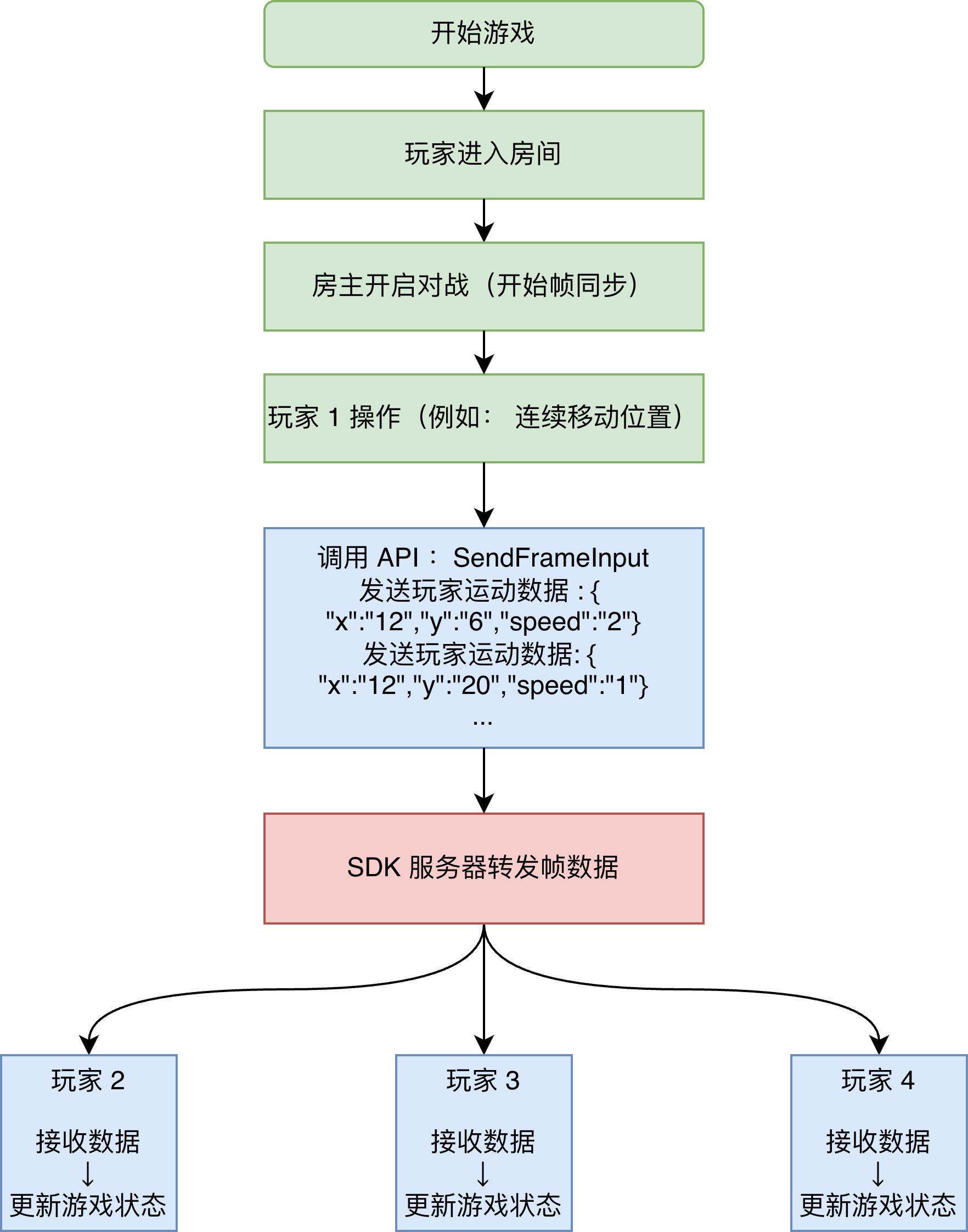
单场对战的帧数据同步流程与对战生命周期对应,整体流程如下:
- 开始对战:由房主触发 开始帧同步,所有玩家进入帧同步状态
- 对战进行中:通过 发送玩家操作数据 进行帧数据同步
- 结束对战:由房主触发 停止帧同步,结束数据同步流程
- 帧率为每秒 30 帧
- 开始帧同步后,最大支持 30 分钟,超过时间后 SDK 会强制停止帧同步
- 每个玩家每帧最多允许发送 5 次操作数据
建议游戏类型
帧同步是针对高实时性竞技游戏采用的一种同步技术,主要用于需要实时进行数据同步的对战游戏,例如常见的 MOBA(多人在线战术竞技类游戏)、 和 FPS (第一人称射击类游戏)等。
开始帧同步
当房间内所有玩家状态就绪后,房主开启对战时,调用开始帧同步接口:
- Unity
- Android Java
- Android Kotlin
- iOS Swift
- iOS Objective-C
using TapSDK.OnlineBattle;

try
{
    // 开始帧同步,仅房主可调用
    await TapTapOnlineBattle.StartFrameSync();
    LogMessage(" 开始帧同步 成功 ");
    // 房间内所有玩家会通过 OnFrameSyncStarted 回调收到通知
}
catch (TapException e)
{
    LogMessage($"开始帧同步 error {e.Code}  {e.Message}");
}
import com.taptap.sdk.battle.TapTapOnlineBattle;
import com.taptap.sdk.battle.StartFrameSyncListener;
import com.taptap.sdk.battle.model.ErrorResponse;

// 开始帧同步,仅房主可调用
TapTapOnlineBattle.startFrameSync(new StartFrameSyncListener() {
    @Override
    public void onSuccess() {
        Log.d(TAG, "开始帧同步 成功");
        // 房间内所有玩家会通过 onFrameSyncStarted 回调收到通知
    }

    @Override
    public void onFailure(ErrorResponse error) {
        Log.e(TAG, "开始帧同步 error " + error.getCode() + " " + error.getMsg());
    }
});
import com.taptap.sdk.battle.TapTapOnlineBattle
import com.taptap.sdk.battle.StartFrameSyncListener
import com.taptap.sdk.battle.model.ErrorResponse
import android.util.Log

// 开始帧同步,仅房主可调用
TapTapOnlineBattle.startFrameSync(object : StartFrameSyncListener {
    override fun onSuccess() {
        Log.d(TAG, "开始帧同步 成功")
        // 房间内所有玩家会通过 onFrameSyncStarted 回调收到通知
    }

    override fun onFailure(error: ErrorResponse) {
        Log.e(TAG, "开始帧同步 error ${error.code} ${error.msg}")
    }
})
import TapOnlineBattleSDK

class StartFrameSyncHandler: StartFrameSyncListener {
    func onSuccess() {
        print("开始帧同步 成功")
        // 房间内所有玩家会通过 onFrameSyncStarted 回调收到通知
    }
    func onFailure(error: ErrorResponse) {
        print("开始帧同步 error \(error.code) \(error.msg)")
    }
}

// 开始帧同步,仅房主可调用
TapTapOnlineBattle.startFrameSync(listener: StartFrameSyncHandler())
#import <TapOnlineBattleSDK/TapOnlineBattleSDK-Swift.h>

[TapTapOnlineBattle startFrameSyncWithListener:[[MyStartFrameSyncListener alloc] init]];
此时房间内所有玩家会通过 SDK 的 OnFrameSyncStarted 回调收到通知:
- Unity
- Android Java
- Android Kotlin
- iOS Swift
- iOS Objective-C
    /// <summary>
    /// 开始帧同步
    /// </summary>
    /// <param name="frameSyncInfo"> 帧同步基础信息 </param>
    public void OnFrameSyncStarted(FrameSyncInfo frameSyncInfo)
    {
        LogMessage($"receive OnFrameSyncStarted {JsonConvert.SerializeObject(frameSyncInfo)}");
    }
import com.taptap.sdk.battle.model.FrameSyncInfo;

// 实现 TapOnlineBattleCallback 接口后,重写以下方法
@Override
public void onFrameSyncStarted(FrameSyncInfo frameSyncInfo) {
    Log.d(TAG, "receive onFrameSyncStarted " + frameSyncInfo);
    // frameSyncInfo.seed 是随机数种子,用于初始化随机数生成器
}
import com.taptap.sdk.battle.model.FrameSyncInfo

// 实现 TapOnlineBattleCallback 接口后,重写以下方法
override fun onFrameSyncStarted(frameSyncInfo: FrameSyncInfo) {
    Log.d(TAG, "receive onFrameSyncStarted $frameSyncInfo")
    // frameSyncInfo.seed 是随机数种子,用于初始化随机数生成器
}
// 实现 TapOnlineBattleCallback 协议后,重写以下方法
func onFrameSyncStarted(frameSyncInfo: FrameSyncInfo) {
    print("receive onFrameSyncStarted \(frameSyncInfo)")
    // frameSyncInfo.seed 是随机数种子,用于初始化随机数生成器
}
// 实现 TapOnlineBattleCallback 协议后,重写以下方法
- (void)onFrameSyncStartedWithFrameSyncInfo:(FrameSyncInfo *)frameSyncInfo {
    NSLog(@"receive onFrameSyncStarted frameSyncId:%ld seed:%ld", (long)frameSyncInfo.frameSyncId, (long)frameSyncInfo.seed);
    // frameSyncInfo.seed 是随机数种子,用于初始化随机数生成器
}
回调中会返回本次帧同步的基础信息 (FrameSyncInfo),主要包含房间信息(roomInfo) 、随机种子(seed)等
注意:开启帧同步后,禁止执行管理房间的所有操作,包括更新房间信息、更新玩家属性、离开房间、踢出玩家等,否则会收到错误码 26 的异常
发送玩家操作数据
对战过程中,玩家的操作数据可通过调用如下接口进行同步:
- Unity
- Android Java
- Android Kotlin
- iOS Swift
- iOS Objective-C
using TapSDK.OnlineBattle;

try
{
    // playData 玩家操作数据,utf8字符串格式,最大1024字节
    await TapTapOnlineBattle.SendFrameInput(playData);
    LogMessage(" 发送玩家 Input 数据 成功 ");
    // 房间内其他玩家通过 OnFrameReceived 回调收到通知
}
catch (TapException e)
{
    LogMessage($"发送玩家 Input 数据 error {e.Code}  {e.Message}");
}
import com.taptap.sdk.battle.TapTapOnlineBattle;
import com.taptap.sdk.battle.SendFrameInputListener;
import com.taptap.sdk.battle.model.ErrorResponse;

// playData 玩家操作数据,utf8字符串格式,最大1024字节
TapTapOnlineBattle.sendFrameInput(playData, new SendFrameInputListener() {
    @Override
    public void onSuccess() {
        Log.d(TAG, "发送玩家 Input 数据 成功");
        // 房间内其他玩家通过 onFrameReceived 回调收到通知
    }

    @Override
    public void onFailure(ErrorResponse error) {
        Log.e(TAG, "发送玩家 Input 数据 error " + error.getCode() + " " + error.getMsg());
    }
});
import com.taptap.sdk.battle.TapTapOnlineBattle
import com.taptap.sdk.battle.SendFrameInputListener
import com.taptap.sdk.battle.model.ErrorResponse
import android.util.Log

// playData 玩家操作数据,utf8字符串格式,最大1024字节
TapTapOnlineBattle.sendFrameInput(playData, object : SendFrameInputListener {
    override fun onSuccess() {
        Log.d(TAG, "发送玩家 Input 数据 成功")
        // 房间内其他玩家通过 onFrameReceived 回调收到通知
    }

    override fun onFailure(error: ErrorResponse) {
        Log.e(TAG, "发送玩家 Input 数据 error ${error.code} ${error.msg}")
    }
})
import TapOnlineBattleSDK

class FrameInputSender: SendFrameInputListener {
    func onSuccess() {
        print("发送玩家 Input 数据 成功")
        // 房间内其他玩家通过 onFrameReceived 回调收到通知
    }
    func onFailure(error: ErrorResponse) {
        print("发送玩家 Input 数据 error \(error.code) \(error.msg)")
    }
}

// playData 玩家操作数据,utf8字符串格式,最大1024字节
TapTapOnlineBattle.sendFrameInput(data: playData, listener: FrameInputSender())
#import <TapOnlineBattleSDK/TapOnlineBattleSDK-Swift.h>

// playData 玩家操作数据,utf8字符串格式,最大1024字节
[TapTapOnlineBattle sendFrameInputWithData:playData listener:[[MySendFrameInputListener alloc] init]];
房间内其他玩家会通过 SDK 的 OnFrameReceived 回调收到通知:
- Unity
- Android Java
- Android Kotlin
- iOS Swift
- iOS Objective-C
    /// <summary>
    /// 收到帧同步数据回调
    /// </summary>
    /// <param name="frameData"> 帧数据 </param>
    public void OnFrameReceived(FrameData frameData)
    {
        if (frameData != null && frameData.inputs != null && frameData.inputs.Count > 0)
        {
            LogMessage($"receive OnFrameReceived {JsonConvert.SerializeObject(frameData)}");
        }
    }
import com.taptap.sdk.battle.model.FrameData;

// 实现 TapOnlineBattleCallback 接口后,重写以下方法
@Override
public void onFrameReceived(FrameData frameData) {
    if (!frameData.getInputs().isEmpty()) {
        Log.d(TAG, "receive onFrameReceived frameId:" + frameData.getId() + " inputs:" + frameData.getInputs().size());
    }
}
import com.taptap.sdk.battle.model.FrameData

// 实现 TapOnlineBattleCallback 接口后,重写以下方法
override fun onFrameReceived(frameData: FrameData) {
    if (frameData.inputs.isNotEmpty()) {
        Log.d(TAG, "receive onFrameReceived frameId:${frameData.id} inputs:${frameData.inputs.size}")
    }
}
// 实现 TapOnlineBattleCallback 协议后,重写以下方法
func onFrameReceived(frameData: FrameData) {
    if !frameData.inputs.isEmpty {
        print("receive onFrameReceived frameId:\(frameData.id) inputs:\(frameData.inputs.count)")
    }
}
// 实现 TapOnlineBattleCallback 协议后,重写以下方法
- (void)onFrameReceivedWithFrameData:(FrameData *)frameData {
    if (frameData.inputs.count > 0) {
        NSLog(@"receive onFrameReceived frameId:%ld inputs:%lu", (long)frameData.id, (unsigned long)frameData.inputs.count);
    }
}
回调中返回的参数 frameData 会包括当前帧 ID 及多个玩家的多个操作数据,其中 inputs 字段为玩家操作数据集合,集合中每条数据包含了玩家 ID、玩家操作数据、发送时间等信息。
停止帧同步
当房主结束对战时,开发者通过调用停止帧同步接口结束同步玩家数据:
- Unity
- Android Java
- Android Kotlin
- iOS Swift
- iOS Objective-C
using TapSDK.OnlineBattle;

try
{
    // 停止帧同步,仅房主可调用
    await TapTapOnlineBattle.StopFrameSync();
    LogMessage(" 停止帧同步 成功 ");
    // 房间内其他玩家通过 OnFrameSyncStopped 回调收到通知
}
catch (TapException e)
{
    LogMessage($"停止帧同步 error {e.Code}  {e.Message}");
}
import com.taptap.sdk.battle.TapTapOnlineBattle;
import com.taptap.sdk.battle.StopFrameSyncListener;
import com.taptap.sdk.battle.model.ErrorResponse;

// 停止帧同步,仅房主可调用
TapTapOnlineBattle.stopFrameSync(new StopFrameSyncListener() {
    @Override
    public void onSuccess() {
        Log.d(TAG, "停止帧同步 成功");
        // 房间内其他玩家通过 onFrameSyncStopped 回调收到通知
    }

    @Override
    public void onFailure(ErrorResponse error) {
        Log.e(TAG, "停止帧同步 error " + error.getCode() + " " + error.getMsg());
    }
});
import com.taptap.sdk.battle.TapTapOnlineBattle
import com.taptap.sdk.battle.StopFrameSyncListener
import com.taptap.sdk.battle.model.ErrorResponse
import android.util.Log

// 停止帧同步,仅房主可调用
TapTapOnlineBattle.stopFrameSync(object : StopFrameSyncListener {
    override fun onSuccess() {
        Log.d(TAG, "停止帧同步 成功")
        // 房间内其他玩家通过 onFrameSyncStopped 回调收到通知
    }

    override fun onFailure(error: ErrorResponse) {
        Log.e(TAG, "停止帧同步 error ${error.code} ${error.msg}")
    }
})
import TapOnlineBattleSDK

class StopFrameSyncHandler: StopFrameSyncListener {
    func onSuccess() {
        print("停止帧同步 成功")
        // 房间内其他玩家通过 onFrameSyncStopped 回调收到通知
    }
    func onFailure(error: ErrorResponse) {
        print("停止帧同步 error \(error.code) \(error.msg)")
    }
}

// 停止帧同步,仅房主可调用
TapTapOnlineBattle.stopFrameSync(listener: StopFrameSyncHandler())
#import <TapOnlineBattleSDK/TapOnlineBattleSDK-Swift.h>

[TapTapOnlineBattle stopFrameSyncWithListener:[[MyStopFrameSyncListener alloc] init]];
其他玩家会通过 OnFrameSyncStopped 回调收到通知:
- Unity
- Android Java
- Android Kotlin
- iOS Swift
- iOS Objective-C
    /// <summary>
    /// 停止帧同步
    /// </summary>
    /// <param name="roomId"> 房间 ID </param>
    /// <param name="frameSyncId"> 帧同步 ID,房间内唯一 </param>
    /// <param name="reason"> 原因 0:房主主动结束,1:因30分钟超时结束 </param>
    public void OnFrameSyncStopped(string roomId, int frameSyncId, int reason)
    {
        LogMessage($"receive OnFrameSyncStopped {roomId}:{frameSyncId}:{reason}");
    }
// 实现 TapOnlineBattleCallback 接口后,重写以下方法
// reason: 0 房主主动结束,1 因30分钟超时结束
@Override
public void onFrameSyncStopped(String roomId, int frameSyncId, int reason) {
    Log.d(TAG, "receive onFrameSyncStopped " + roomId + ":" + frameSyncId + ":" + reason);
}
// 实现 TapOnlineBattleCallback 接口后,重写以下方法
// reason: 0 房主主动结束,1 因30分钟超时结束
override fun onFrameSyncStopped(roomId: String, frameSyncId: Int, reason: Int) {
    Log.d(TAG, "receive onFrameSyncStopped $roomId:$frameSyncId:$reason")
}
// 实现 TapOnlineBattleCallback 协议后,重写以下方法
// reason: 0 房主主动结束,1 因30分钟超时结束
func onFrameSyncStopped(roomId: String, frameSyncId: Int, reason: Int) {
    print("receive onFrameSyncStopped \(roomId):\(frameSyncId):\(reason)")
}
// 实现 TapOnlineBattleCallback 协议后,重写以下方法
// reason: 0 房主主动结束,1 因30分钟超时结束
- (void)onFrameSyncStoppedWithRoomId:(NSString *)roomId frameSyncId:(NSInteger)frameSyncId reason:(NSInteger)reason {
    NSLog(@"receive onFrameSyncStopped %@:%ld:%ld", roomId, (long)frameSyncId, (long)reason);
}
随机数生成器
为保证玩家对战过程中,对于随机掉落物品或其他奖励的概率保持一致,不同玩家可使用该生成器生成相同序列的随机数。
建议在收到开始帧同步( OnFrameSyncStarted) 的回调中,使用返回的帧同步基础信息 FrameSyncInfo 参数的 seed 字段来初始化随机数生成器。
- Unity
- Android Java
- Android Kotlin
- iOS Swift
- iOS Objective-C
using TapSDK.OnlineBattle;

// 使用帧同步回调返回的随机种子
int seed = frameSyncInfo.seed;
// 创建生成器
var randomNumberGenerator = TapTapOnlineBattle.NewRandomNumberGenerator(seed);

// 生成随机数
try
{
    int value = randomNumberGenerator.RandomInt();
    LogMessage(" 生成随机数 成功 " + value);
}
catch (TapException e)
{
    LogMessage($"生成随机数 error {e.Code}  {e.Message}");
}

// 当对战结束后或已确定不需要生成器时,可调用如下接口销毁随机数生成器
randomNumberGenerator.Free();
import com.taptap.sdk.battle.TapTapOnlineBattle;
import com.taptap.sdk.battle.RandomNumberGenerator;

// 在 onFrameSyncStarted 回调中使用服务端下发的随机种子
int seed = frameSyncInfo.getSeed();
// 创建生成器
RandomNumberGenerator rng = TapTapOnlineBattle.NewRandomNumberGenerator(seed);

// 生成随机数(返回 [0, 0x7fffffff])
int value = rng.randomInt();
Log.d(TAG, "生成随机数 成功 " + value);

// 对战结束后释放,也可使用 try-with-resources 自动释放
rng.free();
import com.taptap.sdk.battle.TapTapOnlineBattle

// 在 onFrameSyncStarted 回调中使用服务端下发的随机种子
val seed = frameSyncInfo.seed
// 创建生成器(实现了 Closeable,可用 use{} 自动释放)
val rng = TapTapOnlineBattle.NewRandomNumberGenerator(seed)

// 生成随机数(返回 [0, 0x7fffffff])
val value = rng.randomInt()
Log.d(TAG, "生成随机数 成功 $value")

// 对战结束后释放
rng.free()
// 或使用 use{} 自动释放:TapTapOnlineBattle.NewRandomNumberGenerator(seed).use { val v = it.randomInt() }
import TapOnlineBattleSDK

// 在 onFrameSyncStarted 回调中使用服务端下发的随机种子
let seed = frameSyncInfo.seed
// 创建生成器(deinit 会自动释放,也可手动调用 free())
let rng = TapTapOnlineBattle.NewRandomNumberGenerator(seed: seed)

// 生成随机数(返回 [0, 0x7fffffff])
let value = rng.randomInt()
print("生成随机数 成功 \(value)")

// 对战结束后手动释放
rng.free()
#import <TapOnlineBattleSDK/TapOnlineBattleSDK-Swift.h>

// 在 onFrameSyncStarted 回调中使用服务端下发的随机种子
NSInteger seed = frameSyncInfo.seed;
// 创建生成器(dealloc 会自动释放,也可手动调用 free)
RandomNumberGenerator *rng = [TapTapOnlineBattle NewRandomNumberGeneratorWithSeed:seed];

// 生成随机数(返回 [0, 0x7fffffff])
NSInteger value = [rng randomInt];
NSLog(@"生成随机数 成功 %ld", (long)value);

// 对战结束后手动释放
[rng free];