
# 房间管理
房间是多人游戏的虚拟空间,玩家必须先进入房间才能开始游戏。本文介绍如何创建、加入、管理房间,以及玩家准备机制。
# 一、房间管理核心流程
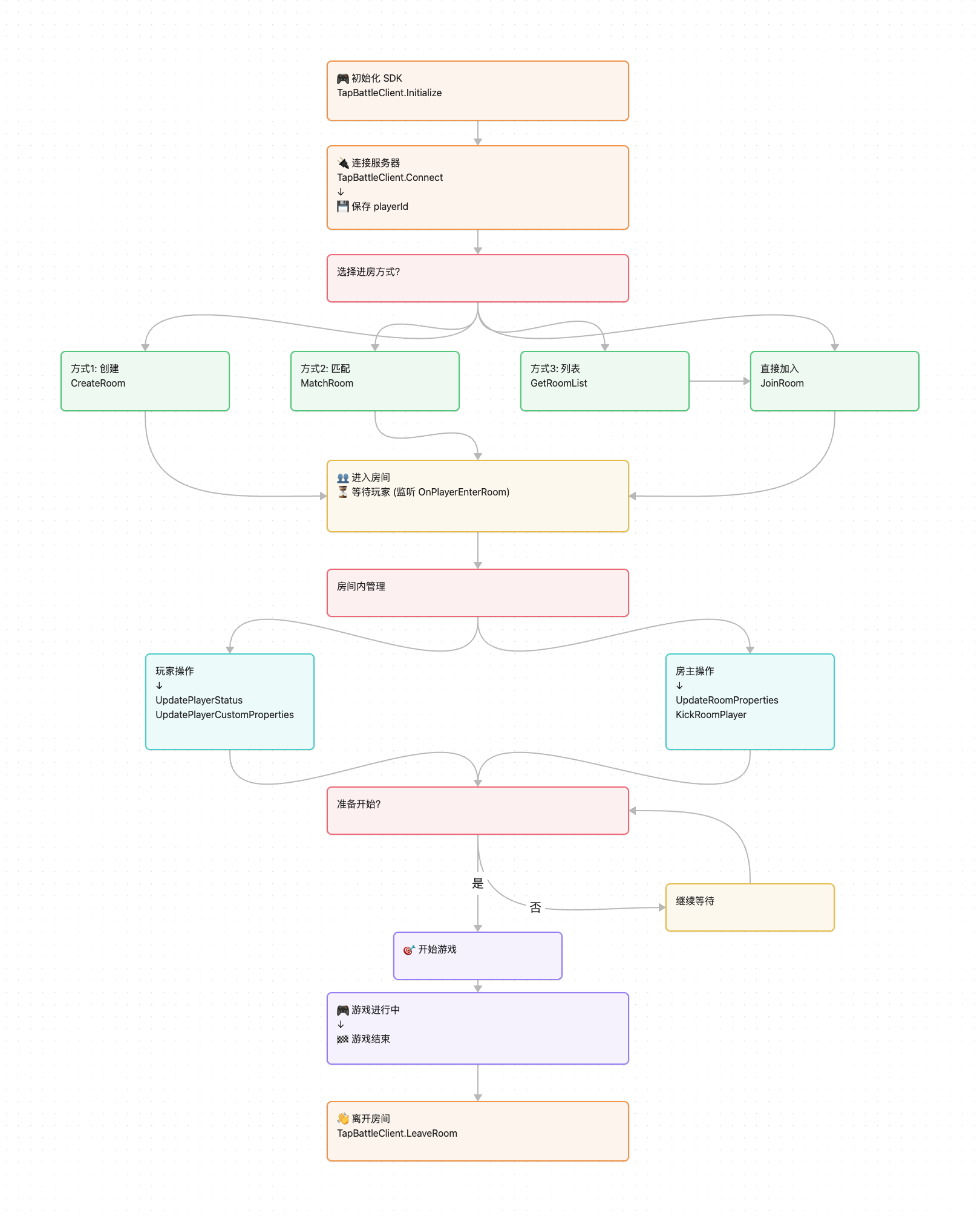
核心概念:
- 房间:玩家联机的虚拟空间,每个房间有唯一的房间ID
- 房主:创建房间的玩家,拥有特殊权限(踢人、修改房间属性、开始游戏)
- 玩家准备:所有玩家准备后才能开始游戏
# 二、初始化与连接
在进行任何房间操作前,必须先初始化SDK并连接服务器。
# 2.1 初始化SDK
// 创建事件处理器
var eventHandler = new MyBattleEventHandler();
TapBattleClient.Initialize(eventHandler);
# 2.2 连接服务器
连接成功后,服务器会返回 playerId,这个ID是玩家的唯一标识,后续判断"我是谁"、"谁是房主"都需要用到。
TapBattleClient.Connect(new BattleConnectOption
{
    success = (result) =>
    {
        string myPlayerId = result.playerId;  // 保存玩家ID,后续会用到
        Debug.Log($"连接成功,我的ID:{myPlayerId}");
    },
    fail = (error) =>
    {
        Debug.LogError($"连接失败:{error.message}");
    }
});
重要:一定要保存 playerId,后续很多地方都需要用到!
# 三、进入房间
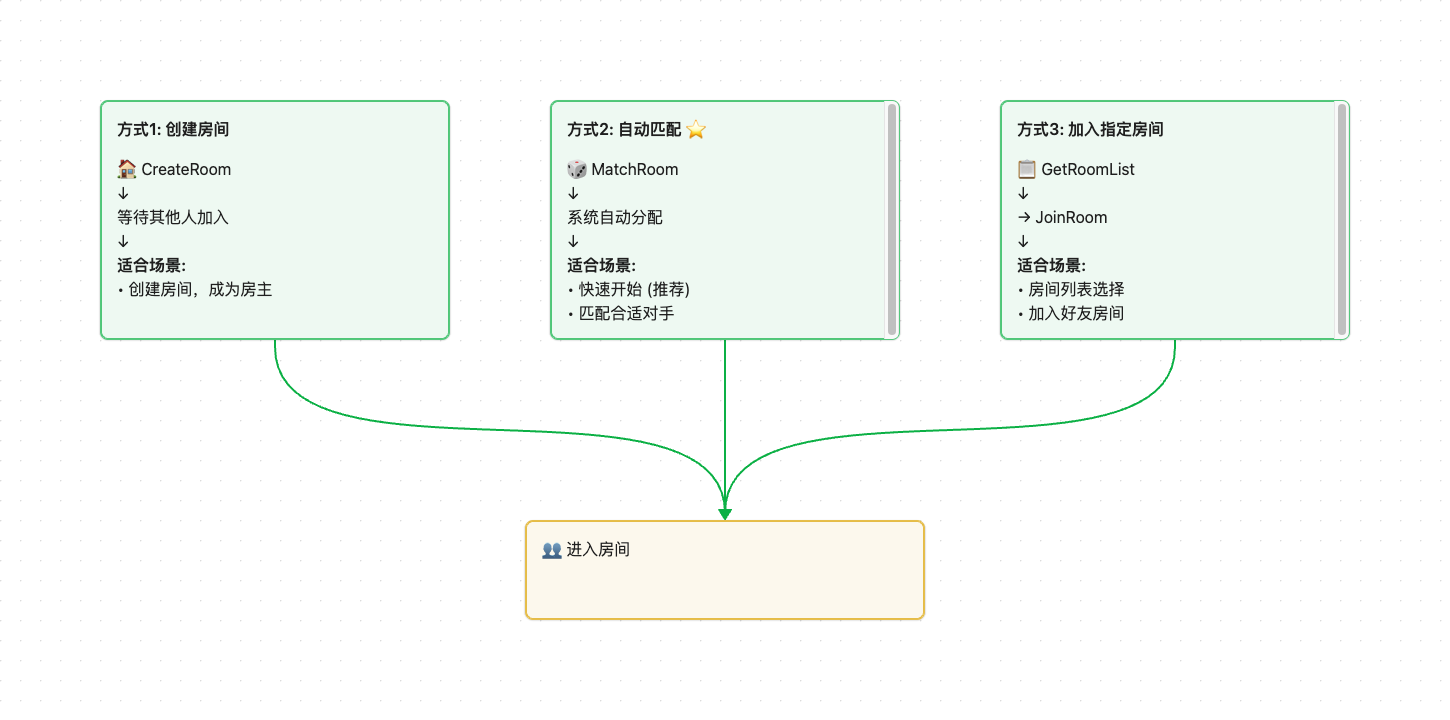
有三种方式可以进入房间:自动匹配、创建房间、加入指定房间。
# 3.1 自动匹配房间(推荐)
系统自动帮你找一个合适的房间,如果没有就创建新房间。最简单,推荐使用。
TapBattleClient.MatchRoom(new MatchRoomOption
{
    data = new MatchRoomRequest
    {
        roomCfg = new RoomConfig
        {
            maxPlayerCount = 2,  // 房间最大玩家数
            type = "休闲模式"
        }
    },
    success = (result) =>
    {
        RoomInfo room = result.roomInfo;
        Debug.Log($"匹配成功!房间ID:{room.id},当前{room.players.Length}人");
    }
});
适用场景:快速匹配对手,不需要选择特定房间
# 3.2 创建房间
自己建房,等待其他玩家加入。创建后你就是房主。
TapBattleClient.CreateRoom(new CreateRoomOption
{
    data = new CreateRoomRequest
    {
        roomCfg = new RoomConfig
        {
            maxPlayerCount = 4,
            type = "竞技模式"
        }
    },
    success = (result) =>
    {
        RoomInfo room = result.roomInfo;
        Debug.Log($"创建成功!房间ID:{room.id}");
        Debug.Log($"把房间ID发给朋友,让他们加入");
    }
});
适用场景:和朋友一起玩,通过分享传递房间ID
# 3.3 加入指定房间
通过房间ID直接加入朋友的房间。
TapBattleClient.JoinRoom(new JoinRoomOption
{
    roomId = "room_123456",  // 房间列表或分享等途径获得到的房间id
    success = (result) =>
    {
        RoomInfo room = result.roomInfo;
        Debug.Log($"加入成功!");
    },
    fail = (error) =>
    {
        Debug.LogError($"加入失败:{error.message}");
    }
});
适用场景:加入朋友创建的房间
# 四、房间内玩家管理
# 4.1 监听玩家加入
当有新玩家加入房间时,所有玩家都会收到通知。
public class MyBattleEventHandler : ITapBattleEventHandler
{
    public void OnPlayerEnterRoom(PlayerEnterRoomInfo info)
    {
        Debug.Log($"玩家 {info.playerInfo.id} 加入房间");
        Debug.Log($"当前房间人数:{info.roomInfo.players.Length}");

        // 检查房间是否已满
        if (info.roomInfo.players.Length == info.roomInfo.maxPlayerCount)
        {
            Debug.Log("房间已满,可以开始准备了");
        }
    }
}
# 4.2 监听玩家离开
public void OnPlayerLeaveRoom(PlayerLeaveRoomInfo info)
{
    Debug.Log($"玩家 {info.playerInfo.id} 离开房间");
}
# 4.3 离开房间
TapBattleClient.LeaveRoom(new LeaveRoomOption
{
    success = (result) =>
    {
        Debug.Log("已离开房间");
    }
});
# 4.4 踢出玩家(仅房主)
只有房主可以踢人。
bool isOwner = (myPlayerId == currentRoom.ownerId);  // 判断是否是房主
if (isOwner)
{
    TapBattleClient.KickRoomPlayer(new KickRoomPlayerOption
    {
        playerId = "要踢出的玩家ID",
        success = (result) => Debug.Log("踢人成功")
    });
}
# 五、房间属性与玩家属性
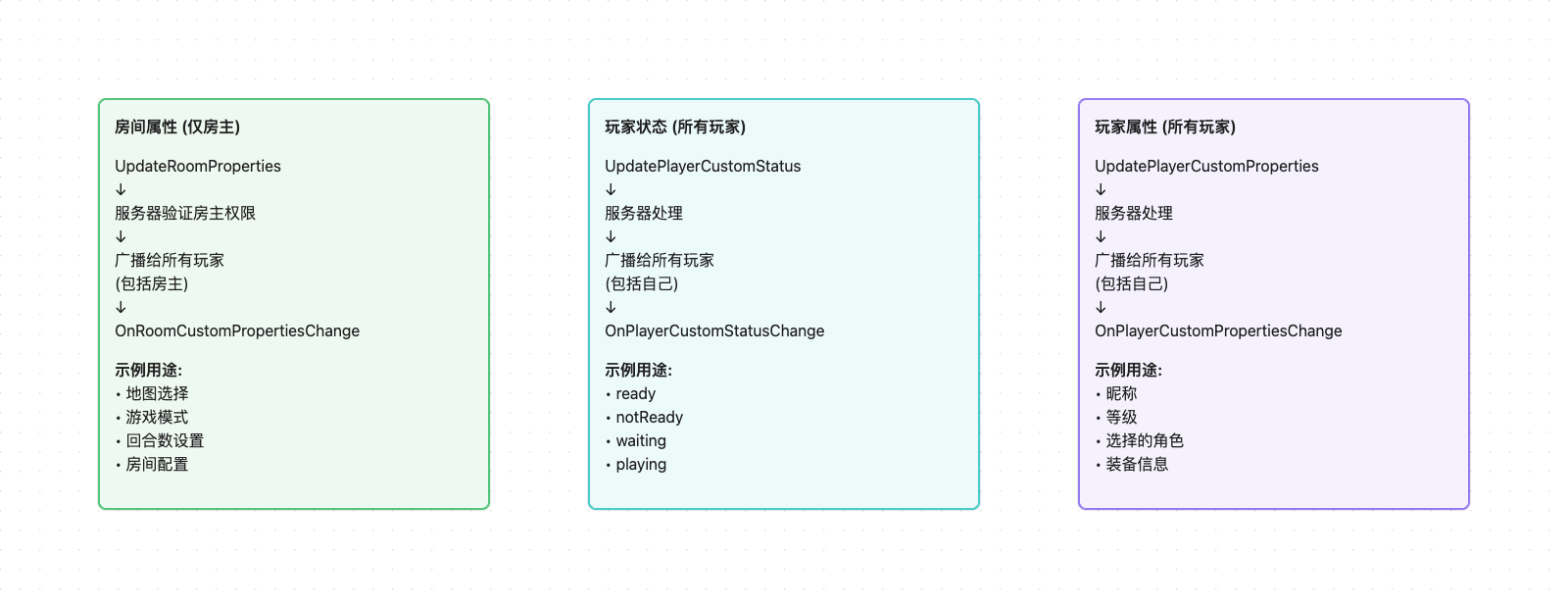
# 5.1 属性更新流程
# 5.2 更新房间属性(仅房主)
房主可以修改房间信息,如地图、模式等,所有玩家都会收到通知。
var properties = new { map = "沙漠地图", mode = "竞技模式" };

TapBattleClient.UpdateRoomProperties(new UpdateRoomPropertiesOption
{
    properties = JsonUtility.ToJson(properties),
    success = (result) => Debug.Log("房间属性已更新")
});
监听房间属性变化:
public void OnRoomCustomPropertiesChange(RoomCustomPropertiesChangeInfo info)
{
    Debug.Log($"房间属性已更新:{info.roomInfo.customProperties}");
    // 解析并显示新的房间设置
}
# 5.3 更新玩家属性
每个玩家可以设置自己的属性,如昵称、等级、头像等。
var properties = new { nickname = "玩家A", level = 10 };

TapBattleClient.UpdatePlayerCustomProperties(new UpdatePlayerCustomPropertiesOption
{
    properties = JsonUtility.ToJson(properties),
    success = (result) => Debug.Log("玩家属性已更新")
});
监听玩家属性变化:
public void OnPlayerCustomPropertiesChange(PlayerCustomPropertiesChangeInfo info)
{
    Debug.Log($"玩家 {info.playerInfo.id} 的属性已更新");
}
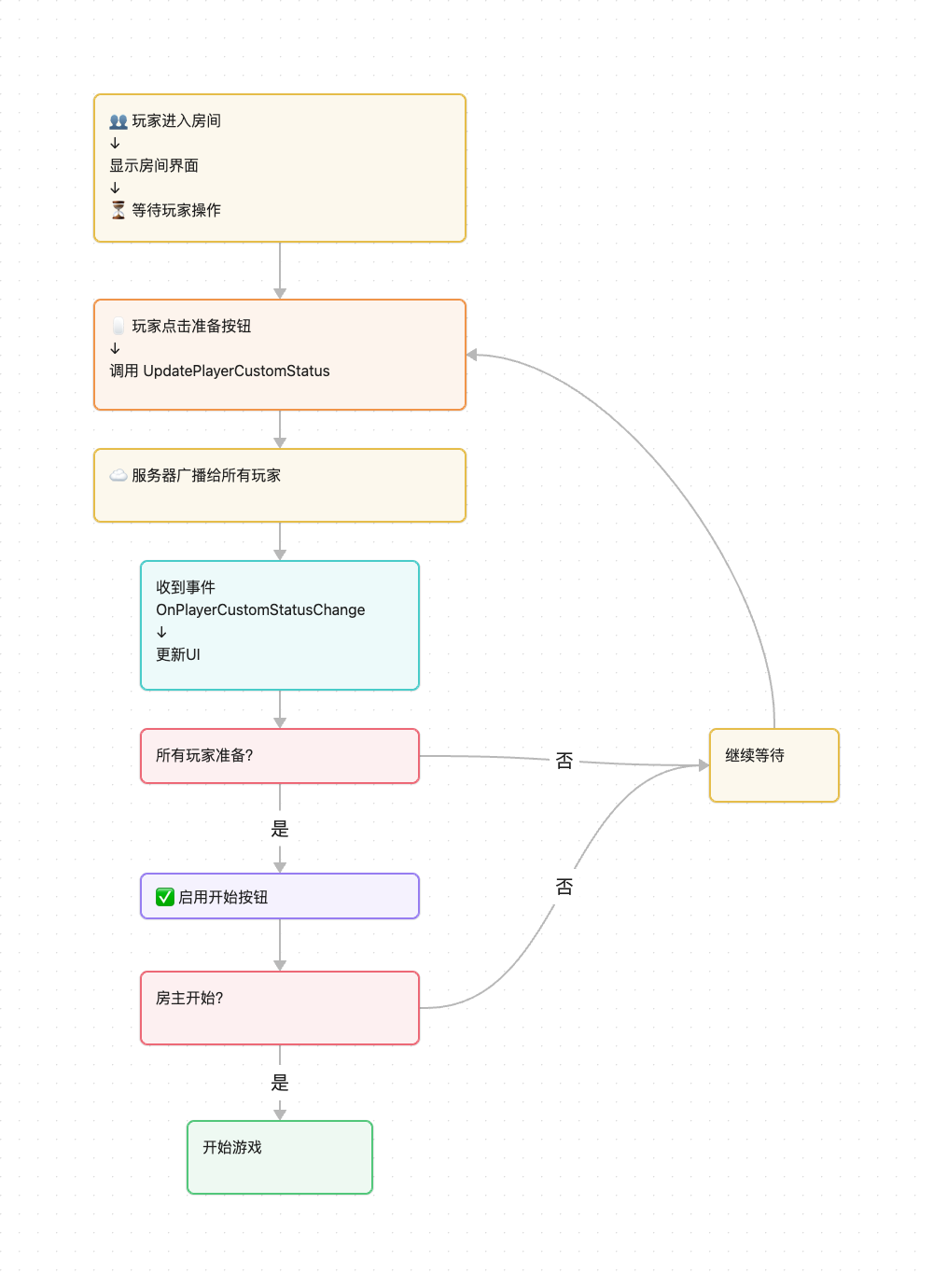
# 六、玩家准备机制
# 6.1 设置准备状态
玩家点击"准备"按钮时,更新自己的准备状态。
// 设置为已准备
TapBattleClient.UpdatePlayerCustomStatus(new UpdatePlayerCustomStatusOption
{
    status = 1,  // 1=已准备, 0=未准备
    success = (result) => Debug.Log("我已准备")
});
# 6.2 监听准备状态变化
public void OnPlayerCustomStatusChange(PlayerCustomStatusChangeInfo info)
{
    if (info.playerInfo.customStatus == 1)
    {
        Debug.Log($"玩家 {info.playerInfo.id} 已准备");
    }

    // 检查是否所有玩家都准备好
    CheckAllPlayersReady(info.roomInfo);
}

void CheckAllPlayersReady(RoomInfo room)
{
    bool allReady = true;

    foreach (var player in room.players)
    {
        if (player.customStatus != 1)
        {
            allReady = false;
            break;
        }
    }

    if (allReady)
    {
        Debug.Log("所有玩家准备完毕,游戏开始!");
        StartGame();
    }
}
# 6.3 取消准备
TapBattleClient.UpdatePlayerCustomStatus(new UpdatePlayerCustomStatusOption
{
    status = 0,  // 设置为未准备
    success = (result) => Debug.Log("已取消准备")
});
# 七、常见问题
# Q1:如何判断自己是不是房主?
bool isOwner = (myPlayerId == currentRoom.ownerId);
# Q2:房主离开后会怎样?
系统会自动选择一个新的房主。建议监听 OnRoomCustomPropertiesChange 事件来更新UI。
# Q3:如何获取房间内所有玩家?
foreach (var player in currentRoom.players)
{
    Debug.Log($"玩家ID:{player.id}");
    Debug.Log($"准备状态:{(player.customStatus == 1 ? "已准备" : "未准备")}");

    if (player.id == currentRoom.ownerId)
    {
        Debug.Log("这是房主");
    }
}
# 八、完整示例
一个简单的房间管理器示例,展示完整流程:
using UnityEngine;
using TapBattle;

public class RoomManager : MonoBehaviour
{
    private string myPlayerId;
    private RoomInfo currentRoom;

    void Start()
    {
        // 1. 初始化
        var eventHandler = new MyBattleEventHandler(this);
        TapBattleClient.Initialize(eventHandler);

        // 2. 连接
        TapBattleClient.Connect(new BattleConnectOption
        {
            success = (result) =>
            {
                myPlayerId = result.playerId;
                Debug.Log($"连接成功,ID:{myPlayerId}");

                // 3. 自动匹配房间
                MatchRoom();
            }
        });
    }

    void MatchRoom()
    {
        TapBattleClient.MatchRoom(new MatchRoomOption
        {
            data = new MatchRoomRequest
            {
                roomCfg = new RoomConfig { maxPlayerCount = 2 }
            },
            success = (result) =>
            {
                currentRoom = result.roomInfo;
                Debug.Log($"匹配成功!房间ID:{currentRoom.id}");
            }
        });
    }

    // 4. 玩家点击准备按钮
    public void OnReadyButtonClick()
    {
        TapBattleClient.UpdatePlayerCustomStatus(new UpdatePlayerCustomStatusOption
        {
            status = 1,
            success = (result) => Debug.Log("我已准备")
        });
    }

    // 5. 检查是否所有人都准备好
    public void CheckAllReady(RoomInfo room)
    {
        bool allReady = true;
        foreach (var player in room.players)
        {
            if (player.customStatus != 1)
            {
                allReady = false;
                break;
            }
        }

        if (allReady)
        {
            Debug.Log("所有人准备完毕,游戏开始!");
            // 开始游戏...
        }
    }

    // 事件处理器
    public class MyBattleEventHandler : ITapBattleEventHandler
    {
        private RoomManager manager;

        public MyBattleEventHandler(RoomManager mgr)
        {
            manager = mgr;
        }

        public void OnPlayerEnterRoom(PlayerEnterRoomInfo info)
        {
            Debug.Log($"玩家 {info.playerInfo.id} 加入");
            manager.currentRoom = info.roomInfo;
        }

        public void OnPlayerCustomStatusChange(PlayerCustomStatusChangeInfo info)
        {
            manager.currentRoom = info.roomInfo;
            manager.CheckAllReady(info.roomInfo);
        }

        // 实现其他必需的接口方法...
        public void OnDisconnected(DisconnectedInfo info) { }
        public void OnPlayerLeaveRoom(PlayerLeaveRoomInfo info) { }
        public void OnPlayerKicked(PlayerKickedInfo info) { }
        public void OnPlayerOffline(PlayerOfflineInfo info) { }
        public void OnPlayerCustomPropertiesChange(PlayerCustomPropertiesChangeInfo info) { }
        public void OnRoomCustomPropertiesChange(RoomCustomPropertiesChangeInfo info) { }
        public void OnFrameSyncStart(FrameSyncStartInfo info) { }
        public void OnFrameInput(string frameData) { }
        public void OnFrameSyncStop(FrameSyncStopInfo info) { }
        public void OnCustomMessage(CustomMessageInfo info) { }
        public void OnBattleServiceError(BattleServiceErrorInfo info) { }
    }
}