
# 数据通信
本文将手把手教你如何在房间内实现玩家之间的互动,让多人游戏真正"联机"起来。适用于绝大多数多人游戏场景。
# 📊 实现原理
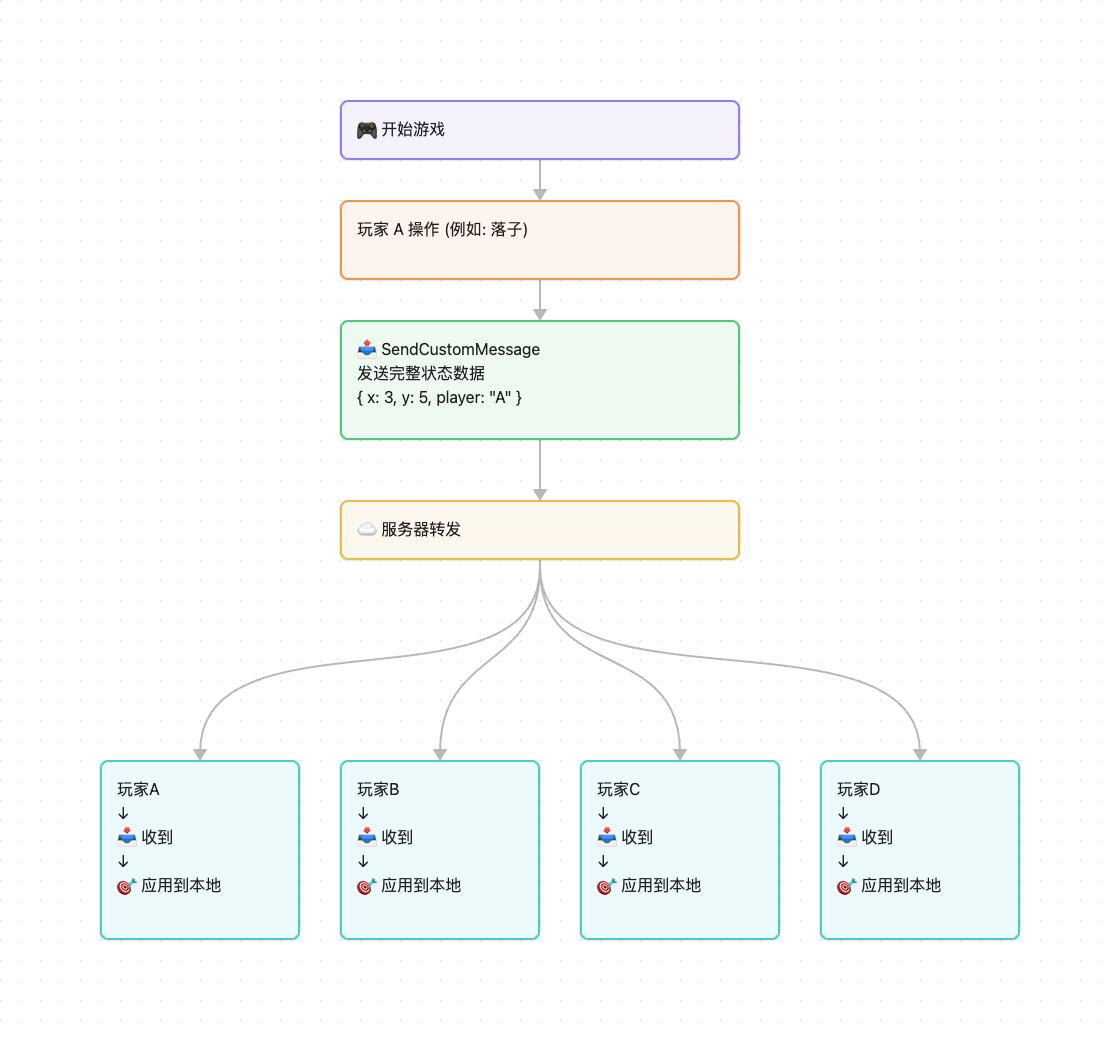
简单来说:
- 玩家 A 做了一个操作(比如下棋、出牌、移动),把操作数据发给房间内的其他玩家
- 玩家 B、C 收到消息后,在自己的游戏中显示出玩家 A 的操作
- 所有玩家看到的游戏画面就同步了
# 一、适合什么样的游戏?
这种方式适合绝大多数多人小游戏,包括:
- ✅ 棋牌类游戏 - 五子棋、象棋、斗地主、麻将等
- ✅ 回合制游戏 - 战棋、策略游戏、回合制 RPG 等
- ✅ 休闲游戏 - 你画我猜、狼人杀、问答游戏等
- ✅ 合作游戏 - 简单的多人闯关、合作解谜等
# 二、完整实现流程
# 步骤 1:玩家进入房间
首先,玩家需要通过匹配或创建房间进入游戏。
// 1. 连接服务器
TapBattleClient.Connect(new ConnectOption
{
    success = (result) => {
        // 保存玩家 ID,后面会用到
        string myPlayerId = result.id;

        // 2. 开始匹配房间
        MatchRoom();
    }
});

// 2. 匹配房间
void MatchRoom()
{
    TapBattleClient.MatchRoom(new MatchRoomOption
    {
        matchConfig = new MatchConfig
        {
            maxPlayers = 2  // 2人对战
        },
        success = (roomInfo) => {
            Debug.Log($"匹配成功,房间ID: {roomInfo.id}");
            // 等待其他玩家加入...
        }
    });
}
# 步骤 2:监听其他玩家的操作
在游戏初始化时,设置好事件监听器,这样就能收到其他玩家的消息了。
public class MyBattleEventHandler : ITapBattleEventHandler
{
    // 当收到其他玩家的消息时,这个方法会被调用
    public void OnCustomMessage(CustomMessageInfo info)
    {
        // info.playerId: 是谁发的消息
        // info.msg: 消息的具体内容

        Debug.Log($"收到玩家 {info.playerId} 的消息: {info.msg}");

        // 解析消息并处理
        HandlePlayerAction(info);
    }
}

// 初始化时注册事件处理器
TapBattleClient.Initialize(new MyBattleEventHandler());
# 步骤 3:发送玩家的操作
当本地玩家做了某个操作,把操作数据发给房间内的其他玩家。
// 示例:玩家点击了棋盘上的某个位置
public void OnPlayerClickChessBoard(int x, int y)
{
    // 1. 构造操作数据
    var action = new ChessAction
    {
        type = "place_chess",
        x = x,
        y = y,
    };

    // 2. 发送给其他玩家
    TapBattleClient.SendCustomMessage(new SendCustomMessageOption
    {
        data = new SendCustomMessageData
        {
            msg = JsonUtility.ToJson(action),  // 把数据转成 JSON 字符串
            type = 0  // 0 表示发给房间内除自己外的所有玩家
        },
        success = (result) => {
            Debug.Log("消息发送成功");
            // 本地立即显示棋子(不用等网络)
            ShowChess(x, y, myPlayerId);
        },
        fail = (error) => {
            Debug.LogError($"发送失败: {error.message}");
        }
    });
}
# 步骤 4:处理收到的操作
当收到其他玩家的消息时,解析并在本地游戏中显示出来。
void HandlePlayerAction(CustomMessageInfo info)
{
    // 解析消息内容
    var action = JsonUtility.FromJson<ChessAction>(info.msg);

    // 根据操作类型处理
    switch (action.type)
    {
        case "place_chess":
            // 显示对方的棋子
            ShowChess(action.x, action.y, info.playerId);
            // 检查是否有人赢了
            CheckWinner();
            break;

        case "surrender":
            // 对方认输
            ShowGameOver(info.playerId + " 认输了");
            break;

        // 更多操作类型...
    }
}
# 步骤 5:游戏结束
游戏结束后,离开房间并清理数据。
void OnGameOver()
{
    TapBattleClient.LeaveRoom(new LeaveRoomOption
    {
        success = (result) => {
            Debug.Log("已离开房间");
            // 清理游戏数据
            CleanupGameData();
            // 返回大厅
            GoBackToLobby();
        }
    });
}
# 三、完整示例:五子棋游戏
下面是一个完整的五子棋游戏示例,展示如何实现玩家对战。
# 1. 定义消息格式
// 游戏操作消息
[System.Serializable]
public class GameAction
{
    public string type;       // 操作类型:"place_chess"、"surrender"、"restart"
    public int x;             // 棋盘 X 坐标
    public int y;             // 棋盘 Y 坐标
}
# 2. 游戏管理器
public class GomokuGameManager : MonoBehaviour
{
    private string myPlayerId;
    private string currentTurnPlayerId;  // 当前轮到谁下棋
    private int[,] chessBoard = new int[15, 15];  // 棋盘,0=空,1=黑棋,2=白棋

    void Start()
    {
        // 初始化 SDK
        TapBattleClient.Initialize(new MyBattleEventHandler(this));

        // 连接并匹配
        ConnectAndMatch();
    }

    void ConnectAndMatch()
    {
        TapBattleClient.Connect(new ConnectOption
        {
            success = (result) => {
                myPlayerId = result.id;

                // 匹配 2 人房间
                TapBattleClient.MatchRoom(new MatchRoomOption
                {
                    matchConfig = new MatchConfig { maxPlayers = 2 },
                    success = (roomInfo) => {
                        Debug.Log("匹配成功,等待对手...");
                    }
                });
            }
        });
    }

    // 玩家点击棋盘
    public void OnClickBoard(int x, int y)
    {
        // 检查是否轮到自己
        if (currentTurnPlayerId != myPlayerId)
        {
            ShowTip("还没轮到你");
            return;
        }

        // 检查位置是否为空
        if (chessBoard[x, y] != 0)
        {
            ShowTip("这里已经有棋子了");
            return;
        }

        // 发送落子消息
        PlaceChess(x, y);
    }

    void PlaceChess(int x, int y)
    {
        var action = new GameAction
        {
            type = "place_chess",
            x = x,
            y = y,
        };

        TapBattleClient.SendCustomMessage(new SendCustomMessageOption
        {
            data = new SendCustomMessageData
            {
                msg = JsonUtility.ToJson(action),
                type = 0
            },
            success = (result) => {
                // 本地立即显示
                ApplyPlaceChess(x, y, myPlayerId);
            }
        });
    }

    // 应用落子操作
    void ApplyPlaceChess(int x, int y, string playerId)
    {
        // 更新棋盘数据
        int chessType = (playerId == myPlayerId) ? 1 : 2;
        chessBoard[x, y] = chessType;

        // 显示棋子
        ShowChessOnBoard(x, y, chessType);

        // 切换回合
        SwitchTurn();

        // 检查是否获胜
        if (CheckWin(x, y, chessType))
        {
            ShowGameOver(playerId + " 获胜!");
        }
    }

    // 接收其他玩家的消息
    public void OnReceiveMessage(CustomMessageInfo info)
    {
        var action = JsonUtility.FromJson<GameAction>(info.msg);

        switch (action.type)
        {
            case "place_chess":
                ApplyPlaceChess(action.x, action.y, info.playerId);
                break;

            case "surrender":
                ShowGameOver(info.playerId + " 认输了,你赢了!");
                break;
        }
    }

    // 认输按钮
    public void OnSurrenderButton()
    {
        var action = new GameAction
        {
            type = "surrender",
            playerId = myPlayerId
        };

        TapBattleClient.SendCustomMessage(new SendCustomMessageOption
        {
            data = new SendCustomMessageData
            {
                msg = JsonUtility.ToJson(action),
                type = 0
            }
        });

        ShowGameOver("你认输了");
    }

    // 检查是否五子连珠(简化版)
    bool CheckWin(int x, int y, int chessType)
    {
        // 检查横向、纵向、斜向是否有五子连珠
        // 这里省略具体实现...
        return false;
    }

    // 显示相关方法(由你的 UI 系统实现)
    void ShowChessOnBoard(int x, int y, int chessType) { /* 在棋盘上显示棋子 */ }
    void ShowTip(string message) { /* 显示提示 */ }
    void ShowGameOver(string message) { /* 显示游戏结束 */ }
    void SwitchTurn() { /* 切换回合 */ }
}

// 事件处理器
public class MyBattleEventHandler : ITapBattleEventHandler
{
    private GomokuGameManager gameManager;

    public MyBattleEventHandler(GomokuGameManager manager)
    {
        gameManager = manager;
    }

    public void OnCustomMessage(CustomMessageInfo info)
    {
        gameManager.OnReceiveMessage(info);
    }

    public void OnPlayerEnterRoom(PlayerInfo player)
    {
        Debug.Log($"玩家 {player.id} 加入房间");
        // 如果人满了,开始游戏
    }

    public void OnPlayerLeaveRoom(PlayerInfo player)
    {
        Debug.Log($"玩家 {player.id} 离开房间");
        // 提示对方掉线
    }

    // 实现其他必需的接口方法...
}
# 四、开发技巧
# 1. 消息格式设计建议
推荐使用统一的消息结构:
[System.Serializable]
public class GameMessage
{
    public string type;        // 操作类型,如 "move"、"attack"、"chat"
    public long timestamp;     // 时间戳(可选,用于延迟检测)
    public string data;        // 具体数据(可以是 JSON 字符串)
}
不同类型游戏的消息示例:
// 卡牌游戏 - 出牌
{
    "type": "play_card",
    "data": "{\"cardId\": \"heart_A\", \"targetPlayerId\": \"player456\"}"
}

// 战棋游戏 - 移动单位
{
    "type": "move_unit",
    "data": "{\"unitId\": \"soldier_1\", \"fromX\": 3, \"fromY\": 5, \"toX\": 4, \"toY\": 6}"
}

// 问答游戏 - 提交答案
{
    "type": "submit_answer",
    "data": "{\"questionId\": 5, \"answer\": \"C\"}"
}
# 2. 发送频率控制
服务器限制:每秒最多 15 次消息(SendCustomMessage 和 UpdateRoomProperties 共享)
优化建议:
// ❌ 不好的做法:高频发送
void Update()
{
    if (Input.GetMouseButton(0))
    {
        // 每帧都发送,会超过频率限制
        SendPosition(player.position);
    }
}

// ✅ 好的做法:控制频率
private float lastSendTime = 0;
void Update()
{
    if (Input.GetMouseButton(0) && Time.time - lastSendTime > 0.1f)
    {
        // 每 0.1 秒最多发送一次
        SendPosition(player.position);
        lastSendTime = Time.time;
    }
}

// ✅ 更好的做法:合并多个操作
private List<Vector3> positionBuffer = new List<Vector3>();
void Update()
{
    if (Input.GetMouseButton(0))
    {
        positionBuffer.Add(player.position);
    }
}

void FixedUpdate()
{
    if (positionBuffer.Count > 0)
    {
        // 每 0.02 秒发送一批位置
        SendPositions(positionBuffer.ToArray());
        positionBuffer.Clear();
    }
}
# 3. 网络延迟处理
添加时间戳,可以检测网络延迟:
// 发送时加上时间戳
var action = new GameAction
{
    type = "move",
    timestamp = DateTimeOffset.Now.ToUnixTimeMilliseconds()
};

// 接收时计算延迟
void OnReceiveMessage(CustomMessageInfo info)
{
    var action = JsonUtility.FromJson<GameAction>(info.msg);
    long now = DateTimeOffset.Now.ToUnixTimeMilliseconds();
    long latency = now - action.timestamp;

    if (latency > 500)
    {
        Debug.LogWarning($"网络延迟较高: {latency}ms");
        ShowNetworkDelayWarning();
    }
}
# 4. 玩家离开处理
监听玩家离开事件:
public void OnPlayerLeaveRoom(PlayerInfo player)
{
    if (isGameStarted)
    {
        // 游戏中有人离开
        ShowDialog($"玩家 {player.id} 已离开游戏");
        EndGame();
    }
}
# 五、常见问题
# Q1:如何知道消息发送成功?
使用 success 和 fail 回调:
TapBattleClient.SendCustomMessage(new SendCustomMessageOption
{
    data = ...,
    success = (result) => {
        Debug.Log("发送成功");
    },
    fail = (error) => {
        Debug.LogError($"发送失败: {error.message}");
        // 可以重试或提示用户
    }
});
# Q2:发送的消息有大小限制吗?
建议单个消息不超过 1KB。如果需要传输大量数据(如地图数据),建议分批发送或存储在服务器上,只传输 ID。
# Q3:自己发的消息自己会收到吗?
不会。发送者不会收到自己发送的消息。建议在发送成功回调中立即在本地处理操作,提升响应速度。
# Q4:如何处理玩家恶意刷屏?
- 客户端限制:控制发送频率
- 服务器限制:已有每秒 15 次的频率限制
- 房主权限:房主可以踢出恶意玩家
// 房主踢人
if (myPlayerId == roomInfo.ownerId)
{
    TapBattleClient.KickRoomPlayer(new KickRoomPlayerOption
    {
        playerId = maliciousPlayerId
    });
}
# Q5:如何实现"准备"机制?
使用玩家自定义状态:
// 设置自己为准备状态
TapBattleClient.UpdatePlayerCustomStatus(new UpdatePlayerCustomStatusOption
{
    status = 1,  // 0=未准备,1=准备
    success = (result) => {
        Debug.Log("已准备");
    }
});

// 检查所有玩家是否都准备好了
bool AllPlayersReady()
{
    foreach (var player in roomInfo.players)
    {
        if (player.customStatus != 1)
            return false;
    }
    return true;
}

// 如果都准备好了,开始游戏
if (AllPlayersReady())
{
    // 玩家可以根据自己游戏逻辑,房主通过 UpdateRoomProperties 或 SendCustomMessage 通知其他玩家游戏开始
    // 方式一:使用 UpdateRoomProperties 更新房间状态
    // 方式二:使用 SendCustomMessage 发送游戏开始消息
}